
New Features - Prisma AIRS - January 2026
AI Red Teaming Executive Reports
When you conduct AI Red Teaming assessments, you often need to share results with executive stakeholders like CISOs and CIOs who require high-level insights rather than granular technical details. The exportable executive PDF report feature addresses this need by transforming your AI Red Teaming assessment data into a consumable format. You can now generate comprehensive PDF reports that consolidate the essential information from the web interface, organized to highlight critical takeaways and strategic insights in a format that can be shared easily with executives. While security practitioners can leverage CSV and JSON export formats to access detailed findings for remediation purposes, this PDF format is highly valuable for CXOs who intend to understand high level risk assessment of any AI system.
Use this feature to communicate security posture and risk assessments to executive leadership who may not have the time or technical background to parse through detailed CSV exports or navigate complex web interfaces. The PDF format ensures you can easily distribute reports through email or include them in executive briefings and board presentations. The report contains AI summary, key risk breakdown, high-level overview charts, and metrics that matter most to decision-makers.
You can use this feature when preparing for executive reviews, board meetings, or any scenario where you need to demonstrate the effectiveness of your security controls and communicate risk exposure to non-technical stakeholders. The structured format with AI summary, overview sections, and detailed attack tables, ensures that both strategic insights and supporting technical evidence are readily accessible, enabling informed decision-making at the executive level.
AI Summary for AI Red Teaming Scans
When you complete an AI Red Teaming scan, you receive an AI Summary (in the scan report) that synthesizes key risks and their implications. This executive summary eliminates the need for manual interpretation of technical data, allowing you to quickly understand which attack categories or techniques pose the greatest threats to your systems and what the potential business impact might be.
The AI Summary contains the scan configuration, key risks, and implications.
This capability is particularly valuable when you need to communicate AI risk assessment results across different organizational levels or when preparing briefings for leadership meetings. Rather than struggling to translate technical vulnerability reports into business language, you can rely on the AI Red Teaming generated report to articulate security, safety, compliance, brand, and business risks in terms that resonate with executive audiences. This summary is also valuable in prioritising remediation measures which teams can adopt for a safer deployment of AI systems in production.
Custom Labels for AI Model Security Scan
Custom Labels for AI Model Security Scans enables you to attach custom key-value metadata to your model scans, providing essential organizational context for enterprise-scale security operations. When you run security scans on your AI models, the results exist in isolation without the operational context your security teams need to effectively triage, assign, and remediate findings. This feature allows you to categorize scan results based on your specific organizational requirements, whether you need to distinguish between production and development environments, assign ownership to specific teams, track compliance framework requirements, or integrate with your existing CI/CD workflows.
Key Benefits:
- Flexible Labeling Options —Attach custom labels to scan results either at scan time through the API and SDK or retroactively through the user interface, accommodating both automated and manual workflows.
- Simple Schema-Free Format —Uses straightforward string key-value pairs that adapt to diverse organizational structures without enforcing rigid schemas (such as, "environment:production", "team:ml-platform", "compliance:SOC2").
- Rich Contextual Categorization —Apply multiple custom labels to each scan result, creating comprehensive categorization that reflects your operational reality.
- Powerful Filtering Capabilities —Quickly isolate scan results by any combination of criteria rather than manually tracking which scans belong to which systems or teams.
- Compliance and Audit Support —Generate targeted audit reports for specific regulatory frameworks, enabling compliance teams to focus on relevant security findings.
- Team-Specific Focus —Allow security teams to prioritize production environment issues while development teams correlate scan results with their deployment pipelines.
- Seamless Integration —Comprehensive API support enables automated custom labelling in CI/CD systems while providing intuitive user interface controls for manual management.
- Enterprise Scalability —Essential for scaling Model Security across enterprise environments where hundreds or thousands of scans must be efficiently categorized, filtered, and acted upon by distributed teams with varying responsibilities and access requirements.
Enhanced AI Red Teaming with Brand Reputation Risk Detection
You can now assess and protect your AI systems against Brand reputation risks using Prisma AIRS enhanced AI Red Teaming capabilities. This feature addresses a critical gap in AI security by identifying vulnerabilities that could damage your organization's reputation when AI systems interact with users in production environments. Beyond the existing Security, Safety, and Compliance risk categories, you can now scan for threats including Competitor Endorsements, Brand Tarnishing Content, Discriminating Claims, and Political Endorsements.
The enhanced agent assessment capabilities automatically generate goals focused on Brand Reputational risk scenarios that could expose your organization to public relations challenges or regulatory scrutiny. You benefit from specialized evaluation methods designed to detect subtle forms of reputational risk, including false claims and inappropriate endorsements that traditional security scanning might miss. This comprehensive approach allows you to proactively identify and address potential brand vulnerabilities before deploying AI systems to production environments, protecting both your technical infrastructure and corporate reputation in an increasingly AI-driven business landscape.
Local Scan AI Models Directly from Cloud Storages
The AI Model Security client SDK now provides native access to scan machine learning models stored across multiple cloud storage platforms without requiring manual downloads. This enhanced capability allows you to perform security scans directly on models hosted in Amazon S3, Azure Blob Storage, Google Cloud Storage, JFrog Artifactory repositories, and GitLab Model Registry using your existing authentication credentials and access controls.
You can leverage this feature when your organization stores trained model repositories that require authenticated access, eliminating the need to manually download large model files or rely on external scanning services that may not have access to your secured storage environments. This approach is particularly valuable when working with proprietary models, models containing sensitive data, or when operating under strict data governance policies that prohibit transferring model artifacts outside your controlled infrastructure.
The native storage integration streamlines your security workflow by automatically handling credential resolution, temporary file management, and cleanup operations while maintaining the same local scanning capabilities you rely on for file-based model analysis. You benefit from reduced operational overhead and faster scan execution since the SDK can optimize download and scanning operations without intermediate storage steps. This capability enables seamless integration into CI/CD pipelines, automated security workflows, and compliance processes where model artifacts must remain within your organization's security perimeter throughout the scanning lifecycle.
Model Security Adds Support for Two New Model Sources
AI Model Security now supports JFrog Artifactory and GitLab Model Registry as sources, adding to existing support for Local Storage, HuggingFace, S3, GCS, and Azure Blob Storage.
You can now scan models stored in two new cloud storage types:
- Artifactory —Models stored in JFrog Artifactory ML Model, Hugging Face, or generic artifact repositories.
- GitLab Model Registry —Models stored in the GitLab Model Registry.
Organizations can now establish consistent security standards across models regardless of where development teams store them. Security Groups can enforce the same comprehensive validation (deserialization threats, neural backdoors, license compliance, insecure formats) for models in Artifactory and GitLab that you already apply to other Sources.
This expansion reduces operational risk from unvalidated models by eliminating blind spots in your AI security posture. Teams no longer need to move models between repositories to apply security rules or generate compliance audit trails.
Configure Artifactory and GitLab sources through the same Security Group workflows used for other model repositories.
Remediation Recommendations for AI Red Teaming Risk Assessment
The Recommendations feature enables you to seamlessly transition from identifying AI system vulnerabilities through Red Teaming assessments to implementing targeted security controls that address your specific risks. This feature closes the critical gap between AI risk assessment and mitigation by transforming vulnerability findings into actionable remediation plans. The remediation recommendations can be found in all Attack Library and Agent Scan Reports.
When you conduct AI Red Teaming evaluations on your AI models, applications, or agents, this integrated solution automatically analyzes the discovered security, safety, brand reputation, and compliance risks to generate contextual remediation recommendations that directly address your specific vulnerabilities.
The generated contextual remediation recommendations include two distinct components:
Runtime Security Policy configuration : Rather than configuring runtime security policies through trial and error, you receive intelligent guidance that maps each identified risk category to appropriate guardrail configurations, such as enabling prompt injection protection for security vulnerabilities or toxic content moderation for safety concerns.
Other recommended measures : The system identifies successfully compromised vulnerabilities, and provides the corresponding remediation measures by prioritizing them based on effectiveness and implementation feasibility, allowing you to eliminate manual evaluation and focus resources on high-impact fixes.
For organizations deploying AI systems in production environments, this capability ensures that your runtime security configurations and remediation measures are informed by actual risk insights rather than generic best practices, resulting in more effective protection against the specific threats your AI systems face.
The remediation recommendations appear directly in your AI Red Teaming scan reports, providing actionable guidance. You can then manually create and attach the recommended security profiles to your desired workloads, transforming AI risk management from a reactive process into a proactive workflow that connects vulnerability discovery with targeted protection.
Secure AI Red Teaming with Network Channels
Network Channels is a secure connection solution that enables AI Red Teaming to safely access and analyze your internal endpoints without requiring firewall rules for specific IP addresses or opening inbound ports. This enterprise-grade solution puts you in complete control of the connection, allowing you to initiate and terminate access while maintaining your security perimeter.
The Network Channels enables you to conduct secure, continuous AI Red Teaming assessments against user APIs and models hosted within private infrastructure. Network channels eliminates the need for users to expose inbound ports or modify firewall configurations, adhering strictly to Zero Trust principles.
A channel is a unique communication pathway that clients use to establish connections. Each channel has a unique connection URL with auth credentials. You will need to create and validate a channel first, before using it to add a target. Multiple channels can be created for different environments and each channel can handle multiple targets accessible to it.
The solution utilizes a lightweight Network Channels client deployed within the user’s environment. This client establishes a persistent, secure outbound WebSocket connection to the Palo Alto Networks environment, facilitating seamless testing of internal systems without the risks associated with allowing specific IP addresses through your firewall or inbound access.
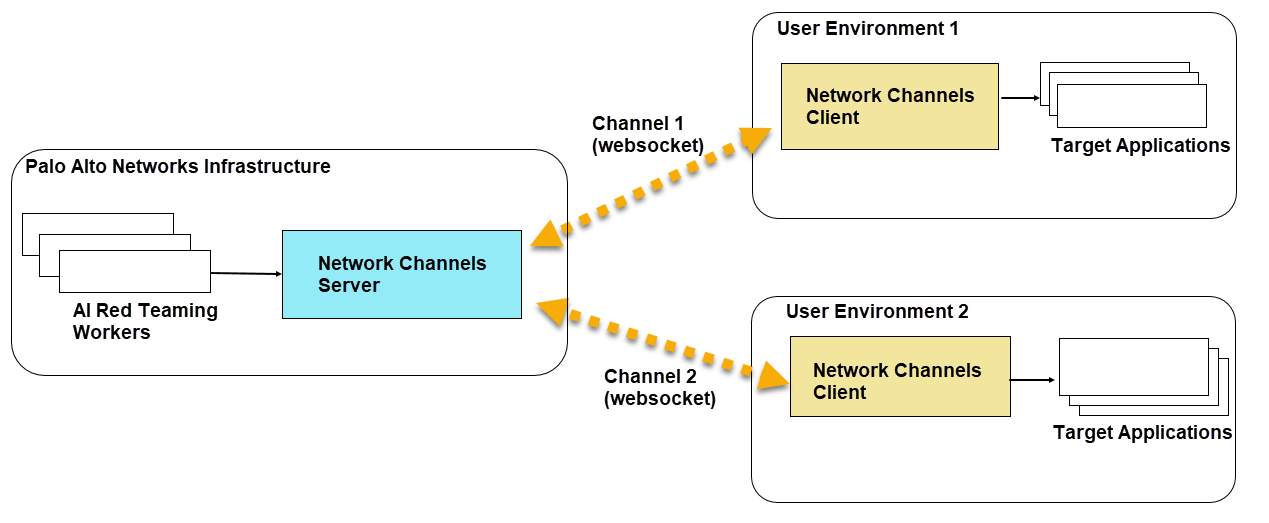
Additionally, you will be provided with a docker pull secret from Strata Cloud Manager, which you can use to pull the docker image and helm chart for the network channels client.
This combined solution is ideal for:
- Restricted Environments : Conducting assessments for enterprise users with air-gapped systems or strict compliance requirements.
- Continuous Monitoring : Maintaining reliable, persistent connectivity for real-time AI security updates.
- Automated Workflows : Deploying network broker clients across distributed infrastructure using existing container orchestration (Kubernetes/Helm) without manual intervention.
- Enhanced Security : No need to expose internal endpoints or modify firewall rules.
- Complete Control : Initiate and terminate connections on demand.
- Easy Setup : Simple client installation process.
- Flexible Management : Create and manage multiple secure channels for different environments.
- Reusability : Use the same connection for multiple targets.
- Enterprise Ready : Designed for organizations with strict security requirements.