Learn about how to configure policy rules with User-ID or User Groups in Prisma
SD-WAN.
Where Can I Use
This?
What Do I
Need?
Prisma SD-WAN (Managed by Strata Cloud Manager)
Prisma SD-WAN
Prisma SD-WAN supports User-ID based policies, wherein you can
configure policies directly for a user or a group of users. You can use the user
name or the group name as part of a policy rule for path, QoS, and security
policies.
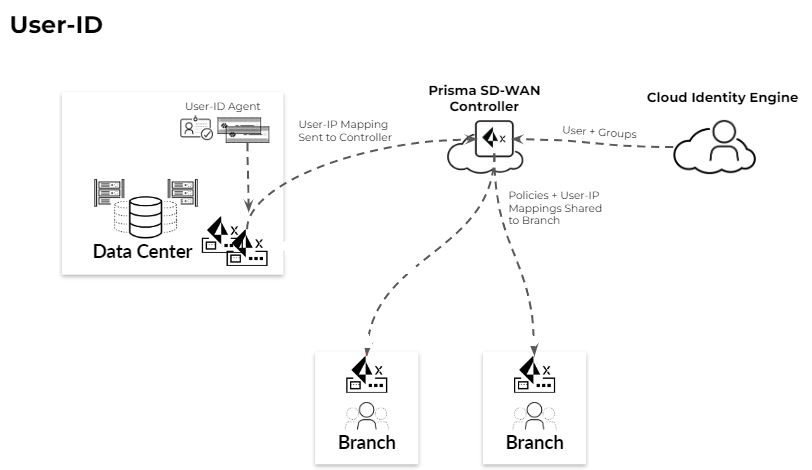
The PAN-OS firewall (either an on-prem NGFW or Prisma Access cloud firewall) maps IP
addresses to users. The Cloud Identity Engine maps users to user
groups.
A data center ION device learns the User-ID mapping from a User-ID Agent running on a PAN-OS
firewall. The User-ID client software runs on the data center ION device.
ION devices support only those PAN-OS firewalls
running versions 10.1.7, 10.2.3, 11.0.x, or higher.
The DC ION device pushes the User-ID to IP address mapping to the Prisma SD-WAN
controller.
The Prisma SD-WAN controller interacts with the Cloud Identity Engine for User
ID to User Group mapping.
The Prisma SD-WAN controller distributes these mappings to
branches (after site-specific filtering based on prefixes and policies). The ION
prefixes are learnt from branches in the following cases:
Interface config that is Global
Prefixes added at site level
Global Prefixes learnt through BGP or OSPF
Controller filters IP-User mappings based on above prefixes and
distributes them to the particular sites.
The Prisma SD-WAN controller pushes User-ID based policies to branch site ION
devices.
The branch ION devices apply User-ID based policies.
The branch ION devices tag the Prisma SD-WAN traffic with user
name information for site-to-site traffic over the Prisma SD-WAN VPNs
The branch ION devices use the tag (username) received in the WAN traffic to
enforce User-ID based policies for remote site users.
The branch ION devices send stats/logs for User ID/Group ID used in the policies
to the controller.
Prisma SD-WAN supports WAN to LAN User-ID based policies for traffic between branch
sites with direct tunnels, but it does not support User-ID based policies for
traffic that originates from or transits through a data center.
You will need the following licenses and subscriptions in the same tenant service
group (TSG) that Prisma SD-WAN belongs to, in order to configure User-ID based
policies in Prisma SD-WAN.
Use the following steps to configure User-ID based policies in Prisma
SD-WAN.
Set up the connection to the User-ID agent.
Configure a data center ION device to connect to the User ID Agent in the
PAN-OS firewall.
Select ConfigurationPrisma SD-WANData Centers and then select a data center site.
In the Configuration tab, click
Configure User Agent.
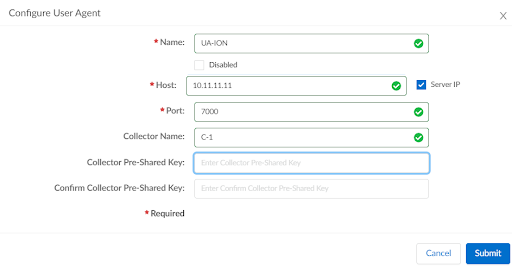
Click Add User Agent.
Enter a Name for the User Agent
configuration.
You can choose to disable the connection
between the user agent client and the user agent running on
the PAN-OS firewall by selecting the
Disabled check box.
Enter the Host IP address or a fully
qualified domain name (FQDN)for the PAN-OS firewall.
If you
specify an FQDN, use the down-level logon name in the
(DLN)\sAMAccountName format instead of the
FQDN\sAMAccountName format. For example, use
example\user.services not
example.com\user.services.
Enter the Port number for the PAN-OS
firewall.
(Optional) Enter a Collector Name.
Enter this
information if you are using a Virtual System
(hardware firewall).
(Optional) Enter a Collector Pre-Shared
Key and confirm.
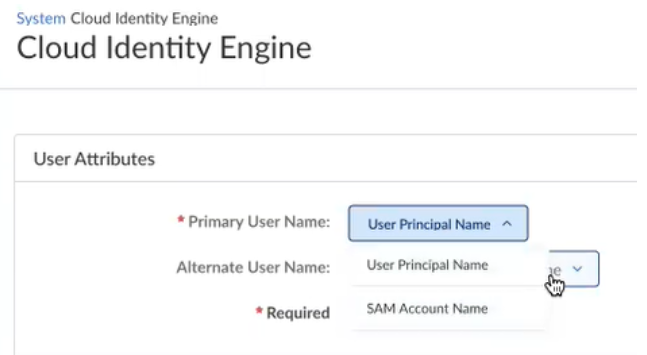
When the username
format is a SAM Account Name, Prisma SD-WAN supports only
the netbios\<user> format and not the domain\<user>
format.
Add users and/or user groups in policy rules.
You can add users or user groups in path, QoS, and security policy
rules.
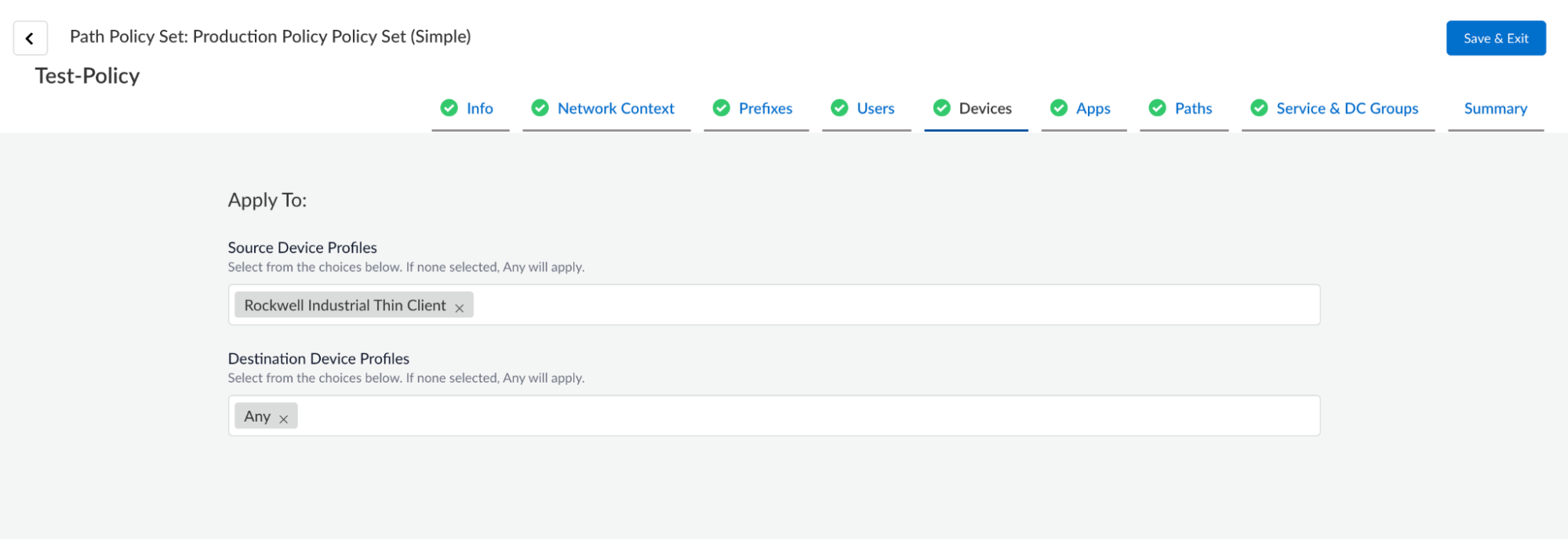
Select ConfigurationPrisma SD-WANPoliciesPathsPath StacksSimple, select a stack and click Add
Rule.
On the Users tab, select a User and/or a Group
from the User/Group drop-down.
The default value is Any. An
explicitly specified user name has priority over a group name. An
explicitly specified group name has priority over any/known/unknown
user.
Configure Cloud User ID for User Contexts
Cloud User ID (CUID) sync integrates the Controller with User Context
(CUID) to fetch IP-to-user mappings. This enables Prisma SD-WAN Controller to
obtain up-to-date user identity information for network policy enforcement and
visibility.
To fetch IP-User mappings, you can configure either Cloud User ID which get
the mappings from Cloud User Context or User ID Agent which get the mappings
from NGFW. If User ID Agent is enabled, you cannot enable Cloud User ID and
vice-versa. Only one of them can be enabled at any point in time.