
New Features - GlobalProtect - 10.1
Configure Split DNS for GlobalProtect App on iOS Endpoints
Organizations using GlobalProtect® to secure access for their mobile workforce have long faced challenges related to balancing security and user experience. Previously, providing secure connectivity often required routing all DNS queries through the corporate gateway, which unintentionally introduced latency for general web browsing and local application use, diminishing the speed and privacy remote users expect.
To resolve this complex networking challenge and optimize performance, GlobalProtect now introduces Split DNS functionality across all major mobile and desktop platforms, including iOS, Linux, Windows, and macOS. This enhancement significantly clarifies GlobalProtect’s positioning within the NetSec platform by offering granular, policy-based control over endpoint network traffic. Instead of an all-or-nothing approach, Split DNS allows you to precisely define which internal domains require resolution exclusively via the secure GlobalProtect gateway servers. All other domains are automatically directed to the device's local DNS servers. This approach ensures that sensitive enterprise traffic remains secure and routable while non-corporate traffic enjoys optimized, high-speed local resolution.
Enhancements for Authentication Using Smart Cards-Authentication Fallback
The smart card authentication method is enhanced to include an authentication fallback mechanism when the smart card is not available to authenticate users to the GlobalProtect app.
When you set smart card authentication for the end users to authenticate to the GlobalProtect app and when the configured smart card is not available, the user authentication will now fallback to any other username and password authentication methods that you have configured for the app.
The smart card authentication fallback will happen only if you have selected the Allow Authentication with User Credentials OR Client Certificate option while configuring the GlobalProtect gateway and portal. This option defines whether users can authenticate to the portal or gateway using credentials and/or client certificates.
Enhancements for Authentication Using Smart Cards-Removal of Multiple PIN Prompts
When using Connect Before Logon (CBL) with smart card authentication and ActivClient software, users previously encountered significant friction due to repeated PIN prompts. This issue occurred on devices where ActivClient software was installed alongside the GlobalProtect app, forcing end users to enter their smart card PIN multiple times and hindering the seamless pre-login process. This disruption compromised the reliable and streamlined access intended by the CBL connection method.
To provide a superior user experience, GlobalProtect® now streamlines smart card authentication for this specific configuration. This enhancement ensures that the GlobalProtect app effectively manages the complex interaction between the Windows identity provider and ActivClient software. Consequently, the end user is prompted to enter their PIN only once. This single required prompt correctly originates from the ActivClient software, ensuring a quick, consistent, and uninterrupted connection using the Connect Before Logon method.
GlobalProtect Embedded Browser Upgrade for SAML Authentication
Prior to GlobalProtect 6.3, users relying on browser-based Security Assertion Markup Language (SAML) authentication often experienced an inconsistent login workflow and sometimes required manual steps such as closing the browser window after successful authentication. In addition, the previous embedded framework lacked robust compatibility with modern methods like FIDO2.
To deliver a seamless and more secure authentication experience, GlobalProtect® version 6.3 introduces an upgrade to the embedded browser framework for SAML authentication. This enhancement utilizes Microsoft Edge WebView2 on Windows and WkWebview on macOS. These components provide a modern, consistent user interface that matches the GlobalProtect client, thereby eliminating the need for end users to configure a SAML landing page or manually close the browser after logging in. The transition to WebView2 also ensures compatibility with FIDO2-based authentication methods. For more information, refer to Microsoft Edge WebView2 documentation.
Host Information Profile (HIP) Exceptions for Patch Management
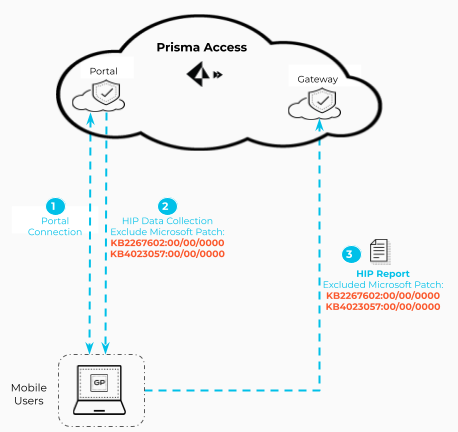
You can now configure the GlobalProtect app to exempt specific security patches from being reported as missing from the endpoint HIP report to prevent the endpoint from failing the HIP check in cases where patch updates happen frequently (for example some companies update their patches multiple times a day with threat updates). When you enable this feature, you can specify specific patches to exclude from the HIP report and the duration for which you want to exclude them. For certain patches, you might want to exclude them from the HIP report permanently if you don’t require them in your environment. For other patches, such as those that get updated frequently by the vendor, you might just want to exclude for a day or less to ensure that end users aren’t getting blocked from accessing the resources they need whenever a patch update happens, but you also want to verify that they’re patching their devices regularly.
Host Information Profile (HIP) Process Remediation
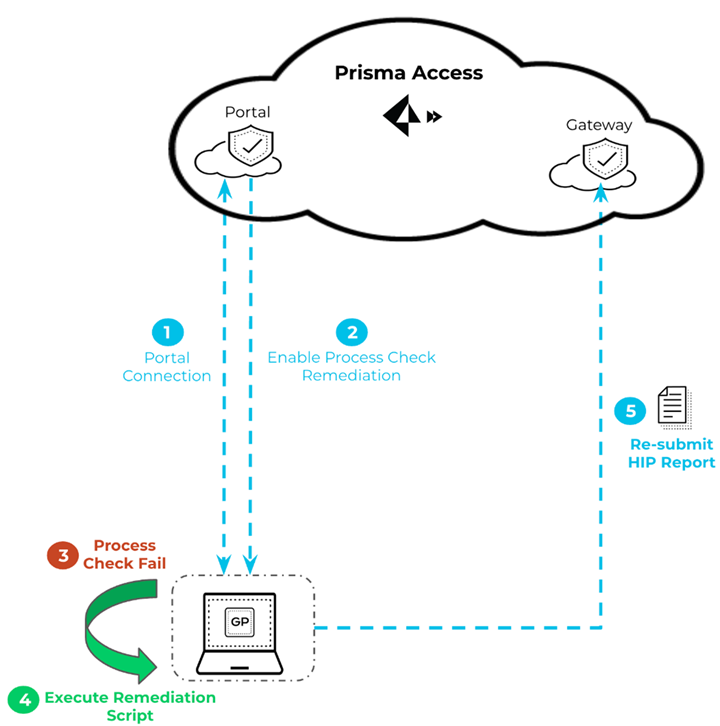
Frequent security issues, such as failed process or registry checks, can unnecessarily block compliant end-users from accessing resources while they wait for the next scheduled hourly Host Information Profile (HIP) check.
This new capability addresses the delay by allowing you to enable a HIP remediation script whenever a GlobalProtect® endpoint fails one or more process checks. The script runs instantly to recover the endpoint from the failure, and the GlobalProtect app immediately resubmits the HIP report. Remediating the issue causing the HIP check failure in real time enables your users access to the resources they need without having to wait until the next hourly HIP check.
Wildcard Support for Split Tunnel Settings Based on the Application
Added in GlobalProtect 6.3.1.
This feature avoids constant manual updates to split-tunnel configurations. When third-party application paths change after a software or patch update, security administrators often waste time manually modifying the exclusion or inclusion lists.
You can now configure the path for the endpoint application using the wildcard character (*) while setting up application-based split-tunneling, for both excluded and included traffic. This enhancement simplifies administration for common third-party applications, such as Symantec Web Security Service (WSS) or Microsoft Teams.
When you use the wildcard character in the application path and add it to the exclude or include list, GlobalProtect® bypasses the specific application path check. This ensures that even if the application path changes after a software or patch update, the split-tunnel configuration remains accurate without requiring manual intervention. You can add up to 200 entries to the list to exclude or include traffic through the VPN tunnel.
