
New Features - Strata Cloud Manager - November 2023
App Acceleration in Prisma Access
When your users access apps, they can experience poor app performance due to decreased throughput. This condition can be caused by degraded wireless connectivity, network congestion, and other factors. These networking issues can adversely affect the employee experience and can reduce their productivity.
App Acceleration directly addresses the causes of poor app performance and acts in real-time to boost throughput while maintaining best-in-class security, dramatically improving the user experience for Prisma Access GlobalProtect and Remote Network users.
Without requiring any changes to your applications, App Acceleration securely builds an understanding of:
Device capability —The type of client endpoint
Network capability —The type of network
App Context — The type of app being used
Using its understanding of network, device, and application context, App Acceleration maximizes throughput and adjusts in real-time to account for changing network conditions.
When compared to direct internet access, App Acceleration offers a marked throughput improvement for TCP traffic when connecting through Prisma Access.
You can view these improvements using Autonomous DEM (ADEM), which provides you with metrics such as throughput per application and the data and apps that were accelerated. Using this information, you can pinpoint how App Acceleration improved the app experience for your users.
IP Protocol Scan Protection
Malicious actors scan Internet Protocol (IP) numbers to identify and exploit open and insecure protocols on target hosts. This reconnaissance technique involves cycling through IP protocol numbers to discover the IP protocols and services that the target host supports, sometimes with the help of automated tools. Starting with PAN-OS® 11.1, you can enable reconnaissance protection against IP protocol scans.
When enabled, your Next-Generation Firewall (NGFW) detects IPv4 and IPv6 protocol scans based on a specified number of scan events that occur within a specified interval. By default, your NGFW generates an alert in the Threat logs when these thresholds are met. However, you can configure the NGFW to take other actions, such as dropping subsequent packets from the source IP address to the target host for a specified time. To minimize false positives and allow legitimate activity, you can exclude the IP addresses of trusted internal groups performing vulnerability testing from this protection.
Details of each detected scan are available in Threat logs.
IPSec VPN Monitoring
Because an IPSec VPN tunnel is a logical interface, it cannot reflect the status of the underlying physical link. This limitation can cause a firewall to continue routing traffic to an unusable path, leading to silent traffic loss until the failure is manually detected.
To address this, PAN-OS® now includes IPSec tunnel monitoring to actively verify connectivity to a target IP address through the tunnel. If the target becomes unreachable, the firewall marks the path as unusable and automatically initiates a failover. During failover, the existing tunnel is torn down, routing changes are triggered, and a new tunnel is established to redirect traffic. The feature provides status visibility for both the IKE gateway and individual IPSec tunnels, which allows the firewall to maintain high availability and reduce traffic loss.
Monitor App Acceleration
App Acceleration addresses the causes of poor app performance and acts in real-time to boost throughput while maintaining best-in-class security, improving the user experience for Prisma Access GlobalProtect and Remote Network users. You can view and monitor App Acceleration to see details about accelerated applications in your environment. In Strata Cloud Manager, select to view details about all accelerated applications.
Security Posture Settings and Check Management
Managing configuration compliance and security best practices often requires navigating multiple, siloed settings pages, leading to inconsistent enforcement and complex exception handling. Strata Cloud Manager now unifies these critical capabilities into Security Posture Settings, consolidating security check functionality previously split across AIOps and Cloud Manager pages. This unification streamlines your security workflow, allowing you to manage both predefined best practice checks (aligned with industry standards like CIS and NIST) and custom organizational checks from a single centralized location. This feature enhances policy granularity by offering a centralized Check Exception capability, allowing you to restrict where checks apply to your deployment rather than simply enabling or disabling them globally. Furthermore, security checks raise an Alert (default) for a failed check, or Block a configuration with failing checks from being pushed out to your deployment. security checks provide immediate, field-level feedback during policy creation, empowering you to address configuration deviations instantly and ensure alignment with best practices before any policy deployment.
SNMP-based Discovery for IoT Devices
Gaining comprehensive visibility into IoT devices that are not directly connected to the Prisma SD-WAN branch ION devices can be challenging, creating security blind spots. To resolve this, Prisma SD-WAN supports the discovery of these off-branch devices using Simple Network Management Protocol (SNMP). The ION devices inspect packets, extract information, and generate messages to send to Strata Logging Service. Device Security obtains this information from Strata Logging Service and lists all the devices discovered in its portal. It also lists details such as IP address, MAC address, vendor details, and so on, for greater visibility into your off-branch IoT environment.
Strata Cloud Manager: Application Name Updates
The application tile names on the hub for Prisma Access, Prisma SD-WAN, and AIOps for NGFW (the premium app only) are now changed to Strata Cloud Manager . With this update, the application URL has also changed to stratacloudmanager.paloaltonetworks.com, and you’ll also now see the Strata Cloud Manager logo on the left navigation pane.
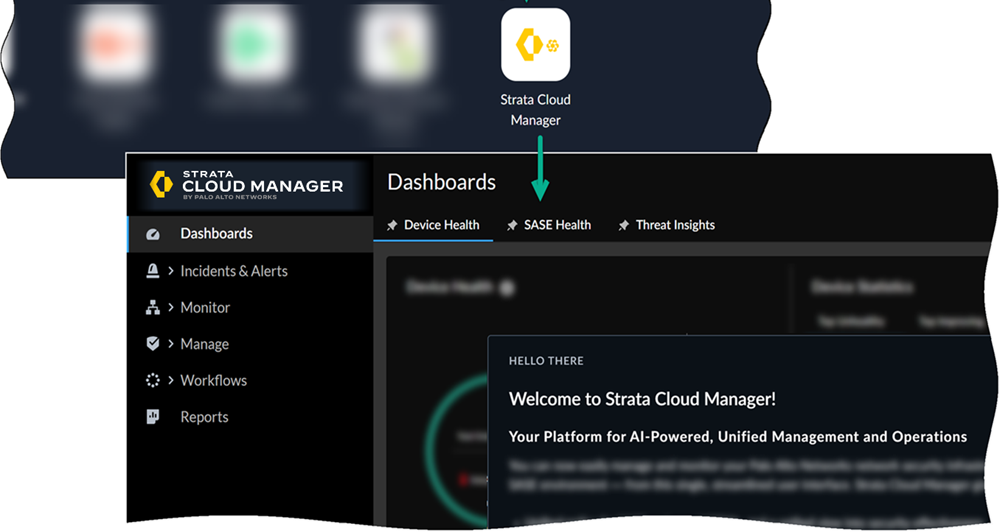
Moving forward, continue using the Strata Cloud Manager app to manage and monitor your deployments.
Streamlined Licensing for Strata Cloud Manager
A new licensing structure for Strata Cloud Manager is now available, featuring two licensing tiers: Strata Cloud Manager Essentials and Strata Cloud Manager Pro. This unified structure streamlines the deployment of network security offerings, including AIOps for NGFW, Autonomous Digital Experience Management (ADEM), cloud management functionality, and Strata Logging Service. Strata Cloud Manager offers a unified experience with the products accessible through a single interface, though you require separate licenses for each product to integrate them into the platform.
Here’s an overview of the two licensing tiers available for Strata Cloud Manager:
Strata Cloud Manager Essentials is the free tier that offers basic configuration and network security lifecycle management features to streamline operations and provide essential security.
Strata Cloud Manager Pro is the paid tier that includes all features of Strata Cloud Manager Essentials, plus advanced features to enhance operational health, prevent network disruptions, strengthen real-time security posture, and ADEM for monitoring user experience performance. Strata Cloud Manager Pro includes Strata Logging Service with one year of log retention and unlimited storage, enabling centralized logging and seamless data retrieval across your deployment.
Strata Cloud Manager Essentials and Strata Cloud Manager Pro are available to activate in customer support portal (CSP) accounts that don't have: Strata Logging Service with sized storage, AIOps for NGFW Free or Premium, or Prisma Access.
For a detailed comparison of the available features and to learn more about how to activate these licenses, visit Strata Cloud Manager License.
Traffic Replication Remote Network and Strata Cloud Manager Support
On-premises network recorders have been a powerful tool for organizations to perform forensic and breach analysis. It's common in on-premises topologies to implement a parallel infrastructure of tap ports, span ports, or packet brokers that would deliver a copy of the traffic to be used for such out-of-band analysis. However, along with the accelerated adoption of hybrid work and cloud, organizations are migrating to SASE architectures to address these challenges. Adhering to SASE cloud security solutions created blind spots for these forensic analysis tools, where a copy of the traffic from a remote user to a SaaS application is no longer available.
Prisma® Access traffic replication adds full visibility into forensic and post-mortem analysis involving SASE architectures by making available a copy of the traffic that is traversing Prisma Access.
In addition to providing a copy of the traffic generated by mobile users, traffic replication support for Remote Networks provides a similar function for the traffic generated by the branches. This support allows you to have complete visibility for all use cases, along with consistency in the way the traffic is being captured. This extension ensures comprehensive visibility across all branch traffic, providing the necessary consistency and flexibility to apply forensic analysis across both mobile user and remote network use cases seamlessly.
Prisma Access (Managed by Strata Cloud Manager) deployments now support Traffic Replication.
View and Monitor Native IPv6 Compatibility
If you use IPv6 networking in your Mobile Users: GlobalProtect deployment, you can configure Prisma Access to use IPv6 addresses in your mobile user networking. To view information about IPv6 in your GlobalProtect deployment, go to in Strata Cloud Manager Command Center.
View and Monitor ZTNA Connector Access Objects
View and monitor private apps that were added through ZTNA Connector access objects by viewing data such as the number of apps added by FQDNs, IP subnets, and wildcards, each access object's connectivity status, and the Connector Groups and Connectors associated with each access object.
The private apps in the data centers connect to Prisma Access through your Connector virtual machines (VMs). You can add apps based on these access objects—FQDNs, FQDN wildcards, or IP subnets.
- FQDNs —Prisma Access resolves the FQDNs of the applications you onboard to ZTNA Connector to the IP addresses in the Application IP address block.
- Wildcards —For wildcard-based apps, create an FQDN-based connector group, then specify the wildcard to use (for example, *.example.com) for the app target. When users access sites that match the wildcard, those apps are automatically onboarded for access from ZTNA Connector for your mobile users and remote network users.
- IP Subnets —Create an IP subnet-based Connector group, and then enter the IP subnet to use for the app target.