
New Features - Strata Cloud Manager - September 2025
Enhanced Visibility with Zero Touch Provisioning of Cloud Managed NGFWs for Installers
Installers can now monitor the real-time status of the NGFW activation during Zero Touch Provisioning (ZTP) deployments through the ZTP Activation Page. ZTP onboarding visibility addresses the challenge that installers with minimal technical knowledge face when they have no insight into the NGFW activation process that spans approximately 30 minutes. ZTP Activation Page now provides comprehensive bootstrap status monitoring through six sequential stages: Firewall Licensing, Content Updates, Wildfire Updates, Antivirus Updates, Routing Mode Changes, and Software Upgrades.
When you initiate NGFW activation using ZTP, you can access detailed progress information through the ZTP Activation Portal for installers and the Device Management interface for administrators. The system displays real-time status indicators for each NGFW activation stage, including spinners that provide visibility into downloads and installation.
ZTP visibility includes error handling and recovery mechanisms that allow administrators and installers to retry failed operations without requiring on-site technical support. When ZTP activation failures occur, the system provides specific error messages and retry options. For non-critical failures in antivirus or Wildfire updates, the system displays warning notifications while allowing the ZTP to continue.
Installers can also review activation history for the past 7 days through Activation History. Enhanced visibility and troubleshooting aims to reduce deployment inefficiencies and provide the seamless experience you expect from ZTP while maintaining your ability to troubleshoot issues remotely through administrator controls.
Flexible Software Upgrades for Cloud Managed NGFWs
Administrators can now skip reboots during PAN-OS software upgrades for cloud managed NGFWs, allowing you to decouple software installation from the reboot process and providing granular control over when your NGFWs restart after receiving software updates. You can schedule software downloads and installations to complete during designated maintenance windows while deferring the actual reboot to a time that minimizes operational impact on your network services. This separation of upgrade phases prevents unexpected downtime during critical business hours and allows you to coordinate reboots across multiple firewalls in your environment.
You configure this feature through the Software Upgrade Scheduler and configure the update to work with the needs of your business and network.
IPv6 for Cloud Managed NGFWs
Strata Cloud Manager now provides comprehensive IPv6 capabilities to help you manage your network infrastructure in dual-stack environments. This enhancement brings IPv6 parity with PAN-OS management capabilities, allowing you to configure and manage both IPv4 and IPv6 addressing across your NGFW deployments through the cloud management platform.
You can now configure IPv6 addressing for management interfaces including dedicated management ports and auxiliary interfaces. The management interface configuration supports both static IPv6 addressing and dynamic DHCPv6 client options with configurable parameters such as non-temporary address options, temporary address options, rapid commit, and DUID type selection. For auxiliary interfaces, you can specify IPv6 addresses with prefix lengths and configure default IPv6 gateways to ensure proper routing in your management network.
QoS Support
QoS enables you to prioritize and manage network traffic to ensure critical applications and services receive the necessary bandwidth and resources.
You can now configure QoS on the next-generation firewalls in Strata™ Cloud Manager. Enable QoS capabilities on NGFWs through the following configuration components for traffic prioritization and bandwidth management:
QoS Profile
- Defines traffic classification rules and bandwidth allocation parameters
- Establishes service level priorities for different application types
- Configures queue management and traffic shaping policy rules
QoS Policy
- Applies QoS Profiles to specific traffic flows based on defined criteria
- Implements rule-based traffic classification and prioritization
- Enables granular control over application and user-based QoS enforcement
QoS Egress Interface Configuration
- Designates network interfaces for QoS policy rule enforcement
- Configures outbound traffic shaping and bandwidth limits
- Ensures proper queue management at interface level
By implementing QoS, you can improve overall network efficiency, enhance user experience for critical services, and align network resource allocation with your organization's priorities. With QoS, you can maximize the value of your existing network infrastructure while ensuring that your most important traffic always gets through, even during periods of high network utilization.
Strata Cloud Manager Pro for NGFW with Enterprise Support Agreement
Palo Alto Networks now enables you to leverage Strata Cloud Manager Pro for NGFW capabilities directly within your Enterprise Support Agreements (ESA), significantly enhancing your support experience while reducing time to resolution. This integration helps you maximize your investment in Palo Alto Networks solutions while simplifying management of your security infrastructure.
With the ESA and Strata Cloud Manager integration, you receive a single authentication code that activates both your support entitlements and Strata Cloud Manager Pro features for your NGFW deployments. This consolidation eliminates the need to purchase and manage separate subscriptions, creating a more streamlined experience. Your ESA agreement with Strata Cloud Manager Pro provides advanced monitoring, reporting, and management capabilities that help you identify and resolve security issues more quickly.
Through this integration, you gain the operational benefits of Strata Cloud Manager's advanced management capabilities combined with Palo Alto Networks support services, all within a single, cost-effective agreement that covers your entire NGFW deployment.
Strata Cloud Manager: NDP Proxy
Strata Cloud Manager now supports Neighbor Discovery Protocol (NDP) Proxy to simplify address resolution in IPv6 environments. This feature allows the firewall to respond to link-layer address requests on behalf of devices behind it, performing a similar function to ARP for IPv4. Configuring NDP Proxy is required when you enable IPv6-to-IPv6 Network Prefix Translation (NPTv6). Key capabilities of NDP Proxy include:
- Simplified Address Resolution: The firewall automatically responds to Neighbor Solicitation messages for configured IPv6 prefixes.
- Selective Proxying: You can specify addresses for which the firewall will not act as a proxy (negated addresses).
Strata Cloud Manager: Support for 5th Generation Hardware
Strata Cloud Manager now provides cloud management support for Generation 5 hardware platforms, including the PA-500 and PA-5500 series NGFWs. This support enables you to manage high-performance enterprise branch NGFWs directly from the cloud. You can leverage Strata Cloud Manager's centralized policy management, configuration distribution, and monitoring capabilities across your Gen 5 deployments while maintaining full visibility into device performance and security posture.
TechDocs Strata Copilot: Your AI Assistant on TechDocs
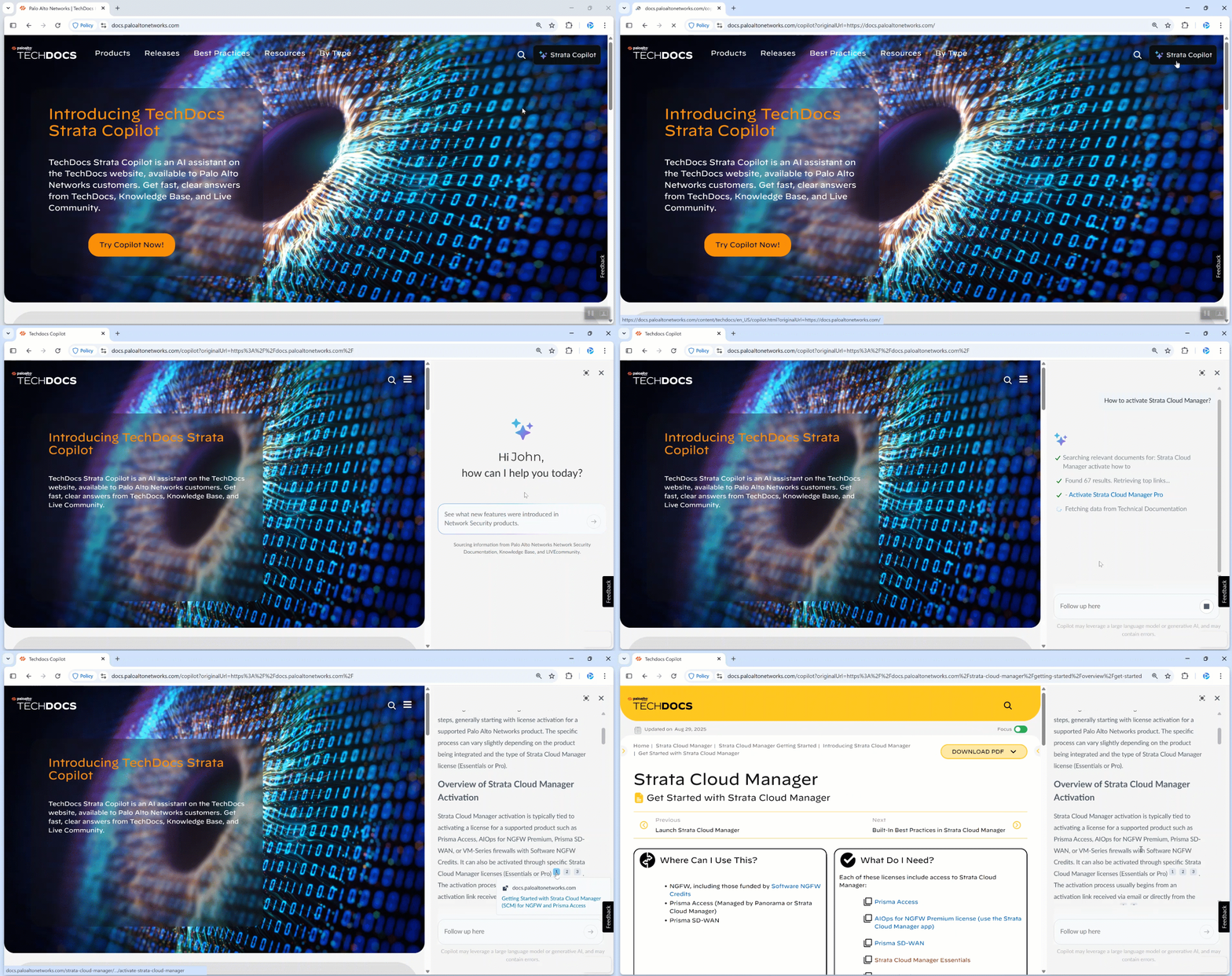
TechDocs Strata Copilot, an AI-powered assistant, is now available on the Palo Alto Networks TechDocs website. It simplifies how you find information by letting you ask questions in natural language, which eliminates the need to search through documentation or use specific keywords.
TechDocs Strata Copilot pulls answers to your queries from a comprehensive data source, such as our Network Security Documentation, Knowledge Base articles, and LIVEcommunity. Instead of just showing you a link, TechDocs Strata Copilot provides a concise summary to give you immediate clarity.
Every answer includes direct links to the source documentation, allowing you to explore the context and verify the information. This feature enhances your self-service experience by providing instant access to critical knowledge, reducing resolution times, and helping you more efficiently manage your network security solutions.
Visibility into Agent Versions for Connected Devices
User Activity Insights in Strata Cloud Manager provides clear visibility into connected gateway agent (GlobalProtect and Prisma Access) versions and subversions for connected user devices in your deployment. Previously, GlobalProtect agent version information varied by its source (Strata Logging Service, ADEM, or SaaS agent) and lacked subversion details.
You can now access both the main agent version and detailed subversion information, including patch details. The subversion details for existing GlobalProtect devices populate over a 30-day period. However, for newly added devices, the subversion details are displayed immediately upon their first connection. The GlobalProtect agent subversions are displayed for devices connected to Prisma Access only. This clear view of your agent distribution landscape helps you identify version inconsistencies and plan updates more effectively.
Zero Touch Provisioning Support for Gen 5 Hardware
You can now use Zero Touch Provisioning (ZTP) to deploy Gen 5 hardware through Strata Cloud Manager with enhanced device-specific QR codes that contain your device's serial number and claim key.When you scan the QR code on your PA-500 or PA-5500 series NGFWs, you are automatically directed to the ZTP Activation page with the serial number and claim key pre-populated, eliminating the need for manual data entry and reducing input errors during onboarding.