
New Features - GlobalProtect - 6.3
Connect to GlobalProtect App with IPSec Only
Added in GlobalProtect 6.3.1.
For organizations that must comply with government regulations, allowing network clients to fallback to a less secure tunnel type can pose a compliance risk. Previously, if the GlobalProtect® app failed to establish an IPSec tunnel, it automatically attempted to establish an SSL tunnel, potentially circumventing mandatory security policies. This lack of strict tunnel enforcement could lead to non-compliant access in high-security environments.
GlobalProtect 6.3.1 addresses this by unifying the control over tunnel mode enforcement under a single portal setting Advanced Control for Tunnel Mode Behavior . This new configuration combines the existing Connect with SSL Only feature with the new ability to enforce IPSec Only connections. For information on using this parameter, see step 5 in Customize the GlobalProtect App.
You can now meet mandates, such as Federal Government compliance regulations, by requiring the GlobalProtect app to stay disconnected if the IPSec tunnel fails or is unavailable on the gateway. This feature ensures that the GlobalProtect app only connects through the specific, approved tunnel mode your security policy requires, preventing unauthorized or non-compliant connections. This simplifies configuration by consolidating tunnel mode preferences in one centralized location.
To meet Federal Government compliance regulations, you can choose to prevent GlobalProtect fallback to SSL tunnel in case IPSec tunnel fails. If IPSec is not configured on the gateway, the GlobalProtect app stays disconnected.

Enhanced HIP Remediation Process Improvements
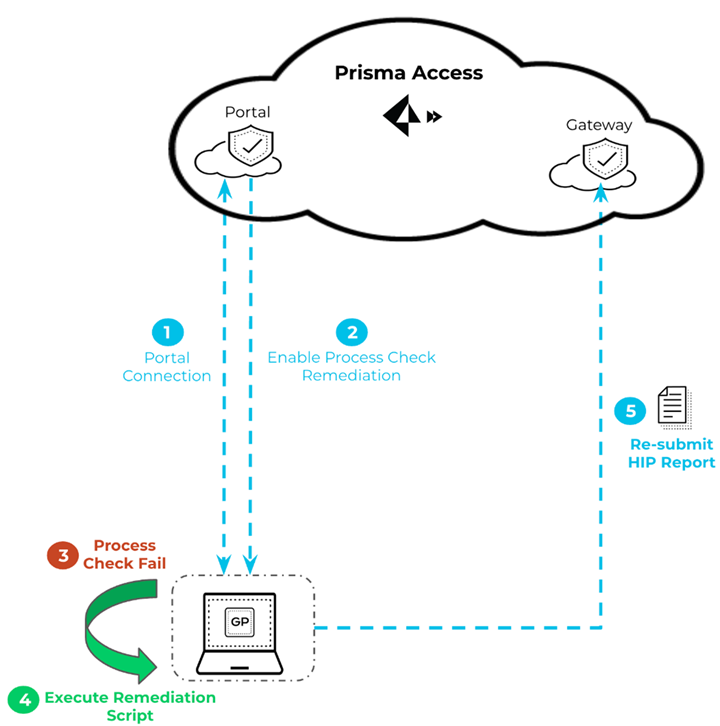
You can now configure the GlobalProtect app to rerun the HIP remediation script whenever the GlobalProtect endpoint fails the process check after running the configured HIP remediation process.
This feature enables the app to rerun the HIP remediation script when the process fails after the set HIP remediation timeout period to help the endpoint recover from a HIP check failure. The app reruns the remediation script after a process check failure based on the HIP Process Remediation Retry count you configure through the app settings of the GlobalProtect portal. When you enable this feature, the GlobalProtect app resubmits the HIP report only after the app reruns the HIP remediation script in case of HIP check failures.
For example, if you configure the retry count as 3 and the remediation timeout period as 5 mins in the portal configuration, then every time the endpoint fails the process check after performing the remediation process, the app runs the script three times and waits up to 5 mins before it submits the HIP report.
Enhancements for Authentication Using Smart Cards
Added in GlobalProtect 6.3.1.
Currently, users configured for smart card authentication must rely solely on their PIV card to access GlobalProtect, potentially blocking access if the physical card is unavailable or forgotten. This dependency caused connectivity disruption, especially for endpoints running Windows or macOS in On-demand operational modes.
To ensure continuous connectivity and user flexibility, GlobalProtect® now provides end users with resilience through flexible authentication profiles. When smart card authentication is enabled, the GlobalProtect app automatically displays two distinct profile options: one profile optimized for smart card login and a second profile for traditional username and password credentials. This key feature allows end users to immediately choose their preferred authentication method directly from the app's portal drop-down menu. This ensures that secure access remains consistently possible even if they forget their physical PIV card or encounter smart card reader issues, significantly improving the reliability of user access without compromising security protocols.
The smart card authentication fallback will happen only if you have selected the Allow Authentication with User Credentials OR Client Certificate option while configuring the GlobalProtect gateway and portal. This option defines whether users can authenticate to the portal or gateway using credentials and/or client certificates.
For Windows endpoints, you can predeploy the customized Windows Registry key values for the profile options < PIV> and < NO PIV> .
Enhancements for Authentication Using Smart Cards-Authentication Fallback
The smart card authentication method is enhanced to include an authentication fallback mechanism when the smart card is not available to authenticate users to the GlobalProtect app.
When you set smart card authentication for the end users to authenticate to the GlobalProtect app and when the configured smart card is not available, the user authentication will now fallback to any other username and password authentication methods that you have configured for the app.
The smart card authentication fallback will happen only if you have selected the Allow Authentication with User Credentials OR Client Certificate option while configuring the GlobalProtect gateway and portal. This option defines whether users can authenticate to the portal or gateway using credentials and/or client certificates.
Enhancements for Authentication Using Smart Cards-Removal of Multiple PIN Prompts
When using Connect Before Logon (CBL) with smart card authentication and ActivClient software, users previously encountered significant friction due to repeated PIN prompts. This issue occurred on devices where ActivClient software was installed alongside the GlobalProtect app, forcing end users to enter their smart card PIN multiple times and hindering the seamless pre-login process. This disruption compromised the reliable and streamlined access intended by the CBL connection method.
To provide a superior user experience, GlobalProtect® now streamlines smart card authentication for this specific configuration. This enhancement ensures that the GlobalProtect app effectively manages the complex interaction between the Windows identity provider and ActivClient software. Consequently, the end user is prompted to enter their PIN only once. This single required prompt correctly originates from the ActivClient software, ensuring a quick, consistent, and uninterrupted connection using the Connect Before Logon method.
GlobalProtect Best Gateway Selection
Added in GlobalProtect 6.3.1.
Suboptimal endpoint conditions, such as high CPU usage or system load, can negatively impact network response time measurements and lead to a suboptimal gateway selection. GlobalProtect® introduces the Best Gateway Selection Criteria to solve this challenge. This capability ensures reliable network discovery results by preventing local endpoint conditions from skewing the measurement of available gateway options.
The selection process evaluates criteria such as gateway priority, load, and response time to determine the best available gateway. When you select Response Time as the primary criteria, GlobalProtect measures the duration of a successful TCP handshake to establish the external gateway connection. Measuring the TCP handshake provides a highly accurate network latency reading because it isolates network connection time from processing delays on the endpoint itself. This isolation guarantees that endpoints connect to the gateway with the highest priority and shortest actual network response time, improving user experience and network efficiency.

GlobalProtect Embedded Browser Upgrade for SAML Authentication
Prior to GlobalProtect 6.3, users relying on browser-based Security Assertion Markup Language (SAML) authentication often experienced an inconsistent login workflow and sometimes required manual steps such as closing the browser window after successful authentication. In addition, the previous embedded framework lacked robust compatibility with modern methods like FIDO2.
To deliver a seamless and more secure authentication experience, GlobalProtect® version 6.3 introduces an upgrade to the embedded browser framework for SAML authentication. This enhancement utilizes Microsoft Edge WebView2 on Windows and WkWebview on macOS. These components provide a modern, consistent user interface that matches the GlobalProtect client, thereby eliminating the need for end users to configure a SAML landing page or manually close the browser after logging in. The transition to WebView2 also ensures compatibility with FIDO2-based authentication methods. For more information, refer to Microsoft Edge WebView2 documentation.
Improvements for Multi Authentication CIE Experience
Added in GlobalProtect 6.3.1.
When CIE (SAML) multi-authentication is configured for the GlobalProtect app as the authentication method, end users are no longer required to enter their single sign-on (SSO) credentials when they try to authenticate to the app.
You can now predeploy the registry key CASSKIPHUBPAGE (path: \HKEY_LOCAL_MACHINE\SOFTWARE\Palo Alto Networks\GlobalProtect\Settings ) on the Windows endpoints to enable this feature.
After you enable this feature, end users are not prompted to enter their SAML credentials while authenticating to the app using the embedded browser or the default browser. This feature is supported only on Windows platforms.

Intelligent Internal Host Detection
Added in GlobalProtect 6.3.1.
When your remote users rely on both the GlobalProtect app and a third-party VPN client, the applications can conflict, leading to issues with User-ID recognition. Traditionally, if the third-party VPN establishes its tunnel before the GlobalProtect app can complete its internal host detection process, the User-ID mapping fails, causing policy enforcement problems. This prevents you from maintaining consistent, user-based security policies for all traffic.
To resolve this complex interoperability challenge, the GlobalProtect app, starting with version 6.3.1 and later releases, introduces the Enable Intelligent Internal Host Detection parameter. This parameter ensures that identification functions work seamlessly alongside external network agents.
When you enable the Intelligent Internal Host Detection parameter, the GlobalProtect app detects the presence of the third-party VPN agent. The application then re-triggers the network discovery processes until the Internal Host Detection is successfully completed. This capability ensures that User-ID mapping and appropriate internal security policies are applied, regardless of the order in which the 3rd party VPN tunnels are established. This functionality eliminates gaps in user-specific policy enforcement when your users rely on external VPNs for accessing private applications.
For information on how to enable this parameter, see Customize the GobalProtect app.

Optimize Remote Access with Intelligent Portal Selection
When remote users travel extensively or move between disparate network locations, their GlobalProtect® app often connects to a suboptimal or fixed portal address. This leads to slower connection times and inconsistent security experiences because the portal is geographically distant or poorly matched to the user’s current network conditions. Relying on manually configured or static portal lists introduces unnecessary friction for mobile workers and reduces overall connection reliability.
To ensure the fastest, most reliable connection for users, GlobalProtect 6.3 introduces the Intelligent Portal feature. This capability enhances the deployment and connection experience by automatically selecting the best available portal based on real-time network conditions and portal availability.

Intelligent Portal is supported for the Always-On and Always-On (Pre-logon) connection modes. It is also supported for Connect Before Logon if no portal addresses are manually defined. By automatically choosing the optimal portal, the app eliminates connection guesswork, thereby improving the user experience and ensuring consistent, high-speed security enforcement. For information on how to use this feature, see Configure Intelligent Portal.
Wildcard Support for Split Tunnel Settings Based on the Application
Added in GlobalProtect 6.3.1.
This feature avoids constant manual updates to split-tunnel configurations. When third-party application paths change after a software or patch update, security administrators often waste time manually modifying the exclusion or inclusion lists.
You can now configure the path for the endpoint application using the wildcard character (*) while setting up application-based split-tunneling, for both excluded and included traffic. This enhancement simplifies administration for common third-party applications, such as Symantec Web Security Service (WSS) or Microsoft Teams.
When you use the wildcard character in the application path and add it to the exclude or include list, GlobalProtect® bypasses the specific application path check. This ensures that even if the application path changes after a software or patch update, the split-tunnel configuration remains accurate without requiring manual intervention. You can add up to 200 entries to the list to exclude or include traffic through the VPN tunnel.
