
PA-5500 Series Firewall Back Panel
Table of Contents

PA-5500 Series Firewall Back Panel
View the back panel components and descriptions of the PA-5500 Series
firewall.
View the back panel components of your PA-5500 Series firewalls.
The back panel of the firewall should remain accessible to ensure ease of replacing a
power supply or fan assembly.
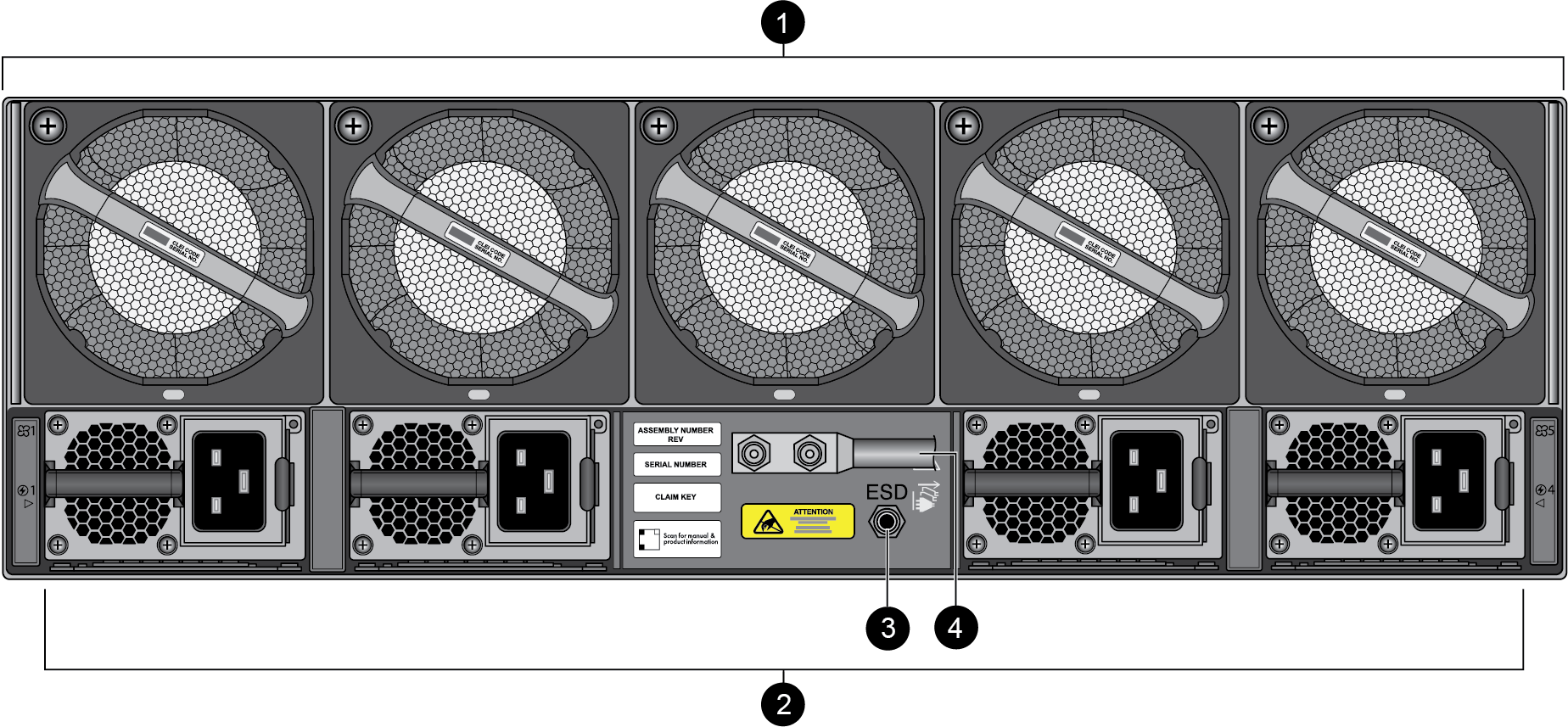
The following image shows the back panel of the PA-5540, PA-5550,
PA-5560, PA-5570, and PA-5580 firewalls and the table describes each back panel
component.
|
Item
|
Component
|
Description
|
|---|---|---|
|
1
|
Fan Assemblies
|
Five dual-rotor fan assemblies (for a total of ten fans) that
provide the appliance with cooling and ventilation. Each fan
assembly can be individually replaced.
The fan assemblies are numbered 1 through 5 from left to
right.
For information on replacing or installing a fan, see Replace a PA-5500 Series Firewall Fan Assembly.
|
| 2 |
Power Supplies
|
Four power supplies that provide AC or DC power to the appliance.
The number of power supplies required for operation and the
number eligible for redundancy depend on whether the power
supplies are high line, low line, or DC.
The power supplies are numbered 1 through 4 from left to
right.
For information on connecting power to the appliance, see Connect Power to the PA-5500 Series Firewall.
|
|
3
|
Electrostatic Discharge (ESD) port
|
Provides a grounding point that you use when removing or
installing appliance components. Secure the provided wrist strap
end of the ESD strap around your wrist and plug the other end
into the ESD port.
|
|
4
|
Ground Studs
|
Two studs used to ground the appliance to earth ground.
|