
New Features - PAN-OS - 11.1
5G Cellular Interface for IPv4
If you have a PA-415-5G firewall, you can now configure a 5G interface for IPv4 cellular traffic. The PA-415-5G is similar to the PA-415 except that it contains an integrated 5G module to support 4G/5G capability and configuration of an interface for IPv4 cellular traffic.
The 5G cellular interface enables configuration of a primary internet connection as well as configuration of a secondary connection for redundancy in case the primary connection is not available. This type of interface supports data connectivity over the 5G mobile network; if the 5G network is unavailable, the firewall automatically switches to a 4G or 3G network, depending on availability.
To enable the 5G cellular interface, configure an Access Point Name (APN) profile. The APN profile specifies which network or networks the device can access and whether the device receives a dynamic or static IP address.
You can configure a primary and secondary SIM card if it is available. If you have a secondary SIM card, you can configure the firewall to switch from one SIM card to another if one SIM card becomes unavailable. For security, enable a PIN code for the SIM card to prevent misuse. If you cannot remember the PIN code, you must obtain a Personal Unblock Key (PUK) for the SIM card to unlock it for use.
For monitoring purposes, you can enable the Dashboard widgets to view more information about the status of the 5G network.
Additional Private Link Types for SD-WAN
The PAN-OS® SD-WAN plugin previously supported a limited number of private link types, which complicated configurations for organizations using more than three distinct private link providers. This limitation required administrators to implement configuration workarounds, preventing the SD-WAN plugin from correctly establishing one-to-one device peering based on the link type.
To address this, four additional link types are now available: Private 1, Private 2, Private 3, and Private 4. These function identically to the existing MPLS link type and inherit its aggressive path monitoring characteristics. By allowing each distinct private link to be assigned a unique type, this feature enables the SD-WAN plugin to correctly determine one-to-one device peering for the overlay network, eliminating the need for configuration workarounds.
Additional SD-WAN Hubs in VPN Cluster
The number of hubs to configure in a VPN cluster has been increased from 4 to 16. Only four of the 16 hubs can have the same hub priority within a VPN cluster due to ECMP.
Authenticate LSVPN Satellite with Serial Number and IP Address Method
A new authentication method called Serial number and IP address Authentication
Beginning with PAN-OS 10.1 and later releases, we support Username/password and Satellite Cookie Authentication method for a satellite to authenticate to the portal. This method requires user intervention to get satellites authenticated by a portal that prevents automating the deployment of remote satellites and adds difficulty and complexity for the administrators to perform software upgrade and deploy new firewalls.
To remove the user intervention while onboarding a remote satellite and to enable automating the deployment of remote satellites, we introduce a new authentication method called Serial number and IP address Authentication . You can now onboard a remote satellite using the combination of serial number and IP address in addition to the username/password and satellite cookie authentication method. This authentication method reduces the complexity by enabling you to deploy new firewalls without manual intervention.
However, Username/password and Satellite Cookie Authentication remains as a default authentication method.
Before enabling the Serial number and IP address Authentication method, configure the satellite serial number at the portal as one of the authentication verification conditions.
- Configure the satellite IP address as an IP allow list at the portal using the set global-protect global-protect-portal portal <portal_name> satellite-serialnumberip-auth satellite-ip-allowlist entry <value> command to add a satellite device IP address on the GlobalProtect portal.
- Enable the Serial number and IP address Authentication method using the set global-protect satellite-serialnumberip-auth enable CLI command. After you enable this method, the satellite continuously attempts to authenticate with the portal for the configured retry interval (in seconds) after power-on until the portal explicitly instructs the satellite to stop.
Upon successfully configuring a satellite device allowed IP address list per portal, and configuring the satellite serial number on the GlobalProtect portal, the satellite can initiate the connection to the portal.
Authentication Exemptions for Explicit Proxy
If you use the explicit proxy configuration for your web proxy, you can now configure exemptions for traffic from specific sources, destinations, or both. IoT devices, such as printers, cannot respond to an authentication request from the proxy or support a certificate or PAC file for authentication. You can configure up to three authentication exemptions for devices using the explicit proxy.
Brotli Decompression for Content-Based Threat Detection
Attackers often use Brotli compression to bypass traditional security mechanisms. To close this visibility gap and improve security, the Content-Based Threat Detection (CTD) engine, used by Palo Alto Networks NGFWs, now supports Brotli decompression for improved analysis and threat detection of HTTP content. Brotli is a high-efficiency data compression format that Google developed for HTTP web applications and content. Palo Alto Networks Security subscription services, such as Advanced Threat Prevention, Advanced WildFire, and Advanced URL Filtering, rely on the CTD engine to facilitate traffic inspection. With the addition of the Brotli decoder, the CTD engine now processes traffic that it previously dropped or passed through the network as an unsupported content-encoding type, making the traffic available for inspection by various Palo Alto Networks content inspection features. This includes, but is not limited to, Precision AI® optimized features such as Advanced WildFire: Inline Cloud Analysis, Advanced Threat Prevention: Inline Cloud Analysis, and Inline Deep Learning Analysis for Advanced URL Filtering. This also applies to any HTTP traffic payloads that a configured and enabled security policy processes. This new capability allows for broader visibility into traffic. When you enable the feature, the existing content decoder framework integrates this software-based Brotli library.
Update :
Dedicated Tunnels for Panorama Connectivity
When you have Panorama deployed without a public IP address, your SD-WAN devices rely solely on the SD-WAN overlay network for connectivity to Panorama. This creates a single point of failure that can result in significant outages when SD-WAN overlay issues occur. The Dedicated Tunnel to Panorama feature addresses this vulnerability by establishing persistent, dedicated IPSec tunnels from your branch devices to Panorama through designated termination devices using direct internet access (DIA) interfaces.
This feature is valuable in environments where Panorama can’t be exposed over the internet using a public IP address. With dedicated tunnels in place, even if your primary SD-WAN overlay network becomes unavailable, your devices can still reach Panorama to receive configuration updates and troubleshooting commands. This eliminates the need for manual recovery, significantly reducing downtime and operational costs.
You can configure primary and secondary termination devices with preferred and secondary DIA interfaces, ensuring redundant connectivity paths to Panorama. The solution uses a separate VPN address pool for tunnel IP address assignments that must not overlap with existing SD-WAN overlay configurations.
Device-ID Visibility and Policy Rule Recommendations
When next-generation firewalls subscribe to Device Security services, they send the Device Security instance that’s in the same tenant service group (TSG) Traffic logs for analysis. Device Security uses AI and machine learning to automatically discover and identify network-connected devices and then construct a data-rich, dynamically updating inventory. From PAN-OS® 11.1, administrators can see this inventory directly in the PAN-OS web interface without having to open the Device Security portal, which is the only place this information appears when Device Security integrates with firewalls running earlier PAN-OS releases. For further Device-ID visibility, the PAN-OS 11.1 web interface also shows a summary of the 10 most common device categories, profiles, and operating systems on the network learned from Device Security .
In addition to identifying devices, Device Security analyzes network behaviors to determine a baseline of normal, acceptable behaviors. It then generates policy rule recommendations that would allow devices to continue their normal network behaviors while denying behaviors that deviate from the norm. PAN-OS administrators can view these recommendations in the PAN-OS 11.1 web interface, select the ones they want their firewalls to apply, and import them into the Security policy rulebase. When using a PAN-OS release prior to PAN-OS 11.1, it was necessary to create policy rule sets in the Device Security portal and activate them before they appeared in the PAN-OS interface. To simplify the workflow, these steps have been eliminated in PAN-OS 11.1.
See and manage the device inventory and top 10 common device categories, profiles, and operating systems directly in the PAN-OS interface. You no longer need to create and activate policy rule sets in Device Security, resulting in more convenient IoT device visibility and simplified policy rule creation.
Dynamic IPv6 Address Assignment on the Management Interface
Manually configuring static IPv6 addresses on a firewall's management (MGT) interface can be time-consuming and complex, especially in large, dynamic network environments. To solve this, your Next-Generation Firewall (NGFW) now supports dynamic IPv6 address assignment on its management (MGT) interface. This makes it easier to insert and manage the firewall in an IPv6 network.
The firewall's MGT interface can dynamically receive its IPv6 address from a stateful DHCPv6 client or an IPv6 stateless address autoconfiguration (SLAAC) client . A stateful client receives its address and configuration information from a DHCPv6 server. A stateless client, on the other hand, automatically generates its own address. This is especially helpful in environments with a large number of endpoints because it avoids the need for a DHCPv6 server to store dynamic state information about each client.
The firewall can also dynamically learn its default gateway from the router’s Router Advertisement (RA) message. This option is available even when you configure a static IPv6 address on the MGT interface. This new flexibility allows you to choose from various combinations for the MGT interface and its default gateway, including both static and dynamic address assignments.
Note: There is a known issue where the firewall prefers a DHCPv6 address over a SLAAC address if a DHCPv6 server is present, even when configured for SLAAC. This occurs when the Autonomous (a) flag is set in the Router Advertisement (RA) message.
Encrypted DNS for DNS Proxy and the Management Interface
When you use DNS on your operating systems and web browsers, you can encrypt the DNS traffic to help maintain privacy and protect traffic from meddler (MitM) attacks. If you configure your PAN-OS firewall to act as a DNS proxy, you can enable encrypted DNS and configure the DNS proxy to accept one or more types of DNS communication from the client: DNS-over-HTTP (DoH), DNS-over-TLS (DoT), or cleartext.
To enforce encryption, you specify the type of encryption that the DNS proxy should use to communicate with DNS servers. If a DNS server rejects encrypted DNS or the DNS proxy does not receive a response from the primary or secondary server within the timeout period, you can configure the DNS proxy to fall back to unencrypted DNS communications with the server.
Additionally, you can enable encrypted DNS on the management interface of the firewall so that DNS requests use DoH, DoT, or fall back to unencrypted DNS.
Exclude All Explicit Proxy Traffic from Authentication
If you do not require authentication for your explicit proxy traffic, you can exclude all explicit proxy traffic from authentication. If you enable this option, the firewall or Panorama does not authenticate any explicit proxy traffic and does not create any logs for authentication events.
GRE Tunnel over a Cellular Interface
GRE support over the PAN-OS cellular interface enables you to establish GRE tunnels using cellular connections on next-generation firewalls. This feature allows you to configure GRE tunnels with dynamic IP addressing, supporting IPv4 for tunnel endpoints and traffic. You can use this capability to securely connect remote IoT devices, such as video cameras and sensors, back to a mobile headend over cellular networks.
A GRE tunnel over a cellular interface is particularly useful for large service providers looking to extend their routing infrastructure while minimizing operational expenses. By supporting dynamic addressing, it accommodates scenarios where IP addresses may change, providing flexibility in mobile and cellular environments. This GRE over cellular solution allows you to deploy NGFWs in locations without traditional Ethernet connectivity, making it ideal for government, industrial, and remote site applications where secure, reliable communication over cellular networks is essential.
IKE Gateway with Dynamic IPv6 Address Assignment
Beginning with PAN-OS 11.1.5, you can set up an IKE gateway on an interface that has a dynamically assigned IPv6 address that is configured by DHCPv6, PPPoEv6, or a 5G modem. (You could already set up an IKE gateway on an interface with a static IPv6 address.)
IKEv2 Certificate Authentication Support for Stronger Authentication
The SD-WAN plugin now supports the certificate authentication type in addition to the default pre-shared key type for user environments that have strong security requirements. We support the IKEv2 certificate authentication type on all SD-WAN supported hardware and software devices.
You can configure certificate-based authentication for the following topologies, provided that you have configured all SD-WAN devices in the topology with the same (or certificate) authentication type:
- VPN clusters (hub-and-spoke and mesh)
- PAN-OS firewalls connecting to Prisma Access compute nodes
Generate certificates for the SD-WAN device using your own certificate authority (CA). Add and deploy the generated certificates in bulk across your SD-WAN cluster and autogenerate the SD-WAN overlay using the certificate-based authentication.
IP Protocol Scan Protection
Malicious actors scan Internet Protocol (IP) numbers to identify and exploit open and insecure protocols on target hosts. This reconnaissance technique involves cycling through IP protocol numbers to discover the IP protocols and services that the target host supports, sometimes with the help of automated tools. Starting with PAN-OS® 11.1, you can enable reconnaissance protection against IP protocol scans.
When enabled, your Next-Generation Firewall (NGFW) detects IPv4 and IPv6 protocol scans based on a specified number of scan events that occur within a specified interval. By default, your NGFW generates an alert in the Threat logs when these thresholds are met. However, you can configure the NGFW to take other actions, such as dropping subsequent packets from the source IP address to the target host for a specified time. To minimize false positives and allow legitimate activity, you can exclude the IP addresses of trusted internal groups performing vulnerability testing from this protection.
Details of each detected scan are available in Threat logs.
Improved Throughput with Lockless QoS
The Palo Alto Networks QoS implementation now supports a new QoS mode called lockless QoS for PA-3410, PA-3420, PA-3430, PA-3440, PA-5410, PA-5420, PA-5430, PA-5440, and PA-5445 firewalls. For firewalls with higher bandwidth QoS requirements, the lockless QoS dedicates CPU cores to the QoS function that improves QoS performance, resulting in improved throughput and latency.
Inbound Policy Rule Recommendations for Device Security
( September 2025 ) Introduced in PAN-OS 11.1.11.
Device Security enables you to secure your connected device environments with both inbound and outbound policy recommendations. While PAN-OS and Panorama initially supported only outbound policy recommendations, the addition of inbound policy recommendations lets you create a more comprehensive security posture for your IT and IoT devices. Creating policy rule recommendations based on both outbound and inbound profile behaviors helps prevent vulnerability exploitation, lateral movement, and other security risks that outbound policies alone cannot address.
You can now view both inbound and outbound behaviors for device profiles in the UI and create security policies accordingly. For outbound behaviors, the source is the IT/IoT device profile, while the destination can be any . For inbound behaviors, you can now set the source as any, and the destination is the IT/IoT device profile. This symmetrical approach lets you control both what your IT/IoT devices can access, as well as what other enterprise sources can access your IT/IoT devices, implementing a true Zero Trust security model.
The policy recommendation workflow supports both per-device and per-profile levels, giving you flexibility in how you implement security policies. When creating policies, you can specify source and destination attributes including device profiles, IP addresses, and FQDNs. The naming convention for policies intelligently selects the appropriate profile name (whether in source or destination) to ensure clarity in your policy set. For policy rule recommendations based on inbound profile behaviors, the name has "-inbound" appended.
By leveraging both inbound and outbound policy recommendations, you can significantly reduce your attack surface by allowing only trusted behaviors for your IT/IoT devices. This is particularly valuable for securing critical infrastructure and sensitive device deployments where you need to control both inbound and outbound traffic.
Increased Maximum Security Policies and Zones for the PA-1400 and PA-3400 Series
( PA-1400 and PA-3400 Series firewalls only ) The maximum number of security policies and security zones supported on the firewalls is now increased.
On the PA-1410 and PA-1420 firewalls, the maximum number of security policies has increased from 5,000 to 10,000. The maximum number of security zones has increased to 1,000.
On the PA-3410, PA-3420, PA-3430, and PA-3440 firewalls, the maximum number of security policies has increased from 10,000 to 30,000. The maximum number of security zones has increased to 1,000.
Multi-VSYS Support for NGFW Clustering
Multi-VSYS support for PA-7500 Series firewalls in clustering mode enables you to efficiently use your firewalls with large virtual system capacity. This feature brings parity with standalone systems, allowing you to configure up to 25 virtual systems on your clustered PA-7500 Series firewalls. You can assign virtual systems at the interface level, including support for MC-LAG and Aggregate Ethernet interfaces. This capability is crucial for customers migrating from PA-7050 NGFWs in HA active/passive or active/active configurations to PA-7500 clustering, as it allows you to carry over your existing multi-VSYS configurations.
The feature supports per-VSYS policies, including security rules, NAT rules, and policy-based forwarding. It also enables role-based administration, local user databases, and services such as syslog and SNMP for each virtual system. By implementing multi-VSYS in NGFW clustering mode, you can efficiently separate traffic and management functionality per department. This feature is particularly valuable to large enterprises, service providers, and organizations across various vertical markets that require robust network segmentation and multi-tenancy capabilities in their high-performance firewall deployments.
Multiple Virtual Routers Support on SD-WAN Hubs
With earlier SD-WAN plugin versions, you can't have SD-WAN configurations on multiple virtual routers. By default, a sdwan-default virtual router is created and it enables Panorama to automatically push the router configurations. Due to this restriction, customers faces difficulty and spends additional effort in some of the SD-WAN deployments:
User Scenario: Overlapping IP addresses from different branches connecting to the same hub.
Single Virtual Router Configuration on SD-WAN Hub: Customers may need to reconfigure the overlapping subnets to unique address spaces.
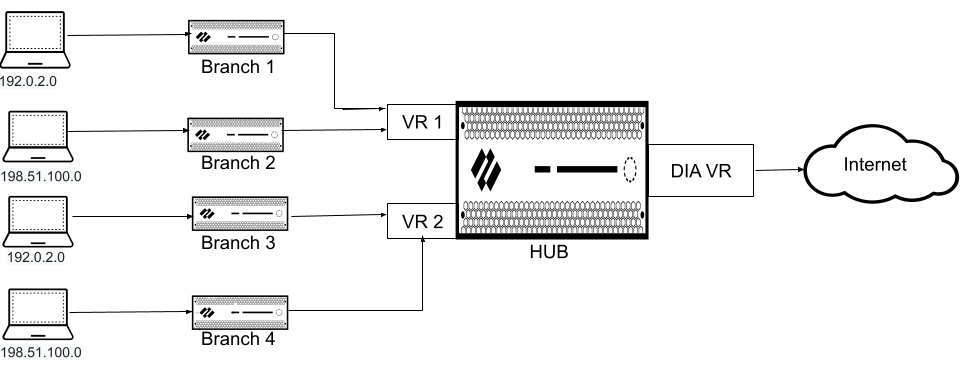
Multiple Virtual Routers Configuration on SD-WAN Hub: Enable Multi-VR Support on the SD-WAN hub device. The traffic from different branches is directed to different virtual routers on a single hub to keep the traffic separate.
User Scenario: Government regulations that disallow different entities to function on the same virtual router.
Single Virtual Router Configuration on SD-WAN Hub: Customers won’t be able to separate routing of different entities with a single virtual router.
Multiple Virtual Routers Configuration on SD-WAN Hub: Enable Multi-VR Support on the SD-WAN hub device to keep the traffic of different entities separate. Multiple virtual routers on the SD-WAN hub maps the branches to different virtual routers on the hub that provides logical separation between the branches.
SD-WAN plugin now supports multiple virtual routers on the SD-WAN hubs that enable you to have overlapping IP subnet addresses on branch devices connecting to the same SD-WAN hub. Multiple virtual routers can run multiple instances of routing protocols with a neighboring router with overlapping address spaces configured on different virtual router instances. Multiple virtual router deployments provide the flexibility to maintain multiple virtual routers, which are segregated for each virtual router instance.
However, the number of virtual routers supported on the PAN-OS SD-WAN hub varies by platform.
Benefits:
- A hub with multiple virtual router configuration logically separates the routing for each branch office that it is connected with.
- Branches sharing the same SD-WAN hub can reuse the same IP subnet address.
The following figure illustrates an SD-WAN hub with two virtual routers. By enabling multiple virtual routers support on the SD-WAN hub, the four branches connecting to the same SD-WAN hub (but different virtual routers) can have overlapping IP subnets or belong to different entities and function independently because their traffic goes to different virtual routers.
NGFW Clustering of PA-7500 Series Firewalls
Data centers require extremely high levels of network bandwidth and reliability. A single point of failure can disrupt network connectivity and compromise security. Next-Generation Firewall (NGFW) clustering solves this problem by providing a single, unified high availability solution for two PA-7500 Series firewalls. This solution offers redundancy and increased resilience against link, card, or chassis failures, ensuring business continuity.
The NGFW cluster solution blends legacy active/active and active/passive solutions into a single architecture, significantly simplifying deployment and reducing failover time. The two cluster nodes connect over a single HSCI connection. The firewalls maintain a dual active data plane with a single active control plane. Neighboring devices see the NGFW cluster as a single Layer 2 (virtual wire) or Layer 3 device. The NGFW cluster supports a multichassis link aggregation group (MC-LAG). The firewalls in the cluster increase port availability and require fewer IP addresses, providing a more efficient and resilient network.
NPTv6 with Dynamically Assigned IPv6 Address Prefix
Internet Service Providers (ISPs) often assign dynamic IPv6 addresses to Next-Generation Firewalls (NGFWs) using DHCPv6, PPPoEv6, or cellular connections. However, some ISPs, especially cellular providers, may not provide a delegated IPv6 prefix that the firewall can use to assign addresses to devices on the local area network (LAN). Additionally, even when a delegated prefix is available, some network administrators may prefer not to use it externally to avoid exposing internal network addressing.
This new capability allows you to use NPTv6 with dynamically assigned IPv6 address prefixes with dynamically assigned IPv6 address prefixes, solving both of these challenges. This enhancement builds upon the existing NPTv6 functionality that previously only supported statically configured IPv6 prefixes.
This feature is for network administrators who need to provide IPv6 connectivity to their LAN hosts when the ISP does not delegate a routable IPv6 prefix or when the organization requires internal address privacy. It is especially useful for deployments in environments that rely on cellular ISPs
The firewall translates the dynamic IPv6 prefix from the ISP into an internal, non-routable prefix for the LAN. This enables seamless IPv6 connectivity for internal hosts while keeping your network's addressing private. The firewall automatically manages the dynamic prefix changes from the ISP, ensuring uninterrupted service without manual intervention.
The key benefits of the feature are that it:
- Ensures LAN Connectivity : Provides IPv6 connectivity to internal hosts even when the ISP does not delegate a prefix.
- Enhances Privacy : Protects your internal network addressing from external exposure.
- Simplifies Management : Automates the translation process for dynamic IPv6 prefixes, reducing the need for manual configuration updates.
- Supports Flexible Deployments : Enables secure and reliable IPv6 connectivity in diverse environments, including those using cellular backhaul.
Supported for:
PAN-OS 11.1.5 or a later release.
New Platform Support for Web Proxy
The web proxy feature is now supported on the PA-5400 series, which includes the PA-5410, PA-5420, PA-5430, PA-5440, and PA-5445 platforms.
New Predefined BGP Redistribution Profile
Configuring full mesh connectivity and ensuring dynamic branch-to-branch communication in complex SD-WAN environments often requires manual intervention and intricate Border Gateway Protocol (BGP) setup. This process is time-consuming and can lead to configuration errors, potentially limiting the seamless flow of traffic across autonomous systems (AS).
Auto VPN simplifies network reachability management across your managed NGFW connections using SD-WAN. When you add NGFW to a VPN cluster, Strata Cloud Manager automatically assigns the predefined All-Connected-Routes BGP Redistribution profile by default. This BGP Redistribution profile determines network reachability based on IP prefixes available within autonomous systems (AS).
By setting the All-Connected-Routes profile as the default, you ensure SD-WAN broadcasts all connected routes to every VPN peer in the cluster. This profile handles both the necessary tunnel and route peering configuration, completing all route advertisements required for secure, dynamic branch-to-branch communication without administrative overhead. This automation immediately enables full network visibility, saving significant configuration time and ensuring a consistent routing policy across your entire VPN cluster.
OOXML Support for WildFire Inline ML
To address the increasing prevalence of evasive Office Open XML (OOXML) files to deliver zero-day threats, Palo Alto Networks WildFire® introduces a new OOXML analysis classification engine for WildFire Inline ML. This powerful engine enables you to configure your NGFW to detect and prevent malicious Office Open XML files from entering your network in real-time by applying machine learning (ML) analytics. WildFire Inline ML dynamically detects malicious files of specific types by evaluating various file details to formulate a high probability classification of a file. This protection extends to currently unknown as well as future variants of threats which match characteristics that Palo Alto Networks identifies as malicious.
Overlapping IP Address Support
Managing large, segmented network environments can be difficult when you can't reuse the same IP address across multiple firewall interfaces. Beginning with PAN-OS® release 11.1.4, duplicate (overlapping) IP address support allows you to use the same IPv4 or IPv6 address on multiple firewall interfaces when the interfaces belong to different logical routers. The interfaces can belong to different security zones on a single virtual system, or the same zone on different virtual systems, or different zones and different virtual systems.
PA-1400 Series firewalls, VM-Series firewalls, and Panorama template stacks support overlapping addresses.
Overlapping IP address support requires the Advanced Routing Engine. When you enable Advanced Routing, the option to enable Duplicate IP Address Support becomes available for you to select. The overlapping addresses can be statically configured or dynamically assigned to interfaces. All Layer 3 interfaces types (Ethernet, VLAN, tunnel, loopback, Aggregate Ethernet [AE], and AE subinterfaces) support overlapping IP addresses.
PA-410R Next-Generation Firewall
Securing industrial and remote environments requires a durable firewall capable of withstanding harsh conditions. The PA-410R is a rugged firewall appliance purpose-built to address this need. As an upgrade to the PA-220R, this IP65-rated hardware is suited for installation in harsh environments with extreme temperatures and high humidity levels.
The PA-410R supports PAN-OS® 11.1.3 and later versions. It features two SFP ports and four RJ-45 ports. The RJ-45 ports include two fail-open ports that you can configure to provide a pass-through connection in the event of a power failure.
The PA-410R uses DC power and supports optional power redundancy. The device's fanless design and rugged build allow for secure installation on a wall or DIN rail, making it ideal for a variety of remote sites. This hardware also meets ICS/SCADA system architecture compliance standards.
PA-410R-5G Next-Generation Firewall
Securing industrial and remote environments requires a firewall capable of withstanding harsh conditions while providing reliable network connectivity. The PA-410R-5G ruggedized firewall is purpose-built to address this challenge. As a cellular version of the PA-410R, it extends enterprise-grade security to industrial, commercial, and government deployments.
This IP65-rated appliance operates safely in harsh environments with extreme temperatures and high humidity levels. It supports PAN-OS® 11.1.4 and later versions, featuring four 5G multi-band antennas and two nano SIM card slots to enable connectivity from two different mobile network providers. For wired connections, the PA-410R-5G has two SFP ports and four RJ-45 ports, including two fail-open ports that you can configure to provide a pass-through connection in the event of a power failure.
The PA-410R-5G uses DC power and supports power redundancy. Its fanless design and compact form factor allow you to install it on a wall or DIN rail. This hardware also meets ICS/SCADA system architecture compliance standards.
PA-450R Next-Generation Firewall
Securing industrial and remote environments requires a durable firewall capable of withstanding harsh conditions. The PA-450R is a rugged firewall appliance purpose-built to address this challenge. As an upgrade to the PA-220R, the PA-450R is designed for industrial, commercial, and government deployments. This hardware is also suited for installation in harsh environments with extreme temperatures and high humidity levels.
The PA-450R supports PAN-OS® 11.1 and later versions. It features two SFP/RJ-45 combo ports and six RJ-45 ports. Two of these ports are fail-open, providing a pass-through connection in the event of a power failure.
This appliance uses DC power and supports optional power redundancy. Its fanless design and rugged build allow for secure installation on a flat surface, wall, or equipment rack. This hardware meets ICS/SCADA system architecture compliance standards.
PA-450R-5G Next-Generation Firewall
Securing industrial and remote environments requires a firewall capable of withstanding harsh conditions while providing reliable network connectivity. The PA-450R-5G ruggedized firewall is purpose-built to address this challenge. As a cellular version of the PA-450R, it extends enterprise-grade security to industrial, commercial, and government deployments.
This hardware is suited for installation in harsh environments with extreme temperatures and high humidity levels. The PA-450R-5G supports PAN-OS® 11.1 and later versions, featuring four 5G multi-band antennas and two nano SIM card slots to enable connectivity from two different mobile network providers. The device's front panel also includes two SFP/RJ-45 combo ports and six RJ-45 ports for versatile network connections.
The PA-450R-5G uses DC power and supports power redundancy. Its fanless design allows for installation on a flat surface, wall, or equipment rack, making it ideal for a variety of remote sites. This hardware is also compliant with ICS/SCADA system architecture standards.
PA-455 Next-Generation Firewall
The PA-455 next-generation firewall addresses the need for enhanced security and connectivity in small to medium branch offices by delivering robust performance and increased interface flexibility. The PA-455 includes a dedicated management port, six copper RJ-45 ports, and two SFP/RJ-45 combo ports to provide greater deployment flexibility in environments that require fiber connectivity. It delivers improved threat prevention performance of up to 2.3 Gbps
The firewall’s integrated Power over Ethernet (PoE) capability on four designated ports supports up to 91W of power for connecting devices like IP phones, wireless access points, and IP security cameras. The platform includes 16GB of memory and 128GB of eMMC storage to support the demanding requirements of modern network security deployments.
A fanless design ensures quiet operation in office environments while maintaining reliability in various deployment scenarios. As with other Palo Alto Networks firewalls, the PA-455 can be managed using the web interface, CLI, or Panorama for centralized management of multiple devices.
PA-455-5G Next-Generation Firewall
The PA-455-5G firewall is ideal for your industrial, commercial, government, and enterprise deployments that rely on cellular activity. It supports PAN-OS® 11.2.3 and later PAN-OS versions.
You can install 4x4 MIMO antennas and up to two nano SIM cards to enable connectivity using two different mobile network providers. You can also establish network connections using two SFP/RJ-45 combo ports and six RJ-45 ports located on the front panel of the device.
The PA-455-5G uses AC power and supports power redundancy, providing four dedicated PoE (Power over Ethernet) ports to extend up to 151 watts of power to a connected device. Additionally, due to its fanless design, you can install the PA-455-5G firewall on a flat surface, wall, or in an equipment rack.
PA-5420 Firewall Supports Additional Virtual Routers
In prior releases, customers with PA-5420 firewalls faced a limitation when configuring a large number of virtual systems. The previous limit of 50 virtual routers made it challenging to deploy a dedicated virtual router for each virtual system, which is a common practice for maintaining network segmentation and administrative simplicity. This limitation often required administrators to merge virtual systems or implement more complex, less scalable routing configurations.
To solve this challenge, PAN-OS® increases the number of supported virtual routers on a PA-5420 firewall from 50 to 65. This enhancement allows you to assign a unique virtual router to each virtual system, providing greater administrative flexibility and simplifying network design. You can now support up to 65 virtual systems, each with its own virtual router, to maintain clear separation and streamline routing management across your network. This increase is particularly valuable for service providers and large enterprises that manage many tenants or independent network segments on a single firewall.
PA-5445 Next-Generation Firewall
Securing enterprise data centers and regional headquarters demands a next-generation firewall with exceptional performance. The PA-5445 addresses this need as the highest-performance fixed form-factor model in the Palo Alto Networks® firewall lineup. It features hardware resources dedicated to networking, security, signature matching, and management.
The PA-5445 supports PAN-OS® 11.1 and later versions. It achieves the highest App-ID speed (93Gbps), L7 threat inspection rate (70Gbps), and session count (48M) in a fixed form-factor firewall. For connectivity, it includes eight RJ-45 ports, twelve SFP+ ports, four SFP28 ports, and four QSFP28 ports that support breakout mode. It also features dedicated HSCI and HA1 ports for high availability control.
The PA-5445 uses AC or DC power supplies and supports optional power redundancy. This hardware occupies 2RU of rack space and is designed to mount in a 19-inch equipment rack.
PA-7500 Next-Generation Firewall
As networks grow, high-end enterprise and service provider deployments demand a scalable modular chassis that provides high-speed connectivity. The PA-7500 is a modular chassis that upgrades the PA-7000 Series firewall to address these needs.
The PA-7500 supports PAN-OS® 11.1 and later versions and features dedicated interface cards for specialized functions:
- The Management Processing Card (MPC) provides a management interface that includes dual 400Gbps (QSFP-DD) HSCI ports, dual 100Gb/s (zQSFP) ports for logging, and dual SFP28 (25GE/10GE/1GE) ports for external management connectivity.
- The Network Processing Card (NPC) provides network connectivity with eight QSFP-DD interfaces and twelve SFP-DD interfaces. The QSFP-DD ports can reach 400Gbps speeds and support QSFP28 (100Gbps) and QSFP+ (40Gbps) optics. These optics can be used with breakout mode to provide four 25Gbps ports or four 10Gbps ports. The SFP-DD ports support 100Gbps operation and are compatible with SFP28, SFP+, and SFP optics.
- The Data Processing Card (DPC) provides increased processing power and capacity to the firewall.
- The Switch Fabric Card (SFC) provides data plane connectivity to the other interface cards as well as redundant switching fabric.
The PA-7500 uses AC or DC power supplies and supports power redundancy. The chassis occupies 14RU of rack space and is designed for installation in a standard 19-inch equipment rack.
PPPoE Client for IPv6
The PAN-OS® firewall supports an Ethernet Layer 3 interface or subinterface acting as a Point-to-Point Protocol over Ethernet (PPPoE) IPv6 client to reach an ISP that provides IPv6 internet services. In PPPoE mode, the interface or subinterface can obtain an IPv6 address dynamically using DHCPv6 either in stateful or stateless mode. In stateful mode, the PPPoE interface acquires all connection parameters dynamically from the DHCPv6 server. In stateless mode, the IPv6 address of the PPPoE interface is obtained using stateless address autoconfiguration (SLAAC), but the other parameters (DNS and prefix delegation) are obtained through DHCPv6. Stateful and stateless DHCPv6 reduce provisioning effort and errors, and simplify address management.
Only Ethernet Layer 3 interfaces and subinterfaces support an IPv6 PPPoE client (tunnel, AE, VLAN, and loopback interfaces don't support an IPv6 PPPoE client). A Layer 3 interface and its subinterface can't act as a PPPoEv6 client at the same time.
Note: A limitation is that the interface configured with PPPoEv6 can't acquire a DNS server address or DNS prefix from Router Advertisement (RA-DNS). You'll have to rely on DHCPv6 to obtain the DNS information or configure those parameters manually.
Note: Once configured for PPPoE, an interface can't be assigned a static IP address.
Persistent NAT for DIPP
Many real-time communication applications, like VoIP and video conferencing, rely on Session Traversal Utilities for NAT (STUN) to establish and maintain stable connections. However, when these applications are deployed with Dynamic IP and Port (DIPP) source NAT, they can experience connectivity issues. This happens because DIPP uses a symmetric NAT approach, which can change the translated IP address and port for each new session. This frequent change can cause compatibility problems with STUN, often resulting in dropped calls or one-way audio for users.
Persistent NAT for DIPP solves this problem by ensuring a consistent and predictable translation for a given internal source IP and port. When you enable this feature, the mapping between a private source IP address and port and its public translated address and port persists for subsequent sessions. This stable binding is crucial for maintaining seamless, uninterrupted communication, providing the reliable connectivity that real-time applications demand.
Public Cloud SD-WAN High Availability
Maintaining network resiliency and session survivability for SD-WAN in public cloud deployments presents unique challenges, often leading to service disruptions during a device failure. To address this, Palo Alto Networks now supports high availability (HA) for SD-WAN on VM-Series next-generation firewalls in public cloud environments.
This feature enables an active/passive HA configuration that uses a floating IP address to ensure seamless failover between firewalls. By maintaining session state during a failover event, it minimizes downtime and preserves application performance for your users. This allows you to build resilient and reliable SD-WAN architectures in the cloud, mirroring the high availability standards traditionally found in on-premises deployments.
This HA capability is available for VM-Series firewalls in AWS and Microsoft Azure.

Quantum-Resistant IKEv2 VPNs
Cryptographically relevant quantum computers (CRQCs) threaten traditional cryptographic systems by dramatically reducing the time needed to break encryption algorithms. VPN communications secured by IKEv2 are vulnerable to the threats posed by CRQCs because IKEv2 uses Diffie-Hellman (DH) and Elliptic Curve Diffie-Hellman (ECDH) for key exchange. Delays in implementing post-quantum cryptography (PQC) increase the risk of Harvest Now, Decrypt Later attacks. In these attacks, adversaries capture and store encrypted data today for future decryption when CRQCs become available. If you handle sensitive data requiring long-term storage, you are especially susceptible.
To future-proof VPN communications against this emerging threat, PAN-OS® 11.1 implements quantum-resistant IKEv2 VPNs based on RFC 8784. RFC 8784 specifies the mixing of post-quantum pre-shared keys (PQ PPKs) with DH keys to create quantum-resistant connections. The implementation involves a PQ PPK and a public key ID associated with the secret. You must share the secret with both VPN peers out-of-band. After the peers perform a standard DH key exchange, one peer sends the key ID to the other in-band. Both peers use that key ID to identify the PQ PPK to mix with the DH key material. This method creates a new, quantum-resistant key that provides multiple layers of protection. CRQCs can't compromise the resulting key because it isn't based on prime number factorization that Shor's algorithm exploits. Harvesting attacks fail because the PPK itself never leaves your IKEv2 peers; adversaries can't capture the key material required for future decryption, even if they compromise the DH key.
Palo Alto Networks implementation of RFC 8784 ensures a seamless transition to PQC. The standard doesn't require cryptography upgrades, so you can introduce PPKs into existing IPsec VPN deployments without network disruption. It also supports falling back to classical cryptography if a peer doesn't support RFC 8784. Further, the standard is interoperable with multiple vendors and works with other standards such as RFC 9370.
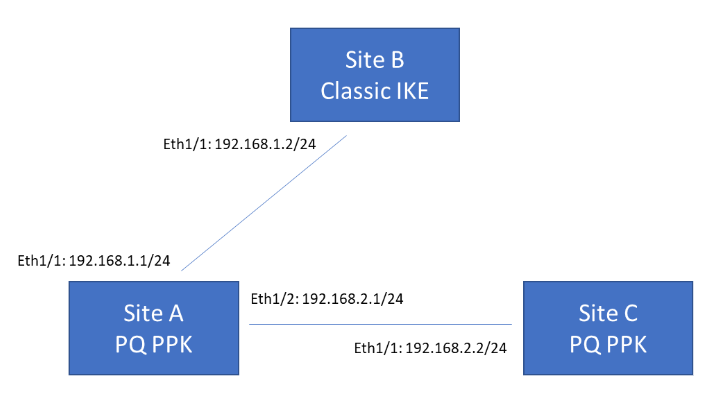
The following example topology shows three VPN termination sites. Sites A and C support post-quantum VPNs based on RFC 8784, while Site B supports classical VPNs only. Site A must be able to communicate with both Site B and Site C. When communicating with Site B, Site A can either fall back to classical negotiation or abort the connection, depending on your configured preference. When communicating with Site C, Site A uses a PQ PPK because Site C supports this.
SD-WAN Bandwidth Monitoring
Bandwidth is the new primary measure of a tunnel performance that’s being introduced in addition to the existing jitter, latency, and packet loss
Currently it's difficult for the network administrators to quickly identify the cause for an application’s poor performance in an SD-WAN device. It's because there isn't enough information available to identify the issue and the available limited information (such as VPN statistics, Panorama's device health statistics, and link health statistics) are located between Panorama® and firewalls. It becomes a time consuming activity for the administrators to correlate this information and locate the performance issues on an SD-WAN device.
For a VPN cluster, you will now be able to view the bandwidth of a tunnel and a physical interface for a selected site by default. Bandwidth is a primary measure of a link performance in addition to existing jitter, latency, and packet loss performance measures. There is no configuration required to view the bandwidth of a tunnel.
SD-WAN IPv6 Support
SD-WAN supports IPv6 interfaces, beginning with SD-WAN plugin 3.2. You have the flexibility to onboard branch locations in a hybrid IPv4/IPv6 environment or a full IPv6 environment. SD-WAN IPv6 support uses intelligent application path steering technology to provide application reliability and SLAs for IPv6 environments. SD-WAN IPv6 support includes the following changes:
- You can configure a physical Ethernet interface to have a static IPv6 address.
- You can configure a static IPv6 route.
- The Advanced Routing Engine allows you to configure IPv6 BGP routing.
- SD-WAN provides health monitoring for the next hop from SD-WAN-enabled IPv6 interfaces and health monitoring for a VPN tunnel endpoint.
- Path monitoring now allows you to use addresses from an IP4 VPN address pool or an IPv6 VPN address pool.
- When an SD-WAN interface is enabled for IPv6, Auto VPN configuration creates a DIA interface named sdwan.9016, which has IPv6 physical interfaces as member interfaces. The default IPv6 route points to the sdwan.9016 interface. The user interface allows you to specify whether the virtual interface is a DIA IPv4 interface, DIA IPv6 interface, or tunnel interface (which can have a mix of IPv4 tunnel interfaces and IPv6 tunnel interfaces). An Ethernet interface can belong to both the sdwan.901 virtual interface and the sdwan.9016 virtual interface.
SD-WAN supports dual stack in the event that one ISP provides you with only an IPv4 address and another ISP provides you with only an IPv6 address. You will create separate virtual SD-WAN interfaces. An IPv4 DIA virtual interface will have Ethernet with an IPv4 address, while an IPv6 DIA virtual interface will have Ethernet with an IPv6 address.
If a DIA link between a branch and a hub has only IPv6 addresses on the interfaces at each end, the tunnel is created using IPv6 addresses. If the branch and hub have IPv4 addresses on the interfaces, the tunnel is created using IPv4 addresses. If the branch and hub use both IPv4 and IPv6 addresses on the interfaces, the tunnel is created using IPv4 addresses only (IPv4 addresses are preferred). If there is a mismatch of address family identifiers (AFI) between the hub and branch, no tunnel configuration is generated for that pair of interfaces.
Similarly, a VPN address pool can have both IPv4 and IPv6 addresses configured, in which case IPv4 addresses are preferred for the tunnel interface and tunnel monitoring. If the IPv4 addresses in the VPN address pool are exhausted, then IPv6 addresses are used for the tunnel interface and tunnel monitoring.
You can also have independent IPv4 VPN address pools that contain IPv4 addresses and IPv6 VPN address pools that contain IPv6 addresses.
Simplified GTP-U Correlation for CUPS Architecture in 5G
Intelligent Security, also known as User Equipment Correlation with IP Addresses, allows you to map user equipment information with IP addresses using the subscriber ID and equipment ID.
If you have a highly-distributed 4G network that you are adapting to include 5G, using Intelligent Security helps ensure policy enforcement for subscriber and equipment-level policy rules.
Previously, for PFCP inspection of GTP-U traffic, the GTP-U tunnel sessions were created on the same dataplane as the PFCP session and all GTP-U traffic had to be forwarded for inspection. Now, there is no need to create GTP-U tunnels and the UEIP database is populated on each dataplane, allowing any dataplane to process user traffic.
The User Plane with GTP-U encapsulation option allows you to correlate user traffic that uses the GTP-U tunnel for subscriber-based and equipment-based security policy enforcement on the N3 interface. This option helps to ensure your policy is applied if your user traffic is encapsulated in GTP-U tunnels on the N4 interface by selecting the option to indicate the user traffic is encapsulated in the Mobile Network Protection Profile. If the traffic is not encapsulated on the N6 interface, leave the option deselected.
When the GTP-U dataplane receives user traffic, it queries the local database with the source and destination IP to obtain the mappings and apply the appropriate security policy. For the duration of the traffic during the user's session, the GTP-U dataplane refreshes the UEIP info and updates the other dataplanes every minute. When the dataplane detects the ending of the session, it removes the UEIP mapping from the local database, updates the other dataplanes, and generates a "UEIP mapping end" entry in the GTP logs.
You can now also distribute UEIP mappings across all dataplanes for multi-dataplane platforms.
Support for Proxy ID in IPSec Transport Mode
In the earlier PAN-OS® versions, the IPSec transport mode did not support proxy ID settings for IPSec negotiation. Hence, you could not configure a proxy ID in transport mode when using the web interface. If you try to configure a proxy ID through the CLI, it will be replaced with 0.0.0.0/0 automatically during the configuration commit. With the lack of proxy ID support, connecting to other vendor’s devices through policy-based IPSec transport mode was leading to communication failure.
To resolve this, PAN-OS now supports proxy IDs in transport mode to enable a seamless connection. You can configure proxy ID in IPSec transport mode only using the CLI command.
TACACS+ Accounting
If you use a Terminal Access Controller Access-Control System Plus ( TACACS+) server for user authorization and authentication, you can now log accounting information to fully make use of the authentication, authorization, and accounting (AAA) framework that is the basis for TACACS+.
The TACACS+ Accounting feature allows you to use a TACACS+ server profile to record user behavior, such as when a user started using a specific service, the duration of use for the service, and when they stopped using the service. The TACACS+ Accounting feature helps to create logs and records of the initiation and termination of services, as well as any services in progress during the user’s session, that you can then use later if needed for auditing purposes.
When you configure and enable an Accounting server profile, the TACACS+ server provides information to the firewall about the initiation, duration, and termination of services by users. The firewall also generates a log when the TACACS+ server successfully provides the accounting records to the server that you configure in the profile. If the firewall is unable to successfully send the accounting records to any of the servers in the profile, the firewall generates a critical severity alert to the system logs.
By using your existing TACACS+ server, you can now configure it to provide even more information about the use of services by users on your network, giving you even more robust visibility into user activity on your network.
TLSv1.3 Support in SSL/TLS Service Profiles for Administrative Access
You can now configure TLSv1.3 for administrative access to Next-Generation Firewalls (NGFWs) and other management interfaces and manage cipher suites directly in an SSL/TLS service profile. In the SSL/TLS service profile, you can select TLSv1.3 as the minimum and maximum supported TLS version. Selecting TLSv1.3 automatically enables a set of modern and secure cipher suites. Additionally, you can customize key exchange algorithms, encryption algorithms, and authentication algorithms without using the command line interface (CLI). TLSv1.3 improves the security and performance of administrative connections. The protocol removes support for vulnerable algorithms, mandates perfect forward secrecy, and reduces connection latency through a faster TLS handshake.
Note: You can only use TLSv1.3-enabled SSL/TLS service profiles for administrative access and GlobalProtect® portals and gateways.
Throughput Enhancements for Web Proxy
The throughput for both the explicit and transparent components of the web proxy has been significantly improved, resulting in better performance at scale.
Traceability and Control of Post-Quantum Cryptography in Decryption
Today, post-quantum cryptography (PQC) algorithms and hybrid PQC algorithms (classical and PQC algorithms combined) are accessible through open-source libraries and integrated into web browsers and other technologies. Traffic encrypted by PQC or hybrid PQC algorithms cannot be decrypted yet, making these algorithms vulnerable to misuse. To address these concerns, Palo Alto Networks firewalls now detect, block, and log the use of PQC and hybrid PQC algorithms in TLSv1.3 sessions.
Your decryption policy rules determine if the firewall detects, blocks, and logs PQC and hybrid PQC algorithms. If SSL/TLS traffic matches an SSL Forward Proxy or SSL Inbound Inspection decryption policy rule, the firewall prevents negotiation with PQC, hybrid PQC, and other unsupported algorithms. Specifically, the firewall removes these algorithms from the ClientHello, forcing the client to negotiate with classical algorithms. This enables continuous decryption and threat identification through deep packet inspection. If the client strictly negotiates PQC or hybrid PQC algorithms, the firewall drops the session. The decryption log entry for dropped sessions shows the error message: "client only supports post-quantum algorithms”.
If SSL/TLS traffic matches a “no-decrypt” decryption policy rule or does not match any decryption policy rules, the firewall allows the negotiation of PQC or hybrid PQC algorithms. In these cases, the firewall generates a decryption log only if the traffic matches a "no-decrypt" decryption policy rule.
Additionally, new threat signatures offer visibility into the use of PQC and hybrid PQC algorithms in your network. These signatures monitor ServerHello responses and alert you when PQC-based SSL/TLS sessions are successfully negotiated. A Threat Prevention license is required to receive alerts.
View Preferred and Base Releases of PAN-OS Software
The Panorama web interface now displays the preferred releases and the corresponding base releases of PAN-OS software. Before you upgrade or downgrade Panorama or PAN-OS, you can view the list of preferred and base releases and choose your preferred target PAN-OS release. Preferred releases offer the latest and the most advanced features and ensure stability and performance. When there are no preferred releases available, the corresponding base version is not displayed. If necessary, you can choose to view either preferred releases or base releases.
Virtual Systems Support on VM-Series Firewall
The VM-Series firewall now supports virtual systems only with flexible license and with one virtual system by default. Virtual systems are separate, logical firewall instances within a single physical Palo Alto Networks firewall. Rather than using multiple firewalls, managed service providers and enterprises can use a single pair of firewalls (for high availability) and enable virtual systems on them. The virtual systems are easier to manage coexisting within a firewall. The additional benefits of virtual systems include improved scalability, segmented administration, and reduced capital and operational expenses. For more information, see Benefits of Virtual Systems and Virtual System Components and Segmentation.
The virtual system support on the VM-Series firewall is available on PAN-OS version 11.1.3 and later. You must have a virtual system license to support multiple virtual systems on the VM-Series firewall. Purchase additional licenses based on your requirement up to a maximum number supported on a particular Tier.
Use a flexible VM-Series firewall license and Tier 3 or Tier 4 instances supporting a minimum of 16 vCPUs or more. The VM-Series firewall in Tier 3 instance supports a maximum of 25 virtual systems. The VM-Series firewall in Tier 4 instance, supports a maximum of 100 virtual systems.
Note: The virtual system support on VM-Series firewall is introduced in PAN-OS 11.2.0, and available in PAN-OS version 11.1.3.