
New Features - PAN-OS - 11.2
Additional Private Link Types for SD-WAN
The PAN-OS® SD-WAN plugin previously supported a limited number of private link types, which complicated configurations for organizations using more than three distinct private link providers. This limitation required administrators to implement configuration workarounds, preventing the SD-WAN plugin from correctly establishing one-to-one device peering based on the link type.
To address this, four additional link types are now available: Private 1, Private 2, Private 3, and Private 4. These function identically to the existing MPLS link type and inherit its aggressive path monitoring characteristics. By allowing each distinct private link to be assigned a unique type, this feature enables the SD-WAN plugin to correctly determine one-to-one device peering for the overlay network, eliminating the need for configuration workarounds.
Additional SD-WAN Hubs in VPN Cluster
The number of hubs to configure in a VPN cluster has been increased from 4 to 16. Only four of the 16 hubs can have the same hub priority within a VPN cluster due to ECMP.
Advanced DNS Security
The Advanced DNS Security service is a new subscription offering by Palo Alto Networks that operates new domain detectors in the Advanced DNS Security cloud that inspect changes in DNS responses to detect various types of DNS hijacking in real-time. With access to Advanced DNS Security, you can detect and block DNS responses from hijacked domains and misconfigured domains. Hijacked and misconfigured domains can be introduced into your network by either directly manipulating DNS responses or by exploiting the DNS infrastructure configuration settings in order to redirect users to a malicious domain from which they initiate additional attacks. The primary difference between these two techniques is where the exploit occurs. In the case of DNS hijacking, the attackers gain the ability to resolve DNS queries to attacker-operated domains by compromising some aspect of an organization's DNS infrastructure, be it through unauthorized administrative access to a DNS provider or the DNS server itself, or an MiTM attack during the DNS resolution process. Misconfigured domains present a similar problem - the attacker seeks to incorporate their own malicious domain into an organization’s DNS by taking advantage of domain configuration issues, such as outdated DNS records, which can enable attackers to take ownership of the customer’s subdomain.
Advanced DNS Security can detect and categorize hijacked and misconfigured domains in real-time by operating cloud based detection engines, which provide DNS health support by analyzing DNS responses using ML-based analytics to detect malicious activity. Because these detectors are located in the cloud, you can access a wide array of detection mechanisms that are updated and deployed automatically without requiring the user to download update packages when changes to detectors are made. Upon initial release, Advanced DNS Security supports two analysis engines: DNS Misconfiguration Domains and Hijacking Domains. Additionally, DNS responses for all DNS queries are sent to the Advanced DNS Security cloud for enhanced response analysis to more accurately categorize and return a result in a real-time exchange. Analysis models are delivered through content updates, however, enhancements to existing models are performed as a cloud-side update, requiring no updates by the user. Advanced DNS Security is enabled and configured through the Anti-Spyware (or DNS Security) profile and require active Advanced DNS Security and Advanced Threat Prevention (or Threat Prevention) licenses.
Authenticate LSVPN Satellite with Serial Number and IP Address Method
A new authentication method called Serial number and IP address Authentication
Beginning with PAN-OS 10.1 and later releases, we support Username/password and Satellite Cookie Authentication method for a satellite to authenticate to the portal. This method requires user intervention to get satellites authenticated by a portal that prevents automating the deployment of remote satellites and adds difficulty and complexity for the administrators to perform software upgrade and deploy new firewalls.
To remove the user intervention while onboarding a remote satellite and to enable automating the deployment of remote satellites, we introduce a new authentication method called Serial number and IP address Authentication . You can now onboard a remote satellite using the combination of serial number and IP address in addition to the username/password and satellite cookie authentication method. This authentication method reduces the complexity by enabling you to deploy new firewalls without manual intervention.
However, Username/password and Satellite Cookie Authentication remains as a default authentication method.
Before enabling the Serial number and IP address Authentication method, configure the satellite serial number at the portal as one of the authentication verification conditions.
- Configure the satellite IP address as an IP allow list at the portal using the set global-protect global-protect-portal portal <portal_name> satellite-serialnumberip-auth satellite-ip-allowlist entry <value> command to add a satellite device IP address on the GlobalProtect portal.
- Enable the Serial number and IP address Authentication method using the set global-protect satellite-serialnumberip-auth enable CLI command. After you enable this method, the satellite continuously attempts to authenticate with the portal for the configured retry interval (in seconds) after power-on until the portal explicitly instructs the satellite to stop.
Upon successfully configuring a satellite device allowed IP address list per portal, and configuring the satellite serial number on the GlobalProtect portal, the satellite can initiate the connection to the portal.
Dedicated Tunnels for Panorama Connectivity
When you have Panorama deployed without a public IP address, your SD-WAN devices rely solely on the SD-WAN overlay network for connectivity to Panorama. This creates a single point of failure that can result in significant outages when SD-WAN overlay issues occur. The Dedicated Tunnel to Panorama feature addresses this vulnerability by establishing persistent, dedicated IPSec tunnels from your branch devices to Panorama through designated termination devices using direct internet access (DIA) interfaces.
This feature is valuable in environments where Panorama can’t be exposed over the internet using a public IP address. With dedicated tunnels in place, even if your primary SD-WAN overlay network becomes unavailable, your devices can still reach Panorama to receive configuration updates and troubleshooting commands. This eliminates the need for manual recovery, significantly reducing downtime and operational costs.
You can configure primary and secondary termination devices with preferred and secondary DIA interfaces, ensuring redundant connectivity paths to Panorama. The solution uses a separate VPN address pool for tunnel IP address assignments that must not overlap with existing SD-WAN overlay configurations.
DoS Protection Policy with Source and Destination IP Classification
Destination IP address-only DoS Protection policy rules pose a risk: they either unintentionally block safe traffic or leave your internet-facing firewalls exposed. Enhanced DoS protection and packet buffer protection (PBP) address this security and operational challenge.
You can now configure edge zones—those that connect directly to the internet—using both the source and destination IP addresses. This capability enables you to block DoS attacks more efficiently without accidentally blocking safe traffic from reaching your network. You are now able to use the software and hardware block tables to protect against these attacks more effectively.
We introduced the following improvements to help protect your Palo Alto Networks firewalls from DoS attacks:
- Configure a DoS policy rule with a destination IP address-only classification for internet-facing zones. This strengthens your firewall’s protection from internet-originated DoS attacks by enabling it to block source IP addresses using software and hardware ACL blocking settings.
- Set both buffer-based and latency-based activation settings simultaneously for improved PBP. PBP monitors session latency and buffer utilization concurrently and activates mitigation when either threshold is exceeded, protecting your firewall resources.
- Increase or decrease the software block duration setting for software block table entries. This improves efficiency for software-based firewalls, while the software block table acts as additional protection alongside the hardware block table for hardware products.
- Monitor software tags (on-chip descriptors), buffer utilization (in percentage), and firewall resources from your SNMP server using new SNMP support for buffer and on-chip packet descriptor utilization.
Encrypted DNS for DNS Proxy and the Management Interface
When you use DNS on your operating systems and web browsers, you can encrypt the DNS traffic to help maintain privacy and protect traffic from meddler (MitM) attacks. If you configure your PAN-OS firewall to act as a DNS proxy, you can enable encrypted DNS and configure the DNS proxy to accept one or more types of DNS communication from the client: DNS-over-HTTP (DoH), DNS-over-TLS (DoT), or cleartext.
To enforce encryption, you specify the type of encryption that the DNS proxy should use to communicate with DNS servers. If a DNS server rejects encrypted DNS or the DNS proxy does not receive a response from the primary or secondary server within the timeout period, you can configure the DNS proxy to fall back to unencrypted DNS communications with the server.
Additionally, you can enable encrypted DNS on the management interface of the firewall so that DNS requests use DoH, DoT, or fall back to unencrypted DNS.
Explicit Proxy Support for Advanced Services
Many organizations rely on explicit proxy servers to filter and control outbound internet traffic. Previously, this setup created a security gap: users could not fully enable core components of Palo Alto Networks Advanced cloud service subscriptions—including Advanced WildFire®: Inline Cloud Analysis, Advanced Threat Prevention: Inline Cloud Analysis, Inline Deep Learning Analysis for Advanced URL Filtering, App-ID™ Cloud Engine, and Enterprise DLP —because these features required direct internet connectivity. This limitation meant users with explicit proxy servers were unable to maximize their security posture across their entire environment.Explicit Proxy Support for Advanced Cloud Service Products resolves this challenge. This new feature allows the firewall to successfully establish connectivity to Palo Alto Networks Advanced cloud services through an explicit proxy server. You can now ensure consistent security enforcement and threat analysis across all your web traffic, regardless of how you route outbound connectivity, thereby maintaining full feature functionality and strengthening your overall network security. To enable explicit proxy support for advanced services, refer to the configuration documentation for the specific advanced subscription service.
GTP Support for Intelligent Security
Intelligent Security, also known as User Equipment to IP Address Mapping or UEIP, helps to correlate mobile user equipment (UE) with IP addresses for security policy enforcement. By mapping the subscriber ID and equipment ID to the IP address associated with traffic from the user equipment (UE), Intelligent Security allows you to create security policy rules for mobile network traffic and helps to ensure consistent application of the security policy rules throughout all of the devices on your network. Configuring Intelligent Security for UEIP Correlation helps you to apply subscriber and equipment identity-based security policy in an enterprise 5G network and to provide advanced threat prevention service for your enterprise 5G customers.
To enable even more deployment options when using Intelligent Security for your mobile infrastructure security policy, Intelligent Security now supports the GPRS tunneling protocol ( GTP) traffic in addition to Packet Forwarding Control Protocol ( PFCP) and Remote Authentication Dial-In Service ( RADIUS) traffic. When you select GTP as the source for UEIP Correlation with Intelligent Security, you can also optionally apply a number of additional security measures, such as protocol validity checks, as well as gain important context through additional visibility for important information contained in GTP session logs.
By providing a simple method to secure your mobile network traffic, whether it is for perimeter security, RAN security, core security, or roaming security, Intelligent Security helps you to establish a zero trust security policy for the traffic on your 5G and 4G/LTE mobile networks.
HTTP/2 Network Support
The NGFW management plane now supports the HTTP/2 network protocol, in addition to the currently supported HTTP/1.1 network protocol. HTTP/2 enables more efficient web communication by utilizing features like multiplexing, header compression, server push functionality, and prioritization support, leading to improved page load times and overall performance. When you manually enable HTTP/2 through the CLI, HTTP/1.1 is automatically disabled and includes no fallback capability. The lack of fallback capability is to maintain compliance with certain security safeguards (for example, to protect against request smuggling, response queue poisoning, other HTTP/1.1 downgrade-related risks, and mandated encryption through TLS), as well as various Federal standards. As such, you may need to specify which protocol to use in environments with compatibility issues or if there are security concerns requiring specific mitigation strategies.
Introduced for firewalls in PAN-OS 11.2.8.
Additional support added for firewalls in PAN-OS 12.1.2.
Hybrid SASE Branch Failover
Hybrid SASE Failover routes internal private resource traffic between Prisma Access and SD-WAN branch devices based on real-time path quality metrics. This feature ensures continuous connectivity for private applications during path degradation.
Branches exchange Prisma hub connectivity status with each other using SD-WAN probes. This provides a real-time view of SASE path health across the SD-WAN fabric to inform routing decisions.
- Supports various traffic distribution profiles, including top-down, best available path, and weighted distribution, for flexible traffic steering.
- Achieves this by nesting the Prisma Access Virtual Interface (VIF) within branch VIFs.
- Automatically fails over traffic to the best available path directly to the branch if paths to Prisma Access become unqualified due to poor quality.
- Restores traffic back to Prisma Access paths when they recover, ensuring resilience and efficient resource utilization.
- Crucial for robust SD-WAN solutions for private applications, particularly in full-mesh topologies, where it also supports failover for internet traffic using DIA anypath with a central Activation Console, ensuring seamless connectivity and an improved user experience.
IPv6 Support on Cellular Interface for PA-415-5G Firewall
Many organizations face the problem of connecting branch offices or remote sites in locations that don't have access to traditional internet providers. The challenge is even greater when a site's only option is a cellular network that uses only IPv6.
The PA-415-5G firewall addresses this by supporting dynamic IPv6 addressing on it cellular interface. This feature allows the firewall to obtain a dynamic IPv6 prefix from a cellular provider, establishing a direct connection to your corporate network even when the ISP only offers IPv6. The firewall can also be configured with a dual-stack configuration to support both IPv4 and IPv6 traffic over the same cellular interface.
This new capability ensures that remote locations can maintain a secure and reliable connection to the rest of your organization. It expands the options available for connecting your business, enabling you to deploy a firewall in any location with a 5G cellular network.
Inbound Policy Rule Recommendations for Device Security
( September 2025 ) Introduced in PAN-OS 11.1.11.
Device Security enables you to secure your connected device environments with both inbound and outbound policy recommendations. While PAN-OS and Panorama initially supported only outbound policy recommendations, the addition of inbound policy recommendations lets you create a more comprehensive security posture for your IT and IoT devices. Creating policy rule recommendations based on both outbound and inbound profile behaviors helps prevent vulnerability exploitation, lateral movement, and other security risks that outbound policies alone cannot address.
You can now view both inbound and outbound behaviors for device profiles in the UI and create security policies accordingly. For outbound behaviors, the source is the IT/IoT device profile, while the destination can be any . For inbound behaviors, you can now set the source as any, and the destination is the IT/IoT device profile. This symmetrical approach lets you control both what your IT/IoT devices can access, as well as what other enterprise sources can access your IT/IoT devices, implementing a true Zero Trust security model.
The policy recommendation workflow supports both per-device and per-profile levels, giving you flexibility in how you implement security policies. When creating policies, you can specify source and destination attributes including device profiles, IP addresses, and FQDNs. The naming convention for policies intelligently selects the appropriate profile name (whether in source or destination) to ensure clarity in your policy set. For policy rule recommendations based on inbound profile behaviors, the name has "-inbound" appended.
By leveraging both inbound and outbound policy recommendations, you can significantly reduce your attack surface by allowing only trusted behaviors for your IT/IoT devices. This is particularly valuable for securing critical infrastructure and sensitive device deployments where you need to control both inbound and outbound traffic.
Increased Maximum Number of Security Rules for PA-3400 Series Firewalls
( PA-3410 and PA-3420 firewalls only ) The maximum number of security rules supported has increased from 2,500 to 10,000.
Multiple Virtual Routers Support on SD-WAN Hubs
With earlier SD-WAN plugin versions, you can't have SD-WAN configurations on multiple virtual routers. By default, a sdwan-default virtual router is created and it enables Panorama to automatically push the router configurations. Due to this restriction, customers faces difficulty and spends additional effort in some of the SD-WAN deployments:
User Scenario: Overlapping IP addresses from different branches connecting to the same hub.
Single Virtual Router Configuration on SD-WAN Hub: Customers may need to reconfigure the overlapping subnets to unique address spaces.
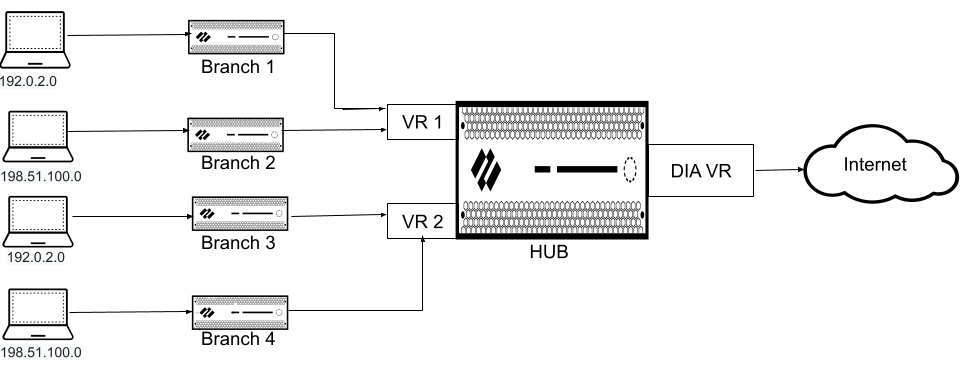
Multiple Virtual Routers Configuration on SD-WAN Hub: Enable Multi-VR Support on the SD-WAN hub device. The traffic from different branches is directed to different virtual routers on a single hub to keep the traffic separate.
User Scenario: Government regulations that disallow different entities to function on the same virtual router.
Single Virtual Router Configuration on SD-WAN Hub: Customers won’t be able to separate routing of different entities with a single virtual router.
Multiple Virtual Routers Configuration on SD-WAN Hub: Enable Multi-VR Support on the SD-WAN hub device to keep the traffic of different entities separate. Multiple virtual routers on the SD-WAN hub maps the branches to different virtual routers on the hub that provides logical separation between the branches.
SD-WAN plugin now supports multiple virtual routers on the SD-WAN hubs that enable you to have overlapping IP subnet addresses on branch devices connecting to the same SD-WAN hub. Multiple virtual routers can run multiple instances of routing protocols with a neighboring router with overlapping address spaces configured on different virtual router instances. Multiple virtual router deployments provide the flexibility to maintain multiple virtual routers, which are segregated for each virtual router instance.
However, the number of virtual routers supported on the PAN-OS SD-WAN hub varies by platform.
Benefits:
- A hub with multiple virtual router configuration logically separates the routing for each branch office that it is connected with.
- Branches sharing the same SD-WAN hub can reuse the same IP subnet address.
The following figure illustrates an SD-WAN hub with two virtual routers. By enabling multiple virtual routers support on the SD-WAN hub, the four branches connecting to the same SD-WAN hub (but different virtual routers) can have overlapping IP subnets or belong to different entities and function independently because their traffic goes to different virtual routers.
Post Quantum Hybrid Key Exchange VPN
Post Quantum Hybrid Key Exchange VPN extends your PAN-OS post-quantum VPN security by adding the ability to create post-quantum cryptographic (PQC) hybrid keys using the NIST round 3 and round 4 cryptographic suites. You can future proof your VPN encryption keys and safeguard against harvest now, decrypt later (HNDL) attacks by combining multiple key exchange mechanisms (KEM) with full crypto agility.
The hybrid key technology is based on RFC 9242 and RFC 9370, and allows you to add up to seven additional key exchange mechanisms (KEM). With each additional KEM added, the level of quantum resistance increases as the attacker needs all used KEMs to become vulnerable before the key can be broken. You can apply the hybrid key technology to both IKEv2's key exchange and IPSec's rekey key exchange to ensure all VPN key exchanges are quantum resistant.
To provide in-depth quantum defense, you can also enable both of its post quantum VPN technologies together. If both the RFC 8784 post quantum pre-shared key (released with PAN-OS 11.1) and this new PQ Hybrid Key feature are enabled, PAN-OS generates the hybrid key and then mixes in the static pre-shared key.
Prisma Access Hub Support for SD-WAN enabled Cellular Interfaces (4G/5G)
SD-WAN plugin 3.3.2 and later 3.3 releases provides Prisma Access hub support, in which 4G/5G capable PAN-OS firewalls connecting to Prisma Access compute nodes (CNs) achieve cloud-based security in an SD-WAN hub-and-spoke topology. In this topology, the SD-WAN hubs are Prisma Access CNs (IPSec Termination Nodes) and the SD-WAN branches are 4G/5G capable PAN-OS firewalls. A maximum of four hubs (any combination of PAN-OS hubs participating in DIA AnyPath and Prisma Access hubs) are supported. SD-WAN automatically creates IKE and IPSec tunnels that connect the branch to the hub. Review the system requirements for SD-WAN and Prisma Access.
Quantum-Resistant IKEv2 VPNs
Cryptographically relevant quantum computers (CRQCs) threaten traditional cryptographic systems by dramatically reducing the time needed to break encryption algorithms. VPN communications secured by IKEv2 are vulnerable to the threats posed by CRQCs because IKEv2 uses Diffie-Hellman (DH) and Elliptic Curve Diffie-Hellman (ECDH) for key exchange. Delays in implementing post-quantum cryptography (PQC) increase the risk of Harvest Now, Decrypt Later attacks. In these attacks, adversaries capture and store encrypted data today for future decryption when CRQCs become available. If you handle sensitive data requiring long-term storage, you are especially susceptible.
To future-proof VPN communications against this emerging threat, PAN-OS® 11.1 implements quantum-resistant IKEv2 VPNs based on RFC 8784. RFC 8784 specifies the mixing of post-quantum pre-shared keys (PQ PPKs) with DH keys to create quantum-resistant connections. The implementation involves a PQ PPK and a public key ID associated with the secret. You must share the secret with both VPN peers out-of-band. After the peers perform a standard DH key exchange, one peer sends the key ID to the other in-band. Both peers use that key ID to identify the PQ PPK to mix with the DH key material. This method creates a new, quantum-resistant key that provides multiple layers of protection. CRQCs can't compromise the resulting key because it isn't based on prime number factorization that Shor's algorithm exploits. Harvesting attacks fail because the PPK itself never leaves your IKEv2 peers; adversaries can't capture the key material required for future decryption, even if they compromise the DH key.
Palo Alto Networks implementation of RFC 8784 ensures a seamless transition to PQC. The standard doesn't require cryptography upgrades, so you can introduce PPKs into existing IPsec VPN deployments without network disruption. It also supports falling back to classical cryptography if a peer doesn't support RFC 8784. Further, the standard is interoperable with multiple vendors and works with other standards such as RFC 9370.
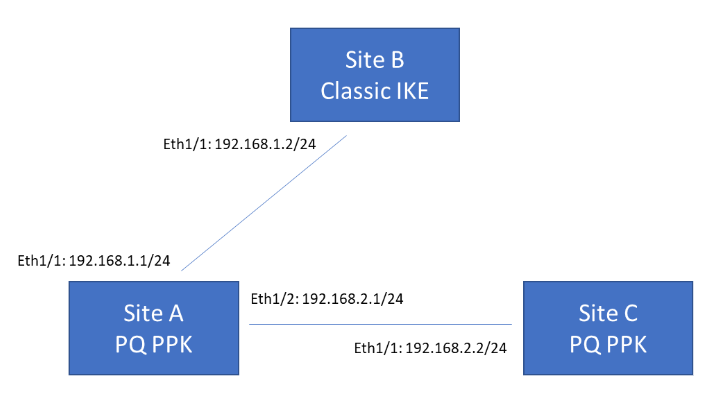
The following example topology shows three VPN termination sites. Sites A and C support post-quantum VPNs based on RFC 8784, while Site B supports classical VPNs only. Site A must be able to communicate with both Site B and Site C. When communicating with Site B, Site A can either fall back to classical negotiation or abort the connection, depending on your configured preference. When communicating with Site C, Site A uses a PQ PPK because Site C supports this.
RBI Bypass Enhancements
Introduced in PAN-OS 11.2.7-h20.
In full isolation deployments, to prevent non-browser traffic from being routed to isolation, Prisma® Access Remote Browser Isolation (RBI) now inspects request origins before applying isolation policies. Previously in full isolation scenarios, isolate actions applied broadly to all web traffic without distinguishing browser sessions from thick-client applications. This also required you to manually identify and bypass individual sub-resource domains.
RBI inspects each web request to determine whether it originates from a browser session and evaluates whether the request is a top-level domain page or a sub-resource. Non-browser application traffic now automatically bypasses isolation. Additionally, bypassing a primary domain automatically bypasses its associated same-domain fonts, scripts, and application programming interfaces (APIs). This request awareness optimizes isolation performance across your network.
SD-WAN Bandwidth Monitoring
Bandwidth is the new primary measure of a tunnel performance that’s being introduced in addition to the existing jitter, latency, and packet loss
Currently it's difficult for the network administrators to quickly identify the cause for an application’s poor performance in an SD-WAN device. It's because there isn't enough information available to identify the issue and the available limited information (such as VPN statistics, Panorama's device health statistics, and link health statistics) are located between Panorama® and firewalls. It becomes a time consuming activity for the administrators to correlate this information and locate the performance issues on an SD-WAN device.
For a VPN cluster, you will now be able to view the bandwidth of a tunnel and a physical interface for a selected site by default. Bandwidth is a primary measure of a link performance in addition to existing jitter, latency, and packet loss performance measures. There is no configuration required to view the bandwidth of a tunnel.
SD-WAN on 5G Cellular Interface
As 5G becomes increasingly prominent, more organizations use or are considering wireless WAN links as the primary or secondary WAN transport to share the load. With wireless WAN 5G connectivity, you can achieve a reliable connection on 5G-capable firewalls.
On the cellular interface, you can enable SD-WAN support on your 5G-capable firewalls. When you enable SD-WAN on the 5G cellular interface, you are adding support for automatic traffic steering based on the collected metrics within qualified paths and links (which includes cellular and wireless WAN connections).
When you enable SD-WAN on a 5G cellular interface, you gain support for:
- IPv4 SD-WAN cellular traffic
- SD-WAN interface profile and upstream NAT
TLSv1.3 Inbound Inspection with HSM-Protected Keys
SSL Inbound Inspection decrypts and inspects traffic entering your network for threats before it reaches your internal servers. Organizations, especially in highly regulated industries, often store private keys for server certificates on hardware security modules (HSMs) for tamper-proof security. However, Next-Generation Firewalls (NGFWs) running PAN-OS® 11.1 and earlier versions could not inspect inbound TLSv1.3 traffic when private keys resided on an HSM. As a workaround, NGFWs automatically downgraded TLSv1.3 connections to TLSv1.2. These downgraded connections lacked the security and performance benefits unique to TLSv1.3.
PAN-OS 11.2 resolves this issue by adding support for inbound inspection of TLSv1.3 sessions when an HSM protects the private keys. After you enable this feature, you can both secure private keys with HSMs and gain full visibility into traffic that the latest TLS version secures. This feature is compatible only with Thales Luna Network HSMs and Entrust nShield HSMs and requires connectivity between your HSMs and virtual or physical NGFWs.