Security Policy Rule Top-Down Order When Wildcard Masks Overlap
Table of Contents

Security Policy Rule Top-Down Order When Wildcard Masks Overlap
Enable Wildcard Top Down Match Mode to evaluate packets
that match Security policy rules having overlapping wildcard masks.
Security policy rules have supported the use
of source and destination addresses using a wildcard address (IP
address and wildcard mask separated by a slash, such as 10.1.2.3/0.127.248.0).
The wildcard address can identify many source or destination addresses
in a single Security policy rule. In earlier releases, if an address matched
rules that had overlapping wildcard masks, the firewall always matched
the rule having the longest prefix in the wildcard mask and no other
rules were examined. This is still the default behavior.
However,
there are use cases where you want to have broad rules that allow
some sources access to generic applications (such as Ping, Traceroute,
and web-browsing), but have narrower rules that allow a subset of
these sources access to different applications (such as SSH, SCP)
in addition to the generic applications. In earlier releases, such
a deployment did not work because only the match to the rule with
the longest prefix in the wildcard mask was processed and other
rules were not considered. The workaround was to copy applications
from the broader rules to the narrower rules, which created operational
complexities.
Beginning with PAN-OS 10.2.1, you can enable Wildcard
Top Down Match Mode so that if a packet with an IP address
matches prefixes in Security policy rules that have overlapping
wildcard masks, the firewall chooses the first fully matching rule
in top-down order (instead of choosing the matching rule with the
longest prefix in a wildcard mask). Wildcard Top Down
Match Mode means more than one rule has the potential
to be enforced on different packets (not just the rule with the longest
matching prefix). Place your more specific rules toward the top
of the list. For example, you can allow a smaller range of matching
addresses (a longer wildcard mask) to access certain applications,
and also, in a subsequent rule allow a larger range of IP addresses
(a shorter wildcard mask) to access a different (more generic) set
of applications.
- Enable Security policy rules to be evaluated in top-down order when a packet matches rules that have overlapping wildcard masks.
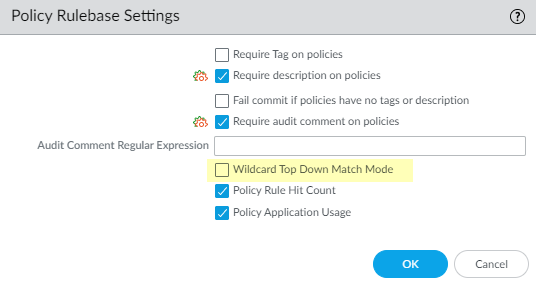
- Select .Edit the Policy Rulebase Settings and select Wildcard Top Down Match Mode (disabled by default).
![]() Click OK.Create a Security Policy Rule that has a Source IP Address or Destination IP Address that is an IP address/wildcard mask.Create another Security policy rule that uses the same source or destination IP address as the rule in the prior step, and uses an overlapping wildcard mask. Place the more specific rule closer to the top of the list.Commit.
Click OK.Create a Security Policy Rule that has a Source IP Address or Destination IP Address that is an IP address/wildcard mask.Create another Security policy rule that uses the same source or destination IP address as the rule in the prior step, and uses an overlapping wildcard mask. Place the more specific rule closer to the top of the list.Commit.