Advanced Threat Prevention: Inline Cloud Analysis
Table of Contents

Advanced Threat Prevention: Inline Cloud Analysis
Palo Alto Networks now operates a series of
ML-based detection engines in the Advanced Threat Prevention cloud
to analyze traffic for advanced C2 (command-and-control) and spyware
threats in real-time to protect users against zero-day threats.
By operating cloud-based detection engines, you can access a wide array
of detection mechanisms that are updated and deployed automatically
without requiring the user to download update packages or operate
process intensive, firewall-based analyzers which can sap resources.
The cloud-based detection engine logic is continuously monitored
and updated using C2 traffic datasets from WildFire, with additional
support through manual updates by Palo Alto Networks threat researchers,
who provide human intervention for highly accurized detection enhancements.
Inline cloud analysis supports five analysis engines for C2-based
threats over HTTP, HTTP2, SSL, unknown-UDP, and unknown-TCP. Additional
analysis models are delivered through content updates, however,
enhancements to existing models are performed as a cloud-side update,
requiring no firewall update. Inline cloud analysis is enabled and
configured using the anti-spyware profile and requires an active
Advanced Threat Prevention license.
Because this feature functions by performing real-time queries against the Advanced
Threat Prevention cloud service, it requires a persistent, active cloud connection
to analyze and mitigate threats effectively. Without a continuous connection to the
cloud service, the system cannot perform the live lookups necessary to identify
evolving zero-day attacks.
When the Advanced Threat Prevention license is enabled, the
firewall performs PAN-DB URL categorization lookups as part of its internal
processing, independent of any URL Filtering license or explicit cloud inline
configuration. This is facilitated by the Cloud Content FQDN, which is enabled by
default to connect to hawkeye.services-edge.paloaltonetworks.com and then resolve to
the closest cloud services server. Refer to step 3 for more details on configuring a
regional content cloud FQDN.
- Install an updated firewall device certificate used to authenticate to the Advanced Threat Prevention inline cloud analysis service. Repeat for all firewalls enabled for inline cloud analysis.Log in to the PAN-OS web interface.To take advanced of inline cloud analysis, you must have a persistent, active cloud connection used by the firewall to handle inline cloud analysis service requests. When the Advanced Threat Prevention license is enabled, the firewall performs PAN-DB URL categorization lookups as part of its internal processing, independent of any URL Filtering license or explicit cloud inline configuration. This is facilitated by the Cloud Content FQDN. The default FQDN connects to hawkeye.services-edge.paloaltonetworks.com and then resolves to the closest cloud services server. You can override the automatic server selection by specifying a regional cloud content server that best meets your data residency and performance requirements.The Cloud Content FQDN is a globally used resource and affects how other services that rely on this connection sends traffic payloads.Verify that the firewall uses the correct Content Cloud FQDN () for your region and change the FQDN if necessary:If your NGFW is configured inline to facilitate a SaaS Security deployment, please note that the FQDNs located in France and Japan do not currently support SaaS Security functionality.
- US Central (Iowa, US)—us.hawkeye.services-edge.paloaltonetworks.com
- Europe (Frankfurt, Germany)—eu.hawkeye.services-edge.paloaltonetworks.com
- APAC (Singapore)—apac.hawkeye.services-edge.paloaltonetworks.com
- India (Mumbai)—in.hawkeye.services-edge.paloaltonetworks.com
- UK (London, England)—uk.hawkeye.services-edge.paloaltonetworks.com
- France (Paris, France)—fr.hawkeye.services-edge.paloaltonetworks.com
- Japan (Tokyo, Japan)—jp.hawkeye.services-edge.paloaltonetworks.com
- Australia (Sydney, Australia)—au.hawkeye.services-edge.paloaltonetworks.com
- Canada (Montréal, Canada)—ca.hawkeye.services-edge.paloaltonetworks.com
- Switzerland (Zürich, Switzerland)—ch.hawkeye.services-edge.paloaltonetworks.com
- Israel (Tel Aviv, Israel)—il.hawkeye.services-edge.paloaltonetworks.com
To take advantage of inline categorization, you must have an active Advanced Threat Prevention subscription with a persistent, active cloud connection.To verify subscriptions for which you have currently-active licenses, select and verify that the appropriate licenses are available and have not expired.![]() Update or create a new Anti-Spyware Security profile to enable inline cloud analysis.
Update or create a new Anti-Spyware Security profile to enable inline cloud analysis.- Select an existing Anti-Spyware Profile or Add a new one ().
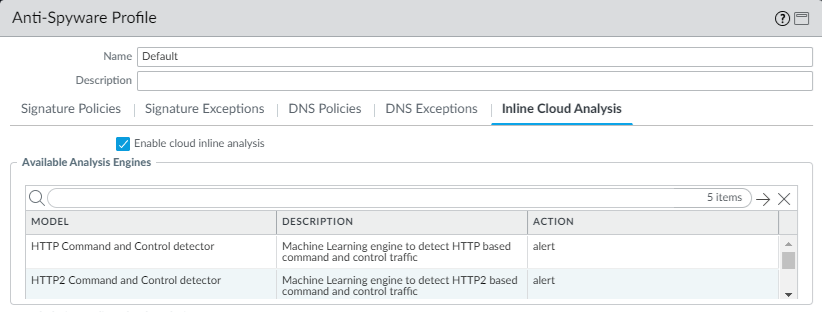
- Select your Anti-Spyware profile and then go to Inline Cloud Analysis and Enable inline cloud analysis.
![]()
- Specify an Action to take when a threat is detected using a corresponding analysis engine. The following options are available:The default action for each analysis engine is alert.
- Allow—The request is allowed and no log entry is generated.
- Alert—The request is allowed and a Threat log entry is generated.
- Drop—Drops the request; a reset action is not sent to the host/application.
- Reset-Client—Resets the client-side connection.
- Reset-Server—Resets the server-side connection.
- Reset-Both—Resets the connection on both the client and server ends.
- Click OK to exit the Anti-Spyware Profile configuration dialog and Commit your changes.
For additional information about configuring inline Cloud Analysis, including adding exceptions, verifying connectivity to the service, and monitoring details, refer to Configure Inline Cloud Analysis.