
New Features - Strata Cloud Manager - June 2023
Advanced Threat Prevention Dashboard
Unknown malware, command and control (C2), and vulnerability exploit attempts often compromise visibility into your network security effectiveness. The Advanced Threat Prevention dashboard in Strata Cloud Manager solves this critical challenge by giving you insight into real-time threat detection data by inline cloud analysis, alongside threats detected based on threat signatures generated from malicious traffic data collected from various Palo Alto Networks services.
This dashboard provides:
- a time line view of threats allowed and blocked, list of source IPs and users responsible for generating command and control (C2) traffic, and hosts targeted by cloud-detected exploits.
- contextual links to Log Viewer to get context around the threat.
- Threat Search result to learn about the usage patterns related to host generating traffic and host targeted by vulnerability exploits.
- cloud report and packet capture from the logs to get additional context and use Palo Alto Networks threat analytics data and threat intelligence to improve your incident response processes.
The dashboard helps you understand the security effectiveness of the Advanced Threat Prevention service. Use the data along with the analysis data from your other Palo Alto Networks security services to prevent security infringement on your network infrastructure.
Best Practices Dashboard
Security best practices are a moving target, and maintaining compliance can be a significant logistical burden. Traditionally, security administrators must manually audit configurations against established frameworks like the Center for Internet Security’s Critical Security Controls (CSC). This manual process is time-consuming, prone to human error, and results in disjointed, disconnected steps when sharing remediation reports with internal stakeholders. Without a streamlined, automated way to track adherence, identify gaps, and share remediation plans, your organization risks falling behind on its security posture.
The Best Practices dashboard solves this challenge by offering a powerful, automated solution. It provides security teams with daily reports that map directly to industry frameworks like CSC, giving you a clear, centralized view of your compliance status and an actionable plan for improvement. This release introduces the following new features:
- Ability to export BPA reports in .csv format for use in third-party applications such as Microsoft Excel
- Ability to download CLI remediations in .txt format. CLI remediations are generated using TSF data you upload when generating an On-Demand BPA report. (PAN-OS 9.1 and above TSFs)
- Ability to view historical trend charts for BPA checks
Capacity Analyzer
When Next-Generation Firewalls (NGFW) approach their capacity thresholds, system performance diminishes and operational disruptions often occur. Capacity-related issues are difficult to manage and typically only become visible after the limits are breached, resulting in time-consuming, reactive remediation efforts.
The Capacity Analyzer solves this problem by monitoring device resource consumption to prevent potential bottlenecks. It provides security teams with deep, centralized visibility into resource usage patterns based on firewall model types. This capability enables proactive planning for upgrading to higher capacity firewalls based on specific needs. This proactive approach ensures that you receive early notification about potential capacity constraints, allowing you to take preemptive action to safeguard your business operations and maintain optimal performance.

Cloud Management of NGFWs
Manage your Palo Alto Networks Next-Generation firewalls from Strata Cloud Manager . Cloud Management of NGFW is a cloud-delivered and AI-powered security solution to manage Palo Alto Networks' advanced ML-powered firewalls alongside your Prisma Access deployments.
Cloud Management of NGFWs is done from a single streamlined user interface and leverages Palo Alto Networks best-in-class cloud-delivered security services. To manage your Next-Gen firewalls from Strata Cloud Manager, you must enable AIOps for NGFW Premium which also draws on PAN-OS device telemetry data to give you an overview of the health and security of your cloud managed NGFWs. For logging, Strata Logging Service provides a secure, resilient, and fault tolerant centralized log storage and aggregation.
Compliance Summary Dashboard
Organizations face challenges in managing security posture due to a lack of historical context, scattered data, and reliance on manual compliance mapping. The Compliance Summary dashboard solves these issues by offering a powerful, centralized, and framework-based view of security compliance. This feature automatically maps security checks directly to industry standards, including CIS and NIST, streamlining your compliance reporting and ensuring robust governance. It provides a unified view of adherence across all firewalls, enabling you to proactively track long-term historical performance trends. By gaining deeper, actionable insights into control relationships and historical statistics, you ensure a strong security posture and confident compliance.
Config Cleanup
Do dynamic business needs often require you to deal with rapid configuration changes that result in complex configurations with a number of zero hit rules, zero hit objects, unused objects, and duplicate objects? Such configurations can lead to a poor security posture and can inadvertently increase the attack surface of your network. Config Cleanup has you covered.
Config Cleanup gives you a comprehensive view of all policy rules that have no hits, objects that aren't referenced directly or indirectly in your configuration, objects that are referenced in a policy rule but have no hits in the Traffic log during the specified time frame, and objects of the same type with different names but have the same values so that you can better:
- Manage attack surface exposure
- Prioritize remediation actions
- Remediate over time
- Respond to audit questions when they arise
Identify and remove unused configuration objects and policy rules from your configuration. Removing unused configuration objects eases administration by removing clutter and preserving only the configuration objects that are required for security enforcement.
Review unused objects and policy rules across your entire Strata Cloud Manager configuration for the last 6 months, and optimize policy rules that are overly permissive rules to convert these to be more specific, focused rules that only allow the applications you’re actually using.
Together with Policy Optimizer, these tools help you ensure that your policy rules stay fresh and up to date.
Custom Dashboards in Strata Cloud Manager
Default dashboards often provide views that may not align with specific operational or your security visibility needs, requiring you to spend extra time manually filtering through irrelevant data. To enable focused, rapid analysis and meet unique requirements, you can now build a custom dashboard in Strata Cloud Manager based precisely on your network and security visibility needs. You can use various types of customizable widgets from the widget library to create the dashboard. The available widgets depend on the services supported with your licenses. You can add up to 10 widgets in a custom dashboard and create 10 custom dashboards per user. The custom dashboard can be customized at any time. This personalization includes full control over the layout, dynamic filtering, and detailed widget presentation, guaranteeing that your custom dashboard delivers security visibility insights precisely tailored to your unique operational requirements.

Device Health Dashboard
Maintaining optimal health and proactive performance across numerous NGFW devices can be challenging. The Device health dashboard in Strata Cloud Manager shows you the cumulative health status and performance of your onboarded NGFW devices. The device health is determined by the severity of the health score (0-100) and its corresponding health grade (good, fair, poor, critical). The health score is calculated based on the priority, quantity, type, and status of the open alerts.
This dashboard helps you:
Understand the deployment improvements that you have made over a period by looking at the historical health score data
Narrow down devices that require attention in your deployment and prioritize the issues to resolve them
- Review the device statistics and fix the critical alerts on the device to improve the health score and deployment health
Feature Adoption Dashboard for Security Posture Optimization
Many organizations invest heavily in comprehensive security subscriptions but struggle to realize the full value, often due to a lack of centralized visibility into active features and configuration gaps. This leads to a reactive security posture, leaving networks exposed to preventable attacks. Strata Cloud Manager introduces the Feature Adoption dashboard, a powerful tool designed to maximize the return on your security investments and close critical protection gaps. This dashboard provides a holistic, actionable view of your security posture by assessing policy strength and capability adoption against Palo Alto Networks best practice baselines. This enables security teams to quickly identify and address dormant features and configuration weaknesses. By providing granular insights across device groups, zones, and tags, this enhancement pinpoints areas needing immediate attention, transforming your security approach from reactive to proactive and ensuring maximum visibility and protection.
This update introduces the following new features:
- TSF upload-generated CLI remediations (PAN-OS 9.1 and above TSFs)
- Historical adoption trend charts
- Per-device views of adoption (including for Panorama-managed devices)
- Ability to export adoption data as .csv file

Incidents and Alerts
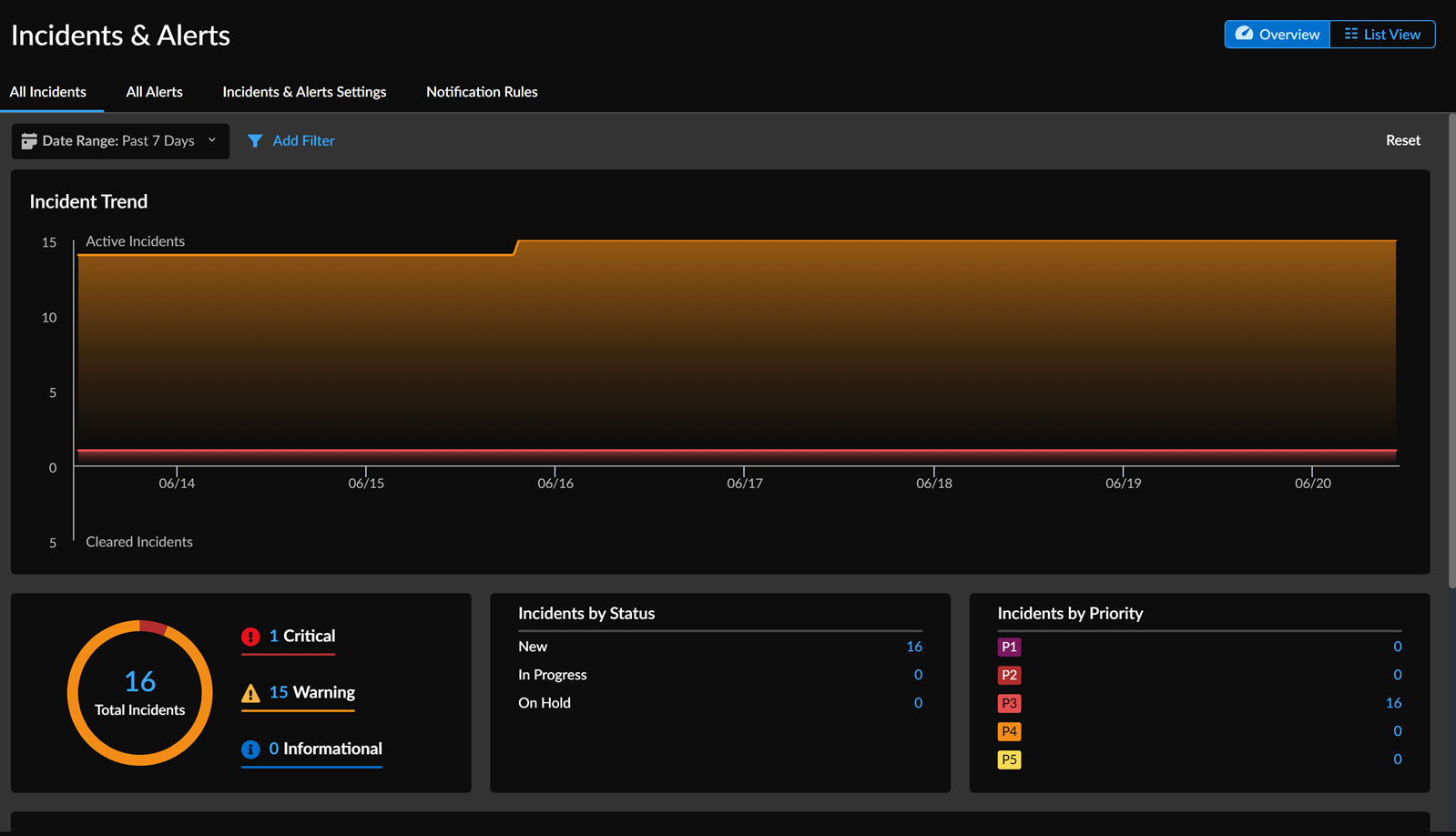
The Incidents & Alerts feature helps monitor the health of your devices and prevent disruptive incidents. It generates incidents and alerts based on detected issues with your firewall deployment. With this feature, you get a singular broad view of your incidents and alerts across NGFWs. Additionally, you can manage notifications by viewing and adding rules.
NGFW SD-WAN Dashboard
When managing large-scale, distributed networks, troubleshooting performance lags requires security teams to sift through countless data points to pinpoint the exact cause, consuming valuable time and resources. This challenge is acute in environments with multiple VPN clusters and remote sites where quickly identifying slow applications or struggling links is critical to preventing business impact.
The new NGFW SD-WAN dashboard solves this problem by providing a centralized, at-a-glance view of your network’s health. It delivers real-time performance metrics for all cloud-managed firewalls, offering deep, actionable visibility into application and link performance across your entire deployment. With this consolidated view, you can rapidly troubleshoot issues across your VPN clusters, isolating problems to specific sites and applications. The dashboard also proactively generates alerts that forecast potential performance trends, allowing your team to address issues before they escalate and impact the end-user experience.
Security Posture Insights Dashboard
Get visibility into the security status and trend of your deployment based on the security postures of the onboarded NGFWs with Security Posture Insights. Use this dashboard to:
Know the trend of issues that impact the security posture of your deployment.
Understand the security improvements that you have made in your deployment by looking at the historical security score data.
Narrow down devices where there is an opportunity to improve the security posture and prioritize the issues to resolve them.

Unified Dashboard for Cloud-Delivered Security Services Monitoring
Rolling out new security features and ensuring they are correctly configured across a large enterprise network is complex, often leading to manual checks and misconfigurations due to a lack of centralized monitoring. Strata Cloud Manager (via its AIOps capability) now streamlines the implementation and monitoring of Cloud-Delivered Security Services (CDSS). The new CDSS dashboard provides a unified view, enabling security teams to easily track the activation, configuration, and best practices adherence across the network. This eliminates the need for manual status checks, helping you identify and address potential security vulnerabilities efficiently. Crucially, the dashboard introduces configuration flexibility, allowing administrators to establish exceptions and override best practice recommendations at the firewall level, rather than managing them individually for every role-pair. This enhancement ensures a more consistent security posture, reduces administrative overhead, and accelerates the adoption of critical security services.
