Copy ToS Header Support
Table of Contents

Copy ToS Header Support
SD-WAN allows you to copy the ToS field from inner IP
header to outer IPSec header on application traffic going through
an IPSec tunnel.
You can tag application traffic going from
a source to a destination with Type of Service (ToS) bits or Differentiated Services Code Point (DSCP)
markings (RFC 2474) so that network devices along the way can provide
QoS to the traffic. When that traffic goes through an SD-WAN virtual interface,
the traffic goes through a VPN tunnel, which requires encapsulation.
Therefore, each packet’s ToS bits or DSCP markings must be copied
from the inner IP header to the outer VPN header so that the networking
devices between the originating firewall and terminating firewall
can apply the proper QoS to each packet.
To satisfy that requirement,
beginning with PAN-OS 10.2.1 and SD-WAN Plugin 3.0.1, you can have
an SD-WAN hub or branch copy
the ToS field from the inner IPv4 header to the outer VPN header
of encapsulated packets going through the VPN tunnel. The ToS field
can contain ToS bits or DSCP markings. The Copy ToS Header option
also copies the Explicit Congestion Notification (ECN) field.
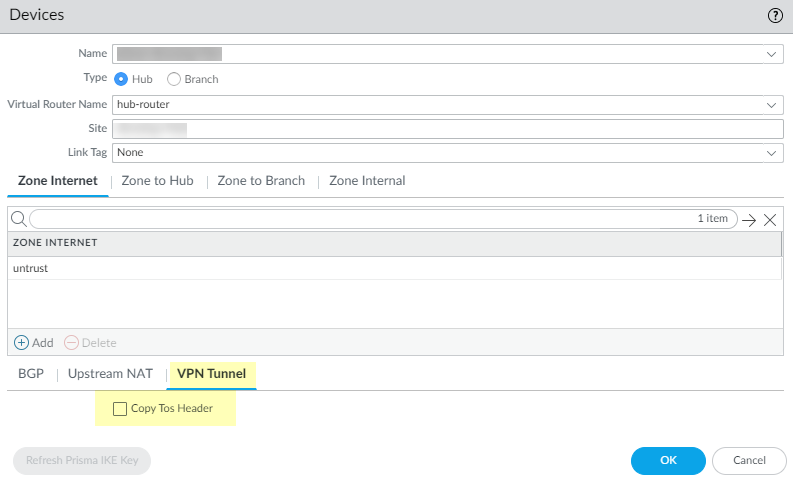
- Log in to the Panorama Web Interface.Select and select a branch or hub.Select the VPN Tunnel tab.Select Copy ToS Header (disabled by default).
![]() Click OK.Commit.
Click OK.Commit.