PA-5510, PA-5520, and PA-5530
Table of Contents

PA-5510, PA-5520, and PA-5530
Learn how to connect power to the PA-5500 Series Firewall.
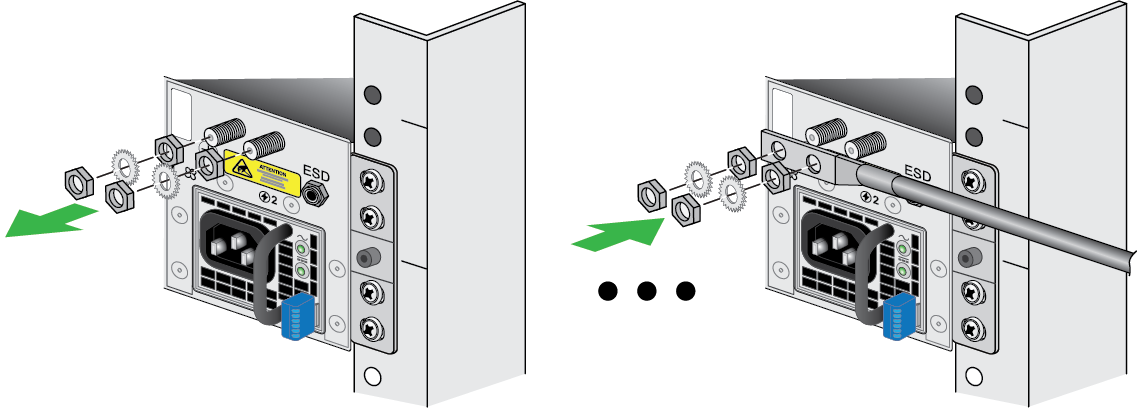
- Read the Safety Warnings.Put the provided ESD wrist strap on your wrist ensuring that the metal contact is touching your skin. Then attach (snap) one end of the ground cable to the wrist strap and remove the alligator clip from the banana clip on the other end of the ESD grounding cable. Plug the banana clip end into the ESD port located on the back of the appliance before handling ESD sensitive hardware. For details on the ESD port location, see PA-5510, PA-5520, and PA-5530.Remove the nuts from one of the ground studs located on the back of the appliance.Crimp a 14AWG ground cable to a ring lug (cable and lug not included) and then attach the ring lug to the ground stud on the firewall. Replace the star washers and nuts, then connect the other end of the cable to earth ground.
![]() Connect the power supplies to a power source based on whether your power supplies are AC or DC.(AC Power Supplies)
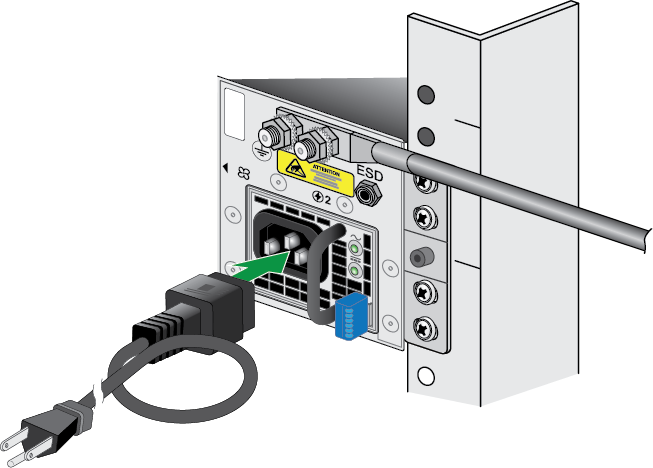
Connect the power supplies to a power source based on whether your power supplies are AC or DC.(AC Power Supplies)- Connect the power supplies to a 120VAC 15-amp circuit breaker or 240VAC 20-amp circuit breaker using the provided power cords.
![]() Connect the second power cord through a different circuit breaker to provide power redundancy and to allow for electrical circuit maintenance.(DC Power Supplies)
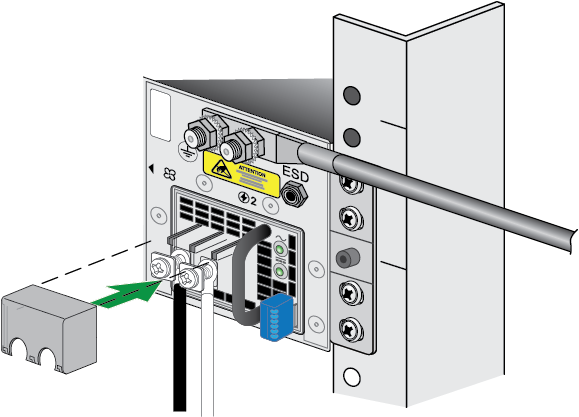
Connect the second power cord through a different circuit breaker to provide power redundancy and to allow for electrical circuit maintenance.(DC Power Supplies)- Remove the connector cover from the power supply. Connect the positive and negative cable ends to the respective polarity slots in the power supply, then re-install the connector cover. Repeat this for each power supply.
![]() Connect the opposite end of the positive and negative cables to a 60A circuit breaker, then secure the power cords to the power inlets. Repeat this for each power supply.Connect the second power cord through a different circuit breaker to provide power redundancy and to allow for electrical circuit maintenance.After each AC or DC cable is securely connected, turn on the power source and the appliance will power on.Before powering on the firewall, ensure that you have connected your Ethernet cables in accordance to the mode you wish to boot the firewall in (standard mode or Zero Touch Provisioning mode) as specified in Set Up a Connection to the Firewall.
Connect the opposite end of the positive and negative cables to a 60A circuit breaker, then secure the power cords to the power inlets. Repeat this for each power supply.Connect the second power cord through a different circuit breaker to provide power redundancy and to allow for electrical circuit maintenance.After each AC or DC cable is securely connected, turn on the power source and the appliance will power on.Before powering on the firewall, ensure that you have connected your Ethernet cables in accordance to the mode you wish to boot the firewall in (standard mode or Zero Touch Provisioning mode) as specified in Set Up a Connection to the Firewall.