Advanced WildFire Cloud API Migration
Table of Contents

Advanced WildFire Cloud API Migration
Palo Alto Networks is transitioning the Advanced WildFire cloud API infrastructure to
a token-based authentication model using the TSG-ID (Tenant Service Group ID)
identity standard, which provides stronger security and enhanced tenant isolation.
If you currently use legacy, CSP-ID based WildFire API keys, you can use the
migration workflow to bind your existing keys to service accounts and transition to
this new token format. To ensure minimal operational disruption, existing Advanced
WildFire customers are provided a period to gracefully transition your API
workflows. During this time, your current legacy WildFire API keys will continue to
function normally. After this period concludes, all customers must adopt token-based
authentication for any communication with the Advanced WildFire API backend
infrastructure systems.
Only WildFire API keys associated with NGFW and Prisma Access devices are
available for migration. The migration workflow displays only the keys that are
associated with the Strata Cloud Manager tenant you are logged in to.
Before you begin migration, ensure that you have service accounts available with
the appropriate role assignment. Each API key must be mapped to a unique service
account. Configure each service account as follows:
- Apps & Services — Select All Apps & Services. There is no predefined WildFire-specific scope, so this setting is required to provide the service account with access to WildFire.
- Role — Assign a custom role with the iam.service_account and iam.custom_role permissions. These are the minimum permissions required for the service account to create and retrieve access tokens.
To create service accounts and configure custom roles, navigate to
. For details, see Add Service Accounts, Add Custom Roles, and About Roles and Permissions.
Although a service account assigned to All Apps & Services
without a specific role can technically access WildFire, Palo Alto Networks
strongly recommends against this configuration. Without a role to constrain
permissions, the All Apps & Services scope grants the service
account unrestricted access to all applications and services in the tenant.
Always pair the scope with a custom role that includes only the required
permissions to follow least-privilege access principles.
Palo Alto Networks recommends migrating all of your previously generated WildFire
API keys as a single batch effort to minimize interruptions to your existing
admin and developer workflows. You may experience the following service changes
during this process:
- Minimize the duration of the migration window to prevent the temporary loss of sample and PCAP download capabilities for specific keys.
- Continue submitting samples as usual, as the submission process remains entirely unaffected throughout the migration period.
- Expect a full restoration of all functions immediately upon completion, including access to any samples submitted while the migration was in progress.
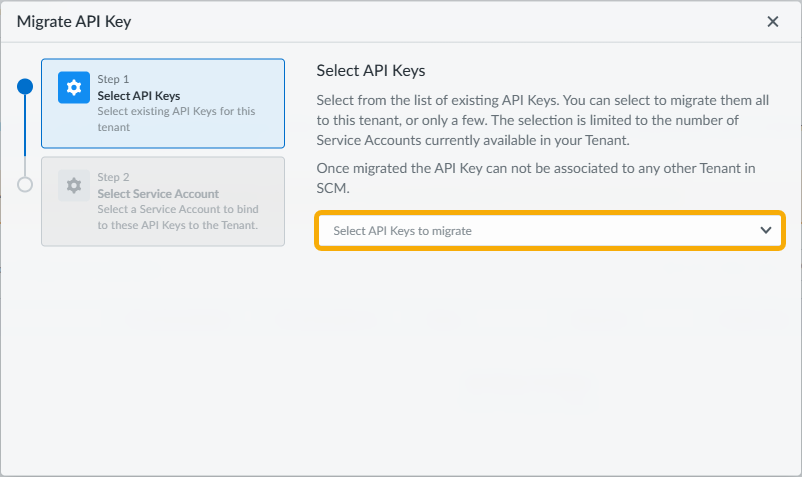
- Log in to Strata Cloud Manager and navigate to .If there are WildFire API keys associated with NGFW and Prisma Access devices in the tenant, a message displays with the Start Migration button.Select Start Migration to open the Migrate API Key workflow.This option is not available if there are no NGFW or Prisma Access WildFire API keys that can be migrated in the current tenant.Select one or more WildFire API keys to migrate and select Next.Only keys associated with NGFW and Prisma Access are displayed in this list.
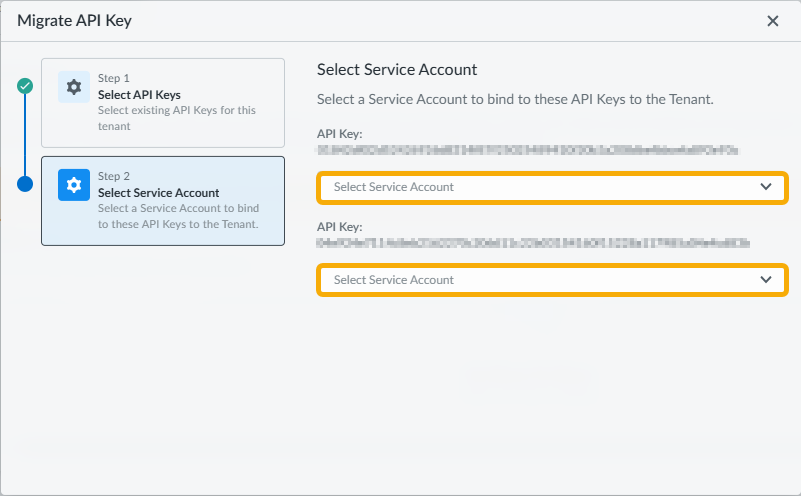
![]() Bind each selected API key to a unique service account.Select a valid service account from the dropdown for each API key. Each API key must be mapped to a different service account.If no service accounts are available, create them in . Ensure each service account is assigned the All Apps & Services scope with a custom role that includes the iam.service_account and iam.custom_role permissions.
Bind each selected API key to a unique service account.Select a valid service account from the dropdown for each API key. Each API key must be mapped to a different service account.If no service accounts are available, create them in . Ensure each service account is assigned the All Apps & Services scope with a custom role that includes the iam.service_account and iam.custom_role permissions.![]() Select Migrate after assigning service accounts for all selected API keys.Verify that the migrated WildFire API keys display in the Keys List with a Status of Valid.After migration is complete, you can use the bound service account credentials to generate an access token for WildFire API requests. You can also revoke migrated keys and create new API keys once all existing keys are migrated or revoked.
Select Migrate after assigning service accounts for all selected API keys.Verify that the migrated WildFire API keys display in the Keys List with a Status of Valid.After migration is complete, you can use the bound service account credentials to generate an access token for WildFire API requests. You can also revoke migrated keys and create new API keys once all existing keys are migrated or revoked.