Connect DC Power to the PA-3500 Series Firewall
Table of Contents

Connect DC Power to the PA-3500 Series Firewall
Learn how to connect power to the PA-3500 Series Firewall.
The following procedure describes how to connect DC power to a PA-3500 Series
firewall with DC power supplies.
Learn how to Set Up a Connection to the Firewall based on your desired boot mode prior
to powering on the firewall for the first time.
To avoid injury to yourself or damage to your Palo Alto Networks® hardware or the
data that resides on the hardware, read the Safety Warnings.
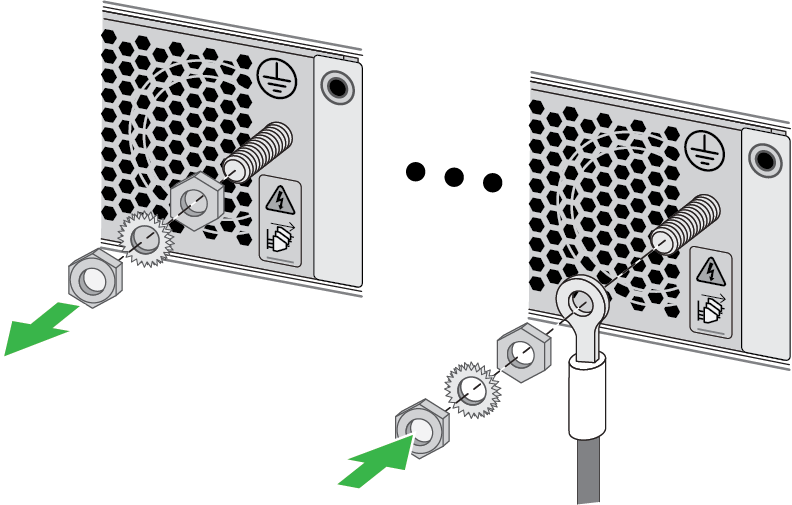
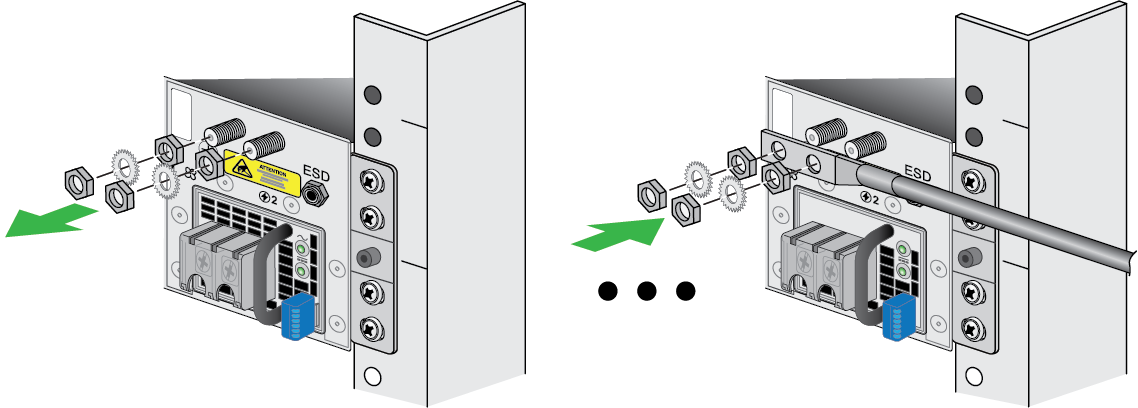
- Ensure that your power source(s) are powered off.Remove the nut and star washer from the ground stud(s) on the back of the firewall.Crimp a 14AWG ground cable to a ring lug (cable and lug not included) and then attach the ring lug to the ground stud on the firewall. Replace the star washers and nuts, then connect the other end of the cable to earth ground.PA-3510 and PA-3520
![]() PA-3530 and PA-3540
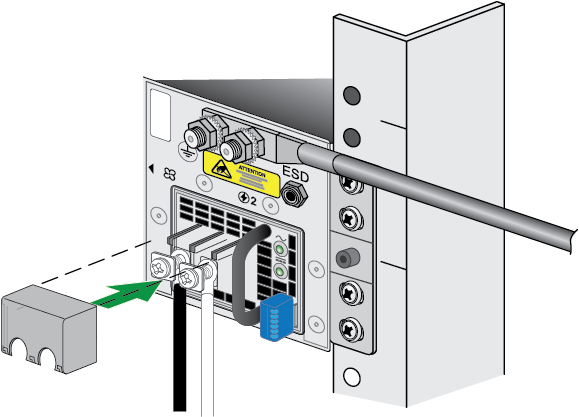
PA-3530 and PA-3540![]() Remove the connector cover from the power supply. Connect the positive and negative cable ends to the respective polarity slots in the power supply, then re-install the connector cover. Repeat this for each power supply.
Remove the connector cover from the power supply. Connect the positive and negative cable ends to the respective polarity slots in the power supply, then re-install the connector cover. Repeat this for each power supply.![]() Connect the opposite end of the positive and negative cables to a 60A circuit breaker, then secure the power cords to the power inlets using the velcro straps. Repeat this for the second power supply, ensuring that each power supply is connected to its own 60A power circuit breaker. This ensures power redundancy and allows for planned electrical circuit maintenance.After each DC cable is securely connected, turn on the power source and the appliance will power on.Before powering on the firewall, ensure that you have connected your Ethernet cables in accordance to the mode you wish to boot the firewall in (standard mode or Zero Touch Provisioning mode) as specified in Set Up a Connection to the Firewall.
Connect the opposite end of the positive and negative cables to a 60A circuit breaker, then secure the power cords to the power inlets using the velcro straps. Repeat this for the second power supply, ensuring that each power supply is connected to its own 60A power circuit breaker. This ensures power redundancy and allows for planned electrical circuit maintenance.After each DC cable is securely connected, turn on the power source and the appliance will power on.Before powering on the firewall, ensure that you have connected your Ethernet cables in accordance to the mode you wish to boot the firewall in (standard mode or Zero Touch Provisioning mode) as specified in Set Up a Connection to the Firewall.