
PA-501 and PA-505
Table of Contents

PA-501 and PA-505
View the front and back panel components of the PA-501 and PA-505
firewalls.
The following image shows the front panel
of the PA-501 and PA-505, which have the
same front panel components (PA-505 pictured). The table describes
each front panel component.
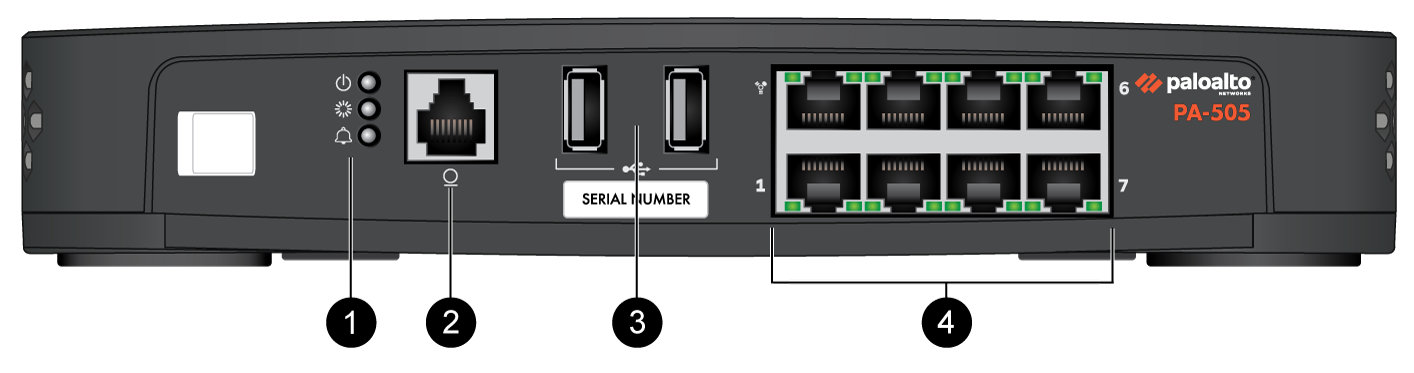
| Item | Component | Description |
|---|---|---|
|
1
|
LED Status Indicators
|
Three LEDs that indicate the status of the firewall hardware
components (see PA-500 Series Firewall LED Definitions).
|
|
2
|
Console Port
|
Use this port to connect a management computer to the firewall using
a 9-pin serial to RJ-45 cable and terminal emulation software.
The console connection provides access to firewall boot messages, the
Maintenance Recovery Tool (MRT), and the command line interface
(CLI).
If your management computer does not have a serial port, use a
USB-to-serial converter. Use the following settings to configure your terminal emulation
software to connect to the console port:
|
|
3
|
USB Ports
|
Two USB ports for debugging and administration only. Use one of the
two ports to bootstrap the firewall.
Bootstrapping enables you to provision the firewall with a specific
PAN-OS configuration and then license it and make it operational on
your network.
In PAN-OS 12.2.2 and later versions, you can use this USB port
to perform self-service enhanced factory reset (EFR). EFR
provides remediation of a compromised or potentially compromised
firewall to initiate a complete cleanup of the device. |
|
4
|
RJ-45 Ports
|
Management Port
One Ethernet10/100/1000Mbps port (the top-left port) that is used to
access the management web interface and perform administrative
tasks. The firewall also uses this port for management services,
such as retrieving licenses and updating threat and application
signatures.
Ethernet Ports
Seven RJ-4510/100/1000Mbps ports for network traffic.You can set the
link speed and duplex mode or choose autonegotiate.
|
The following image shows the back panel of the PA-501 and PA-505, which have the same
back panel components (PA-505 pictured). The table describes each back
panel component.
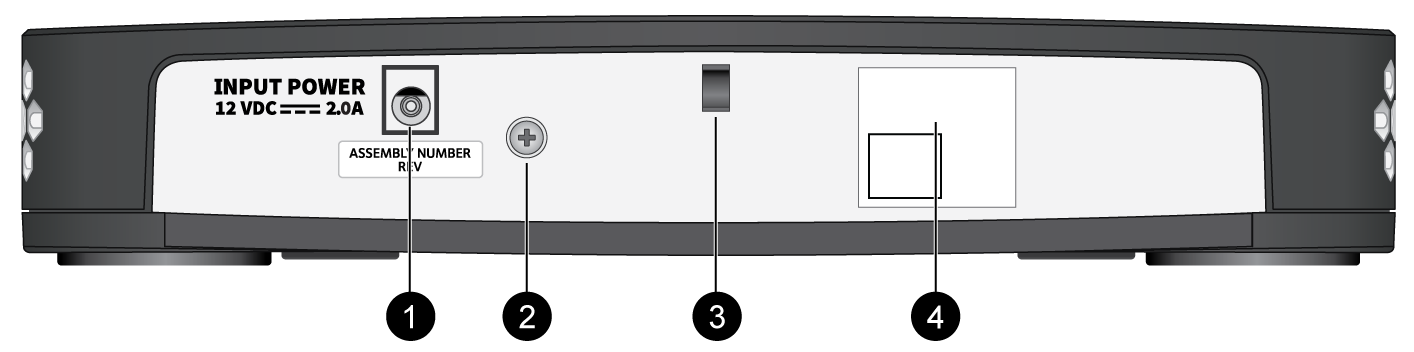
| Item | Component | Description |
|---|---|---|
|
1
|
Power Adapter Input
|
Use the power input to connect power to the firewall. The PA-505
ships with one 25W power adapter.
|
|
2
|
Ground Stud
|
Use the single post ground stud to connect the firewall to earth
ground (ground cable not included).
|
|
3
|
Power Cord Retainer
|
Use the power cord retainer to secure the power cord.
|
|
4
|
QR Code
|
Scan the QR code to access product and ZTP onboarding
information.
|