
New Features - Strata Cloud Manager - May 2025
Configuration Management Support by Region
Strata Cloud Manager for Configuration Management is a solution that is defined and controlled based on the region where it is deployed. You can deploy Strata Cloud Manager in the locations of your choosing, based on data location preferences and where you have the most users. For this reason, we are rolling out region-specific support for Strata Cloud Manager as soon as we are able to do so for each region.
Update:
Strata Cloud Manager now supports the following additional regions:
- Saudi Arabia
- Israel
- Indonesia
Content-ID Settings Support
If you need to enable Advanced WildFire Inline Cloud Analysis, configure a Vulnerability Protection profile, or configure best practices for Advanced WildFire or Advanced Threat Prevention, you might need to configure Content-ID settings. Strata Cloud Manager now supports the viewing and modification of Content-ID settings.
Enhanced Visibility with Zero Touch Provisioning of Cloud Managed NGFWs for Administrators
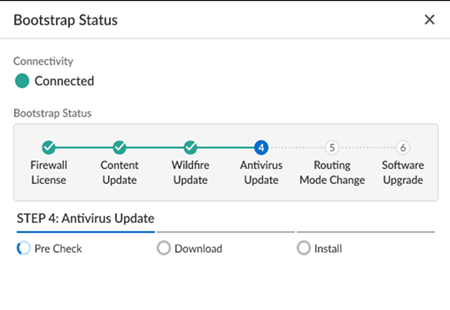
Installers with minimal technical knowledge often face challenges onboarding NGFWs at branch locations. Enhanced visibility and status monitoring for Zero Touch Provisioning (ZTP) addresses this by improving the NGFW activation process for branch locations, providing visibility and troubleshooting capabilities. Status monitoring for ZTP onboarding and bootstrapping offers real-time status updates in Strata Cloud Manager for administrators to review and monitor throughout the activation and onboarding process.
With status monitoring for onboarding and bootstrapping, you can monitor the detailed bootup status, including Firewall Licensing, Content Updates, Wildfire Updates, Antivirus Updates, Routing Mode Changes, and Software Upgrades. The feature introduces status bars and status spinners that reflect the progress of each stage, ensuring you have a clear understanding of the activation process. In case of any interruptions or errors, such as issues with device certificates, TSG ID validation, software updates, or content updates, the bootstrap status indicates where the process failed and allows you to immediately restart.
Improved Policy and Device Management in Strata Cloud Manager
Strata Cloud Manager provides user interface improvements that streamline security operations and management efficiency. These updates focus specifically on making policy and device management more intuitive, simplifying complex workflows, improving data visibility, and ensuring a smoother user experience. The core goal is to provide administrators with greater control and clarity over their security posture and device lifecycle.
Precise Security Policy Rule Insertion: New security policy rules can now be inserted immediately after a selected rule, simplifying the organization and management of rule sets.
NGFW Update Schedule Pagination: NGFW software update schedules now feature pagination with clearly defined column headings, which improves both clarity and performance when handling large datasets.
Non-Disruptive Device Details View: Device details for each update schedule now open in a sidebar panel instead of expanding within the main table. This allows users to view essential details without losing context or disrupting the main table's structure.
Strata Cloud Manager: Config Cleanup Enhancements
Here are the enhancements for Config Cleanup :
Role-Based Access Control (RBAC): Access to Config Cleanup operations is governed by RBAC, allowing you to view either the Admin View or the User View based on your assigned role.
Unified Filtering Experience: Seamless navigation with consistent filter dropdowns and text across the Unused Objects, Zero Hit Objects, and Zero Hit Policy Rules pages.
Advanced Filtering Options: Use the new filter ranges (30+ Days, 60+ Days, 90+ Days) and a customizable option for precise data view control.
Dynamic Zero Hit Object Calculation: Filters now recalculate Zero Hit Objects based on "Days with Zero Hits" in real time, providing more relevant information.
- Streamlined Rule Details: Explore Zero Hit Objects Rule details in a single-table sidecar for improved clarity and easier data interpretation.
These enhancements offer improved usability, and more precise control over your configuration cleanup process.
Strata Cloud Manager: IPv4 Multicast Routing Support
Strata Cloud Manager (SCM) now enables you to configure IPv4 multicast routing on virtual routers and logical routers. You can enable Protocol-Independent Multicast (PIM), Internet Group Management Protocol (IGMP), and Multicast Source Discovery Protocol (MSDP) on supported interfaces. Additionally, SCM enables you to configure PIM Interface Timer profiles, MSDP Timer profiles, and IGMP Interface Query profiles. You can also create IPv4 mroutes, which are static unicast routes that point to a multicast source. Logical routers support only IGMPv2 and IGMPv3 (not IGMPv1). Only logical routers support a multicast static group (virtual routers do not).
Strata Cloud Manager: New Best Practice Assessment Checks and Custom Checks
Strata Cloud Manager introduces the following new checks:
Custom checks include support for verifying subnet matches within IP address objects and groups.
- Inline Best Practices Assessment (BPA) supports all the configuration objects in Strata Cloud Manager.
- BPA check supports verifying whether a vulnerability protection security profile is applied to the GlobalProtect interface to protect the GlobalProtect services from attacks using published product security vulnerabilities.
Strata Cloud Manager: Policy Optimizer Enhancements
Policy Optimizer now allows you to create address groups within policy recommendations, addressing challenges in efficiently managing firewall policies at scale. You can create source and destination address groups within recommended rules, allowing you to adjust and preview suggested groups before accepting recommendations. These enhancements streamline the process of optimizing firewall policies, helping you balance security and operational efficiency as your network grows.
Strata Copilot: New Region Support
Strata Copilot now extends its reach to new regions, enhancing global accessibility. This expansion brings the powerful AI-driven assistance to users in China, Qatar, and Saudi Arabia. By increasing geographical coverage, Strata Copilot offers more organizations the opportunity to streamline their security operations, leverage intelligent insights, and improve overall efficiency in managing their Palo Alto Networks solutions in Strata Cloud Manager across these diverse locations.
Update:
Strata Copilot now supports the following additional regions:
- China
- Qatar
- Saudi Arabia
Transparent Proxy Support for Prisma Access Agent
Prisma® Access Agent now supports transparent proxy connections, offering always-on internet security and private app access for your mobile users. This feature enables seamless coexistence with third-party VPN agents, enhancing your organization's security posture. You can use it to secure all internet traffic from browser and nonbrowser apps, even when users are disconnected from the tunnel. The solution forwards internet traffic to Prisma Access, preventing users from bypassing Prisma Access.
You can support various scenarios including users connecting from home, branch offices, or public Wi-Fi. It's compatible with endpoints running third-party VPNs in full or split tunnel modes. The feature prevents conflicts on endpoints and offers admin controls to maintain smooth operation. You will find this useful for maintaining consistent security across diverse networks. It supports continuous trust verification for mobile users through device posture checks. By implementing this functionality, you can enforce security policies regardless of user location or connection method, strengthening your overall security stance and strengthening your overall security posture with always-on connectivity.
Visibility for ZTNA Connector
Depending on your license for ZTNA Connector, you can see the following updates in Strata Cloud Manager Strata Cloud Manager for visibility:
Select the number next to Total Connector Groups, Total Wildcards, FQDN, or IP Subnet to get the details for each ZTNA object. You can see the status related to each ZTNA object (UP, Partially Up, Down). Additionally, you can now monitor a Wildcard's bandwidth by selecting Action .
