Configure Fast Delicensing Using UI
Table of Contents

Expand all | Collapse all
-
- VM-Series Deployments
- VM-Series in High Availability
- IPv6 Support on Public Cloud
- Enable Jumbo Frames on the VM-Series Firewall
- Hypervisor Assigned MAC Addresses
- Custom PAN-OS Metrics Published for Monitoring
- Interface Used for Accessing External Services on the VM-Series Firewall
- PacketMMAP and DPDK Driver Support
- Enable NUMA Performance Optimization on the VM-Series
- Enable ZRAM on the VM-Series Firewall
- Additional XFF IP Logging
-
- Licensing and Prerequisites for Virtual Systems Support on VM-Series
- System Requirements for Virtual Systems Support on VM-Series
- Enable Multiple Virtual Systems Support on VM-Series Firewall
- Enable Multiple Virtual Systems Support on VM-Series in Panorama Console
- Enable Multiple Virtual Systems Support Using Bootstrap Method
-
- VM-Series Firewall Licensing
- Create a Support Account
- Serial Number and CPU ID Format for the VM-Series Firewall
- Use Panorama-Based Software Firewall License Management
-
- Activate Credits
- Create a Deployment Profile
- Activate the Deployment Profile
- Manage a Deployment Profile
- Register the VM-Series Firewall (Software NGFW Credits)
- Provision Panorama
- Migrate Panorama to a Software NGFW License
- Transfer Credits
- Renew Your Software NGFW Credits
- Deactivate License (Software NGFW Credits)
- Delicense Ungracefully Terminated Firewalls
- Set the Number of Licensed vCPUs
- Customize Dataplane Cores
- Migrate a Firewall to a Flexible VM-Series License
-
- Generate Your OAuth Client Credentials
- Manage Deployment Profiles Using the Licensing API
- Create a Deployment Profile Using the Licensing API
- Update a Deployment Profile Using the Licensing API
- Get Serial Numbers Associated with an Authcode Using the API
- Deactivate a VM-Series Firewall Using the API
- What Happens When Licenses Expire?
-
- Supported Deployments on VMware vSphere Hypervisor (ESXi)
-
- Plan the Interfaces for the VM-Series for ESXi
- Provision the VM-Series Firewall on an ESXi Server
- Perform Initial Configuration on the VM-Series on ESXi
- Add Additional Disk Space to the VM-Series Firewall
- Use VMware Tools on the VM-Series Firewall on ESXi and vCloud Air
- Use vMotion to Move the VM-Series Firewall Between Hosts
- Use the VM-Series CLI to Swap the Management Interface on ESXi
- Configure Link Aggregation Control Protocol
- ESXi Simplified Onboarding
-
-
- Supported Deployments of the VM-Series Firewall on VMware NSX-T (North-South)
- Components of the VM-Series Firewall on NSX-T (North-South)
-
- Install the Panorama Plugin for VMware NSX
- Enable Communication Between NSX-T Manager and Panorama
- Create Template Stacks and Device Groups on Panorama
- Configure the Service Definition on Panorama
- Deploy the VM-Series Firewall
- Direct Traffic to the VM-Series Firewall
- Apply Security Policy to the VM-Series Firewall on NSX-T
- Use vMotion to Move the VM-Series Firewall Between Hosts
- Extend Security Policy from NSX-V to NSX-T
-
- Components of the VM-Series Firewall on NSX-T (East-West)
- VM-Series Firewall on NSX-T (East-West) Integration
- Supported Deployments of the VM-Series Firewall on VMware NSX-T (East-West)
-
- Install the Panorama Plugin for VMware NSX
- Enable Communication Between NSX-T Manager and Panorama
- Create Template Stacks and Device Groups on Panorama
- Configure the Service Definition on Panorama
- Launch the VM-Series Firewall on NSX-T (East-West)
- Add a Service Chain
- Direct Traffic to the VM-Series Firewall
- Apply Security Policies to the VM-Series Firewall on NSX-T (East-West)
- Use vMotion to Move the VM-Series Firewall Between Hosts
-
- Install the Panorama Plugin for VMware NSX
- Enable Communication Between NSX-T Manager and Panorama
- Create Template Stacks and Device Groups on Panorama
- Configure the Service Definition on Panorama
- Launch the VM-Series Firewall on NSX-T (East-West)
- Create Dynamic Address Groups
- Create Dynamic Address Group Membership Criteria
- Generate Steering Policy
- Generate Steering Rules
- Delete a Service Definition from Panorama
- Migrate from VM-Series on NSX-T Operation to Security Centric Deployment
- Extend Security Policy from NSX-V to NSX-T
- Use In-Place Migration to Move Your VM-Series from NSX-V to NSX-T
-
-
- Deployments Supported on AWS
-
- Planning Worksheet for the VM-Series in the AWS VPC
- Launch the VM-Series Firewall on AWS
- Launch the VM-Series Firewall on AWS Outpost
- Create a Custom Amazon Machine Image (AMI)
- Encrypt EBS Volume for the VM-Series Firewall on AWS
- Use the VM-Series Firewall CLI to Swap the Management Interface
- Enable CloudWatch Monitoring on the VM-Series Firewall
- Publish ENA Network Performance Metrics to AWS CloudWatch
- VM-Series Firewall Startup and Health Logs on AWS
- Simplified Onboarding of VM-Series Firewall on AWS
- Use AWS Secrets Manager to Store VM-Series Certificates
- AWS Shared VPC Monitoring
- Use Case: Secure the EC2 Instances in the AWS Cloud
- Use Case: Use Dynamic Address Groups to Secure New EC2 Instances within the VPC
-
- Software Cut-through Based Offload
-
- Deployments Supported on Azure
- Deploy the VM-Series Firewall from the Azure Marketplace (Solution Template)
- Simplified Onboarding of VM-Series Firewall on Azure
- Deploy the VM-Series Firewall from the Azure China Marketplace (Solution Template)
- Deploy the VM-Series with the Azure Gateway Load Balancer
- Create a Custom VM-Series Image for Azure
- Deploy the VM-Series Firewall on Azure Stack
- Deploy the VM-Series Firewall on Azure Stack HCI
- Enable Azure Application Insights on the VM-Series Firewall
- Azure Health Monitoring
- Set up Active/Passive HA on Azure
- Use Azure Key Vault to Store VM-Series Certificates
- Use the ARM Template to Deploy the VM-Series Firewall
-
- About the VM-Series Firewall on Google Cloud Platform
- Supported Deployments on Google Cloud Platform
- Create a Custom VM-Series Firewall Image for Google Cloud Platform
- Prepare to Set Up VM-Series Firewalls on Google Public Cloud
-
- Deploy the VM-Series Firewall from Google Cloud Platform Marketplace
- Management Interface Swap for Google Cloud Platform Load Balancing
- Use the VM-Series Firewall CLI to Swap the Management Interface
- Enable Google Stackdriver Monitoring on the VM Series Firewall
- Enable VM Monitoring to Track VM Changes on Google Cloud Platform (GCP)
- Use Dynamic Address Groups to Secure Instances Within the VPC
- Use Custom Templates or the gcloud CLI to Deploy the VM-Series Firewall
- Enable Session Resiliency on VM-Series for GCP
- Google Cloud Network Security Integration (NSI) with VM-Series Firewalls
- Secure Boot Support for VM-Series on GCP
-
- Prepare Your ACI Environment for Integration
-
-
- Create a Virtual Router and Security Zone
- Configure the Network Interfaces
- Configure a Static Default Route
- Create Address Objects for the EPGs
- Create Security Policy Rules
- Create a VLAN Pool and Domain
- Configure an Interface Policy for LLDP and LACP for East-West Traffic
- Establish the Connection Between the Firewall and ACI Fabric
- Create a VRF and Bridge Domain
- Create an L4-L7 Device
- Create a Policy-Based Redirect
- Create and Apply a Service Graph Template
-
- Create a VLAN Pool and External Routed Domain
- Configure an Interface Policy for LLDP and LACP for North-South Traffic
- Create an External Routed Network
- Configure Subnets to Advertise to the External Firewall
- Create an Outbound Contract
- Create an Inbound Web Contract
- Apply Outbound and Inbound Contracts to the EPGs
- Create a Virtual Router and Security Zone for North-South Traffic
- Configure the Network Interfaces
- Configure Route Redistribution and OSPF
- Configure NAT for External Connections
-
-
- Choose a Bootstrap Method
- VM-Series Firewall Bootstrap Workflow
- Bootstrap Package
- Bootstrap Configuration Files
- Bootstrapping VM-Series in Virtual Metadata Collector Mode
- Generate the VM Auth Key on Panorama
- Create the bootstrap.xml File
- Prepare the Licenses for Bootstrapping
- Prepare the Bootstrap Package
- Bootstrap the VM-Series Firewall on AWS
- Bootstrap the VM-Series Firewall on Azure
- Bootstrap the VM-Series Firewall on Azure Stack HCI
- Bootstrap the VM-Series Firewall on Google Cloud Platform
- Verify Bootstrap Completion
- Bootstrap Errors
Configure Fast Delicensing Using UI
To configure Fast Delicensing in AWS ASG using the user Interface:
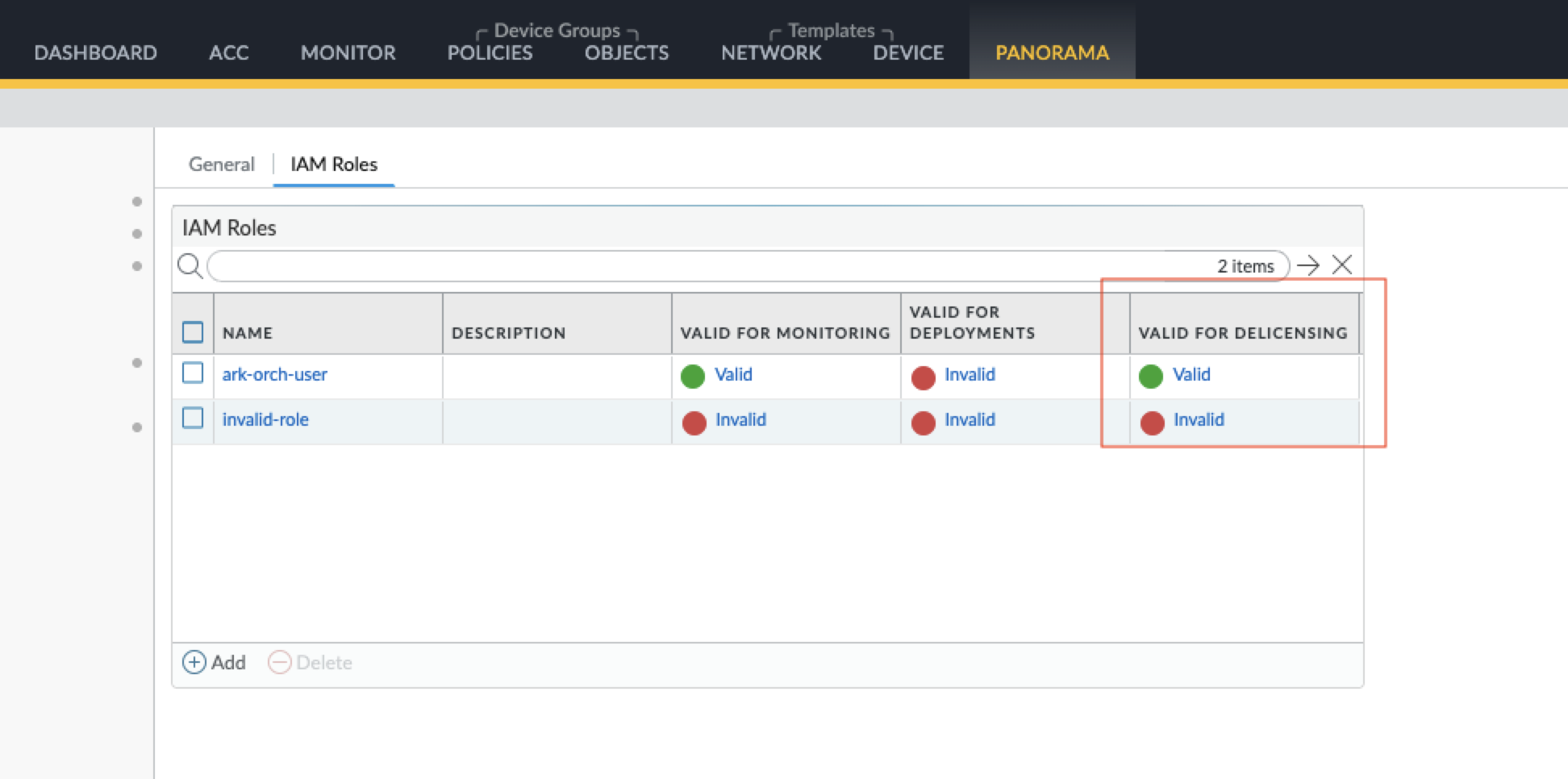
- Ensure the IAM role is valid for delicensing.
- From your Panorama web interface, Select Panorama > Plugins > AWS Plugin.Select NGFW > Setup > IAM Roles.
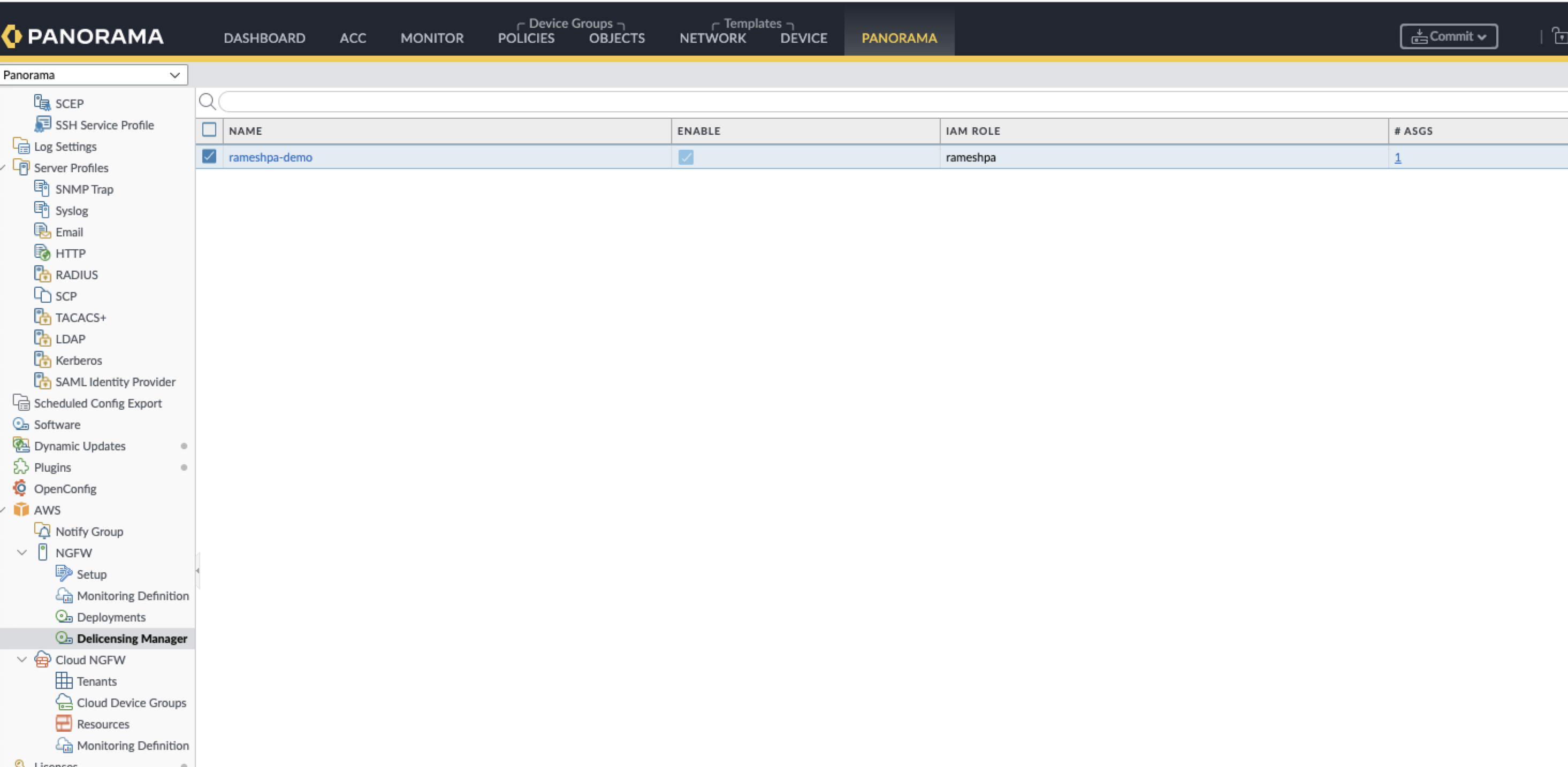
![]() Navigate to the Delicensing Manager in your Panorama web interface.
Navigate to the Delicensing Manager in your Panorama web interface.- From your Panorama web interface, Select Panorama > Plugins > AWS Plugin.Select Delicensing Manager.
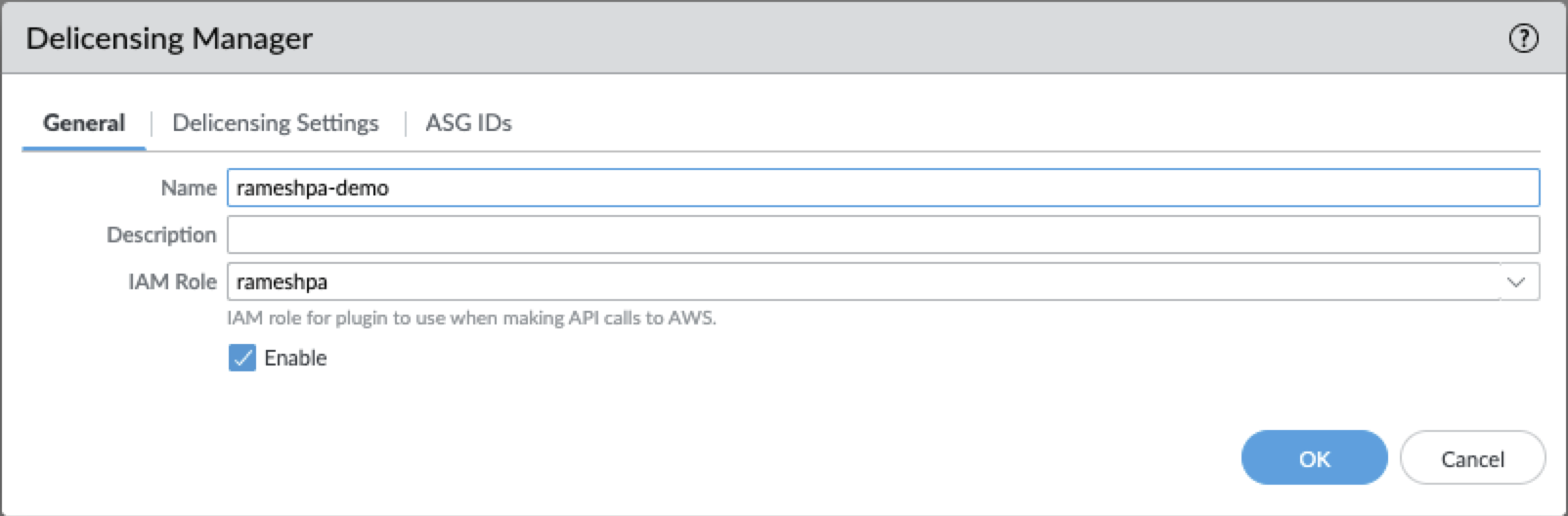
![]() Create a new Delicensing Manager configuration.
Create a new Delicensing Manager configuration.- On the Delicensing Manager page, Select Add.Enter a unique Name for the configuration.(Optional) Enter a Description to provide more context.
![]() Select the IAM Role for cloud account access in your AWS environment.Define your Panorama device management settings.
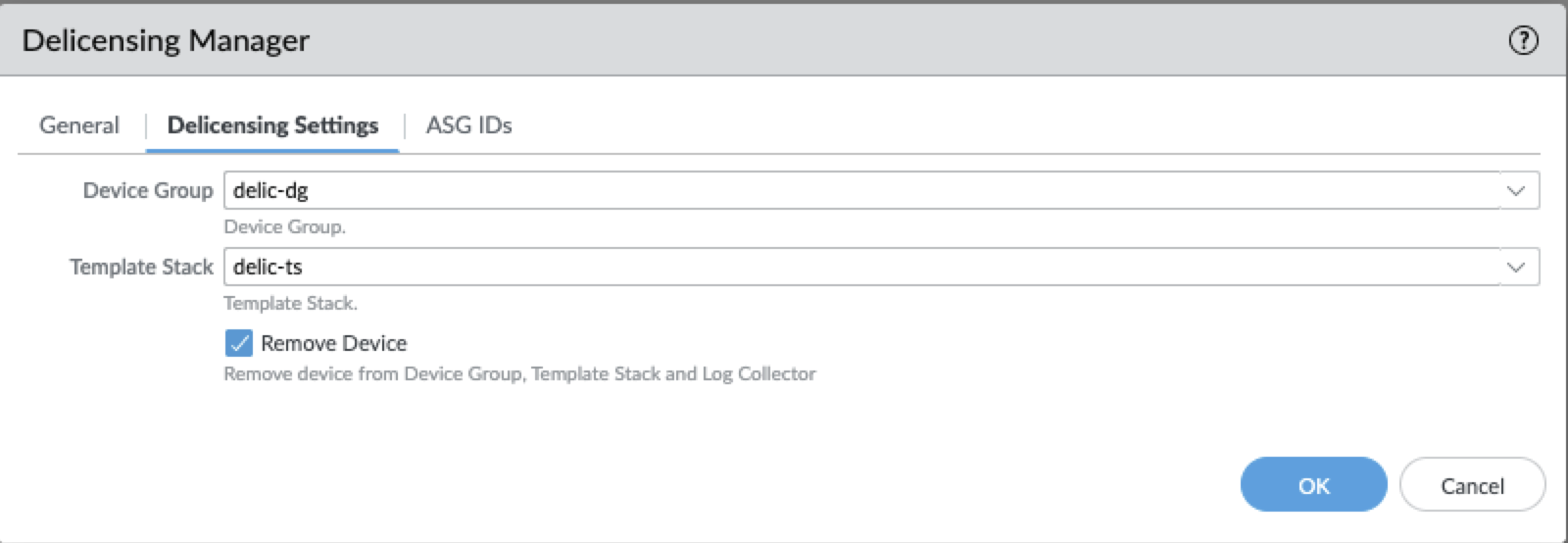
Select the IAM Role for cloud account access in your AWS environment.Define your Panorama device management settings.- Select the Device Group to which your monitored firewalls belong.Select the Template Stack that applies to your monitored firewalls.
![]() Specify the AWS Auto Scaling Groups (ASGs) to monitor.
Specify the AWS Auto Scaling Groups (ASGs) to monitor.- Select the Region where your ASGs are deployed.Select the specific ASG IDs from the prepopulated list.Select Remove Device to enable or disable automatic removal from Panorama inventory.Select Enable to enable the Delicensing Manager configuration.Commit the changes to your Panorama.Verify the Delicensing Manager status.
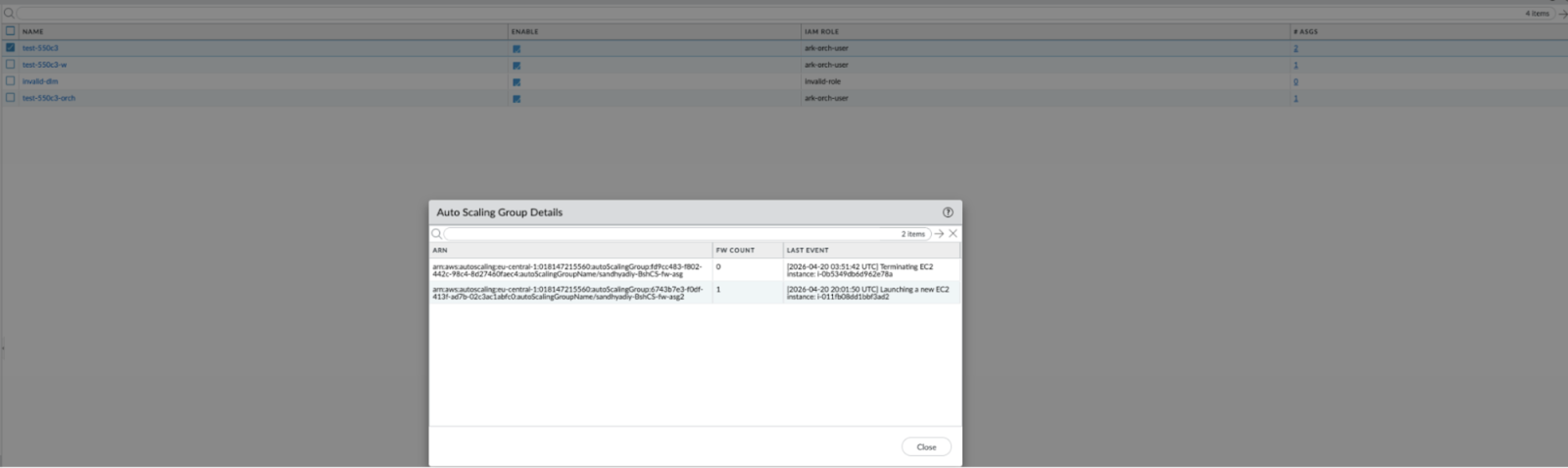
- On the Delicensing Manager page, review the ASG count. When clicked, it displays the firewall count and the last event detected on the ASG.(Optional) Select a specific configuration to view details.
![]()