Download PDF
Google Cloud Network Security Integration (NSI) with VM-Series Firewalls
Table of Contents

Expand all | Collapse all
-
- VM-Series Deployments
- VM-Series in High Availability
- IPv6 Support on Public Cloud
- Enable Jumbo Frames on the VM-Series Firewall
- Hypervisor Assigned MAC Addresses
- Custom PAN-OS Metrics Published for Monitoring
- Interface Used for Accessing External Services on the VM-Series Firewall
- PacketMMAP and DPDK Driver Support
- Enable NUMA Performance Optimization on the VM-Series
- Enable ZRAM on the VM-Series Firewall
- Additional XFF IP Logging
-
- Licensing and Prerequisites for Virtual Systems Support on VM-Series
- System Requirements for Virtual Systems Support on VM-Series
- Enable Multiple Virtual Systems Support on VM-Series Firewall
- Enable Multiple Virtual Systems Support on VM-Series in Panorama Console
- Enable Multiple Virtual Systems Support Using Bootstrap Method
-
- VM-Series Firewall Licensing
- Create a Support Account
- Serial Number and CPU ID Format for the VM-Series Firewall
- Use Panorama-Based Software Firewall License Management
-
- Activate Credits
- Create a Deployment Profile
- Activate the Deployment Profile
- Manage a Deployment Profile
- Register the VM-Series Firewall (Software NGFW Credits)
- Provision Panorama
- Migrate Panorama to a Software NGFW License
- Transfer Credits
- Renew Your Software NGFW Credits
- Deactivate License (Software NGFW Credits)
- Delicense Ungracefully Terminated Firewalls
- Set the Number of Licensed vCPUs
- Customize Dataplane Cores
- Migrate a Firewall to a Flexible VM-Series License
-
- Generate Your OAuth Client Credentials
- Manage Deployment Profiles Using the Licensing API
- Create a Deployment Profile Using the Licensing API
- Update a Deployment Profile Using the Licensing API
- Get Serial Numbers Associated with an Authcode Using the API
- Deactivate a VM-Series Firewall Using the API
- What Happens When Licenses Expire?
-
- Supported Deployments on VMware vSphere Hypervisor (ESXi)
-
- Plan the Interfaces for the VM-Series for ESXi
- Provision the VM-Series Firewall on an ESXi Server
- Perform Initial Configuration on the VM-Series on ESXi
- Add Additional Disk Space to the VM-Series Firewall
- Use VMware Tools on the VM-Series Firewall on ESXi and vCloud Air
- Use vMotion to Move the VM-Series Firewall Between Hosts
- Use the VM-Series CLI to Swap the Management Interface on ESXi
- Configure Link Aggregation Control Protocol
- ESXi Simplified Onboarding
-
-
- Supported Deployments of the VM-Series Firewall on VMware NSX-T (North-South)
- Components of the VM-Series Firewall on NSX-T (North-South)
-
- Install the Panorama Plugin for VMware NSX
- Enable Communication Between NSX-T Manager and Panorama
- Create Template Stacks and Device Groups on Panorama
- Configure the Service Definition on Panorama
- Deploy the VM-Series Firewall
- Direct Traffic to the VM-Series Firewall
- Apply Security Policy to the VM-Series Firewall on NSX-T
- Use vMotion to Move the VM-Series Firewall Between Hosts
- Extend Security Policy from NSX-V to NSX-T
-
- Components of the VM-Series Firewall on NSX-T (East-West)
- VM-Series Firewall on NSX-T (East-West) Integration
- Supported Deployments of the VM-Series Firewall on VMware NSX-T (East-West)
-
- Install the Panorama Plugin for VMware NSX
- Enable Communication Between NSX-T Manager and Panorama
- Create Template Stacks and Device Groups on Panorama
- Configure the Service Definition on Panorama
- Launch the VM-Series Firewall on NSX-T (East-West)
- Add a Service Chain
- Direct Traffic to the VM-Series Firewall
- Apply Security Policies to the VM-Series Firewall on NSX-T (East-West)
- Use vMotion to Move the VM-Series Firewall Between Hosts
-
- Install the Panorama Plugin for VMware NSX
- Enable Communication Between NSX-T Manager and Panorama
- Create Template Stacks and Device Groups on Panorama
- Configure the Service Definition on Panorama
- Launch the VM-Series Firewall on NSX-T (East-West)
- Create Dynamic Address Groups
- Create Dynamic Address Group Membership Criteria
- Generate Steering Policy
- Generate Steering Rules
- Delete a Service Definition from Panorama
- Migrate from VM-Series on NSX-T Operation to Security Centric Deployment
- Extend Security Policy from NSX-V to NSX-T
- Use In-Place Migration to Move Your VM-Series from NSX-V to NSX-T
-
-
- Deployments Supported on AWS
-
- Planning Worksheet for the VM-Series in the AWS VPC
- Launch the VM-Series Firewall on AWS
- Launch the VM-Series Firewall on AWS Outpost
- Create a Custom Amazon Machine Image (AMI)
- Encrypt EBS Volume for the VM-Series Firewall on AWS
- Use the VM-Series Firewall CLI to Swap the Management Interface
- Enable CloudWatch Monitoring on the VM-Series Firewall
- Publish ENA Network Performance Metrics to AWS CloudWatch
- VM-Series Firewall Startup and Health Logs on AWS
- Simplified Onboarding of VM-Series Firewall on AWS
- Use AWS Secrets Manager to Store VM-Series Certificates
- AWS Shared VPC Monitoring
- Use Case: Secure the EC2 Instances in the AWS Cloud
- Use Case: Use Dynamic Address Groups to Secure New EC2 Instances within the VPC
-
- Intelligent Traffic Offload
- Software Cut-through Based Offload
-
- Deployments Supported on Azure
- Deploy the VM-Series Firewall from the Azure Marketplace (Solution Template)
- Simplified Onboarding of VM-Series Firewall on Azure
- Deploy the VM-Series Firewall from the Azure China Marketplace (Solution Template)
- Deploy the VM-Series with the Azure Gateway Load Balancer
- Create a Custom VM-Series Image for Azure
- Deploy the VM-Series Firewall on Azure Stack
- Deploy the VM-Series Firewall on Azure Stack HCI
- Enable Azure Application Insights on the VM-Series Firewall
- Azure Health Monitoring
- Set up Active/Passive HA on Azure
- Use Azure Key Vault to Store VM-Series Certificates
- Use the ARM Template to Deploy the VM-Series Firewall
-
- About the VM-Series Firewall on Google Cloud Platform
- Supported Deployments on Google Cloud Platform
- Create a Custom VM-Series Firewall Image for Google Cloud Platform
- Prepare to Set Up VM-Series Firewalls on Google Public Cloud
-
- Deploy the VM-Series Firewall from Google Cloud Platform Marketplace
- Management Interface Swap for Google Cloud Platform Load Balancing
- Use the VM-Series Firewall CLI to Swap the Management Interface
- Enable Google Stackdriver Monitoring on the VM Series Firewall
- Enable VM Monitoring to Track VM Changes on Google Cloud Platform (GCP)
- Use Dynamic Address Groups to Secure Instances Within the VPC
- Use Custom Templates or the gcloud CLI to Deploy the VM-Series Firewall
- Enable Session Resiliency on VM-Series for GCP
- Google Cloud Network Security Integration (NSI) with VM-Series Firewalls
- Secure Boot Support for VM-Series on GCP
-
- Prepare Your ACI Environment for Integration
-
-
- Create a Virtual Router and Security Zone
- Configure the Network Interfaces
- Configure a Static Default Route
- Create Address Objects for the EPGs
- Create Security Policy Rules
- Create a VLAN Pool and Domain
- Configure an Interface Policy for LLDP and LACP for East-West Traffic
- Establish the Connection Between the Firewall and ACI Fabric
- Create a VRF and Bridge Domain
- Create an L4-L7 Device
- Create a Policy-Based Redirect
- Create and Apply a Service Graph Template
-
- Create a VLAN Pool and External Routed Domain
- Configure an Interface Policy for LLDP and LACP for North-South Traffic
- Create an External Routed Network
- Configure Subnets to Advertise to the External Firewall
- Create an Outbound Contract
- Create an Inbound Web Contract
- Apply Outbound and Inbound Contracts to the EPGs
- Create a Virtual Router and Security Zone for North-South Traffic
- Configure the Network Interfaces
- Configure Route Redistribution and OSPF
- Configure NAT for External Connections
-
-
- Choose a Bootstrap Method
- VM-Series Firewall Bootstrap Workflow
- Bootstrap Package
- Bootstrap Configuration Files
- Bootstrapping VM-Series in Virtual Metadata Collector Mode
- Generate the VM Auth Key on Panorama
- Create the bootstrap.xml File
- Prepare the Licenses for Bootstrapping
- Prepare the Bootstrap Package
- Bootstrap the VM-Series Firewall on AWS
- Bootstrap the VM-Series Firewall on Azure
- Bootstrap the VM-Series Firewall on Azure Stack HCI
- Bootstrap the VM-Series Firewall on Google Cloud Platform
- Verify Bootstrap Completion
- Bootstrap Errors
Google Cloud Network Security Integration (NSI) with VM-Series Firewalls
Google Cloud’s Network Security Integration (NSI) enables traffic inspection for
existing Virtual Private Cloud (VPC) networks by steering or mirroring traffic to Palo Alto
Networks Software Firewalls without requiring changes to the underlying network
configuration. The in-line deployment model uses packet intercept to redirect traffic to the
software firewall for inspection, while the out-of-band deployment model uses packet
mirroring to send a copy of the traffic for analysis.
Google Cloud's Network Security Integration (NSI) with Palo Alto Networks®
software firewalls, including VM-Series Next-Generation Firewalls (NGFWs), addresses
common cloud security challenges. Traditional cloud security deployments often faced
complexities such as intricate routing, operational overhead, and VPC peering
limitations. This integration simplifies deploying advanced security services within
Google Cloud, ensuring consistent security policies and faster protection across
cloud infrastructure without altering your application architecture or existing
networking. It provides granular East-West traffic inspection, crucial for
preventing lateral threat movement, and Layer 7 network runtime security through
deep packet inspection, which controls applications, users, and content to protect
against sophisticated threats.
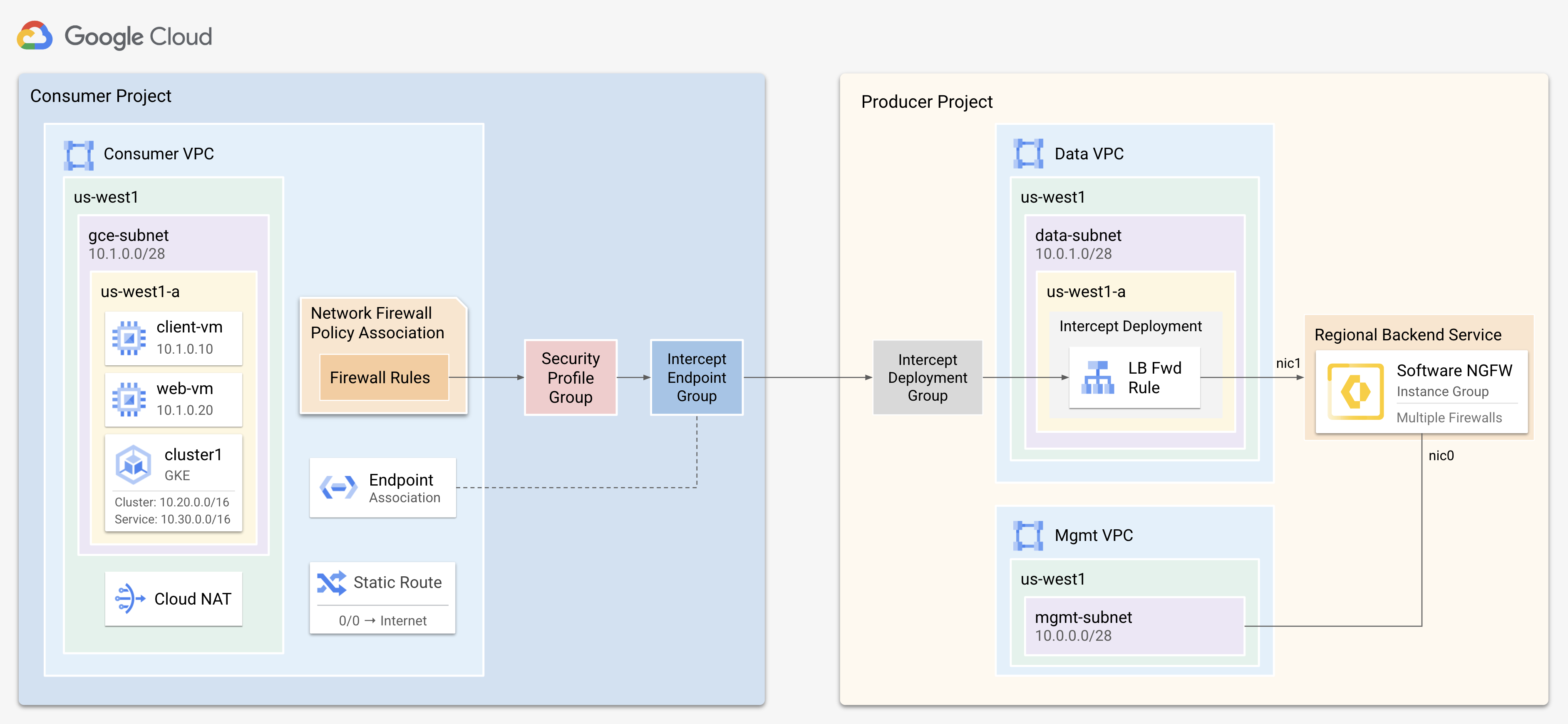
The NSI architecture operates on a producer-consumer model for scalable
security. In this model, security services (the producer) are deployed as a scalable
backend behind a Google Cloud internal load balancer, serving workloads (the
consumer). Key components include Palo Alto Networks® software firewalls with a load
balancer for advanced threat prevention and efficient traffic distribution, along
with Intercept Deployments and Endpoint Groups for security enforcement and policy
management. Geneve encapsulation is used to tunnel traffic to the firewall for
inspection without requiring extensive network modifications. Within the Geneve
packets, both the Security Profile Group ID (SPG-ID) and VPC ID are passed,
providing context for traffic.
NSI offers two primary modes:
- Inline (Packet Intercept) — Provides inline inspection for real-time threat prevention and blocking.
- Out-of-Band (Packet Mirroring) — Offers out-of-band monitoring for non-disruptive threat intelligence, compliance, and auditing.
Prerequisites
Before configuring the VM-Series firewall, ensure the following
prerequisites are met:
- Google Cloud Network Security Integration (NSI) Environment Setup:
- Fully provisioned and operational Google Cloud NSI environment.
- Producer and Consumer VPCs defined and interconnected.
- Intercept Deployments and Endpoint Groups configured and linked.
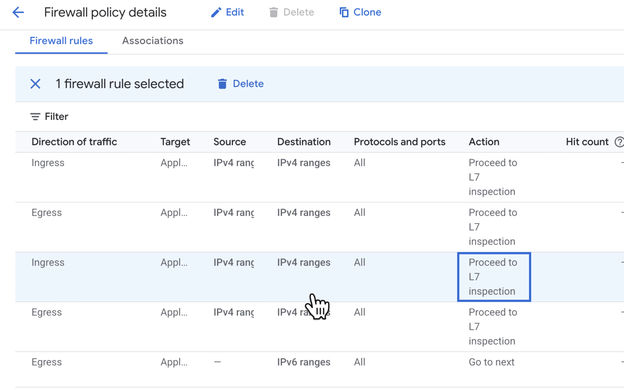
- Firewall rules in the Consumer VPC configured for Layer 7 redirection.
- Palo Alto Networks® VM-Series Firewall Deployment:
- A VM-Series firewall instance deployed within your Google Cloud Producer VPC.
- Essential VM-Series Firewall Geneve Configuration:
- gcp-geneve=true parameter for Geneve inspection enablement.
Google Cloud Deployment (for VM-Series Firewall Configuration):
- Create a Security Profile Group.
- In GCP, go to Network Security Integration > Security Profile Groups.
- Click Create Security Profile Group.
- Define traffic inspection policies (For example: allow/block rules).
- Click Save.
This defines inspection criteria for intercepted traffic.Set Up Intercept Endpoint Group- Go to Network Security Integration > Intercept Endpoint Groups.
- Click Create Intercept Endpoint Group.
- Select the consumer VPC(s) whose traffic should be intercepted.
- Associate the relevant Security Profile Group.
- Click Save.
This links consumer VPCs to the security inspection pipeline.Create Intercept Deployment GroupIn the producer project:- Go to Network Security Integration > Intercept Deployment Groups.
- Click Create Intercept Deployment Group.
- Associate the previously created Intercept Endpoint Group.
- Specify load balancing details if needed (to direct traffic to VM-Series firewall).
- Click Save.
Deploy the Intercept Deployment- Go to Intercept Deployments.
- Click Create Intercept Deployment.
- Link it to the Intercept Deployment Group.
- Configure backend service/load balancer pointing to VM-Series firewall NICs.
- Save.
This step deploys the inspection service tied to the endpoint and deployment groups.Configure Firewall Rules in Consumer VPCs.- In each consumer VPC, configure firewall rules to permit traffic destined for the Intercept Endpoint Group.
- (Optional), Set explicit routes if required by your architecture
Enable Geneve Encapsulation on the VM-Series Firewall.You must configure the VM-Series firewall to handle Geneve-encapsulated packets.Option A: Enable via CLISSH into the VM-Series firewall and run the following command:request plugins vm_series geneve-inspect enable yes|noThis command requires you to reboot the VM-Series firewall.CommitOption B: Enable via Bootstrap ConfigurationAdd the following setting to the init-cfg.txt in your bootstrap package:plugin-op-commands=geneve-inspect:enable|disableConfigure necessary firewall rules in GCP to permit traffic redirection. You must ensure that routing rules allow return traffic post-inspection and validate endpoint associations across VPCs.You can validate the deployment initiating the test traffic between VMs in the consumer VPC.- On the VM-Series firewall, go to Monitor > Traffic Logs for intercepted traffic entries.
- Confirm traffic is processed according to your policies.
