Insert a SIM Card into a PA-50R Series 5G Firewall
Table of Contents

Insert a SIM Card into a PA-50R Series 5G Firewall
Learn how to install or replace a SIM card in a PA-50R Series 5G
firewall.
Only the PA-52R-5G, PA-54R-POE-D-5G, and PA-56R-POE-5G firewalls use field
replaceable SIM cards to enable mobile connectivity. The following procedure
describes how to install or replace a SIM card.
- Locate the SIM access cover.
- On the PA-52R-5G, the cover is located on the side panel.
- On the PA-54R-POE-D-5G, the cover is located on the front panel.
- On the PA-56R-POE-5G, the cover is located on the front panel.
Remove the SIM access cover.- PA-54R-POE-D-5G and PA-56R-POE-5G—Use a Philips head screwdriver.
- PA-52R-5G—Use a Torx screwdriver.
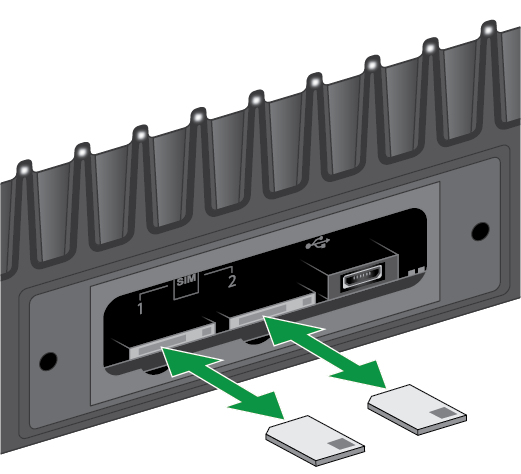
With the chamfered corner (sloping edge) of the SIM facing towards the slot, gently push the SIM into the SIM 1 or SIM 2 slot until the SIM clicks into position.![]() The SIM may get damaged if you attempt to insert it into the slot by the wrong end.Tweezers may be required to install the SIM cards. If using tweezers, use only the ones provided.SIM 1 is the primary (active) SIM slot by default. If you intend to use only one SIM, it is recommended to use SIM 1 as the primary slot. A SIM installed in SIM 2 enables redundancy.After inserting the SIM, place the SIM cover back onto the device and refasten the screw(s).(To remove a SIM card) Gently push the SIM inward using your fingertip. Release your fingertip and pull out the SIM. It is recommended that you use tweezers to extract the SIM.
The SIM may get damaged if you attempt to insert it into the slot by the wrong end.Tweezers may be required to install the SIM cards. If using tweezers, use only the ones provided.SIM 1 is the primary (active) SIM slot by default. If you intend to use only one SIM, it is recommended to use SIM 1 as the primary slot. A SIM installed in SIM 2 enables redundancy.After inserting the SIM, place the SIM cover back onto the device and refasten the screw(s).(To remove a SIM card) Gently push the SIM inward using your fingertip. Release your fingertip and pull out the SIM. It is recommended that you use tweezers to extract the SIM.