
Compliance
Table of Contents

Compliance
Review the safety warnings, certifications, and supporting documents for the
PA-50R Series firewalls.
Read the Safety Warnings prior to installing the PA-50R Series firewall hardware. This
section also lists certifications that apply to the firewall.
- Safety Warnings
- Safety Warnings (French)
- Certifications
- Tamper Proof Statement
- Third-Party Component Support
Safety Warnings
Review the cautions and warnings pertaining to the PA-50R Series firewalls prior to
installing the hardware.
To avoid personal injury or death for yourself and others and to avoid
damage to your Palo Alto Networks hardware, be sure you understand and prepare for the
following warnings before you install or service the hardware. You will also see warning
messages throughout the hardware reference where potential hazards exist.
All Palo Alto Networks products with laser-based optical
interfaces comply with 21 CFR 1040.10 and 1040.11.
- When installing or servicing a Palo Alto Networks firewall or appliance hardware component that has exposed circuits, ensure that you wear an electrostatic discharge (ESD) strap. Before handling the component, make sure the metal contact on the wrist strap is touching your skin and that the other end of the strap is connected to earth ground.
- Use grounded and shielded Ethernet cables (when applicable) to ensure agency compliance with electromagnetic compliance (EMC) regulations.
- Fiber SFP transceivers emit invisible infrared lasers that can cause significant retinal damage if they make contact with your eyes. As a best practice, power off the device when installing or replacing an SFP module. If handling an SFP module while the device is operating, apply dust caps to the end of the transceiver or make sure to keep it pointed away from your eyes.
- Do not connect a supply voltage that exceeds the input range of the firewall or appliance. For details on the electrical range, refer to electrical specifications in the hardware reference for your firewall or appliance.
-
![]() Caution: Shock hazardDisconnect all power cords (AC or DC) from the power inputs to fully de-energize the hardware.
Caution: Shock hazardDisconnect all power cords (AC or DC) from the power inputs to fully de-energize the hardware.

- Do not connect or disconnect energized DC wires to the power supply.
- The DC supply source must be located within the same premises as the firewall.
- The firewall must be in the same immediate area (such as adjacent cabinets) as any other equipment that has a connection between the earthing conductor of the DC supply circuit and the earthing of the DC system.
- Install all firewalls that use DC power in restricted access areas only. A restricted access area is where access is granted only to craft (service) personnel using a special tool, lock and key, or other means of security, and that is controlled by the authority responsible for the location.
- Install the firewall DC ground cable only as described in the power connection procedure for the firewall that you are installing. You must use the American wire gauge (AWG) cable specified and torque all nuts to the torque value specified in the installation procedure for your firewall.
Radio Antenna Safety Warnings
- Radio Frequency (RF) Radiation Exposure Warning: Hazardous Radiation Exposure Warning—Adjustments or procedures other than those specified may result in hazardous RF radiation exposure. A minimum distance of 20cm (7.87in) must be maintained between the operating radio antennas and personnel.
- Antenna Installation Warning: To avoid hazardous RF radiation exposure, ensure the device is switched off when installing or changing antennas.
- Cellular Devices: The USB 2.0 port on the cellular device is used for maintenance only.
Safety Warnings (French)
Review the French-language safety warnings for the PA-50R Series firewalls prior to
installing the hardware.
- French Translation: Lorsque vous installez ou que vous intervenez sur un composant matériel de pare-feu ou de dispositif Palo Alto Networks qui présente des circuits exposés, veillez à porter un bracelet antistatique. Avant de manipuler le composant, vérifiez que le contact métallique du bracelet antistatique est en contact avec votre peau et que l’autre extrémité du bracelet est raccordée à la terre.
- French Translation: Des câbles Ethernet blindés reliés à la terre doivent être utilisés pour garantir la conformité de l'organisme aux émissions électromagnétiques (CEM).
- French Translation: Veillez à ce que la tension d’alimentation ne dépasse pas la plage d’entrée du pare-feu ou du dispositif. Pour plus d’informations sur la mesure électrique, consulter la rubrique des caractéristiques électriques dans la documentation de votre matériel de pare-feu ou votre dispositif.
-
![]() French Translation: (Tous les appareils Palo Alto Networks avec au moins deux sources d’alimentation) Débranchez tous les cordons d’alimentation (c.a. ou c.c.) des entrées d’alimentation et mettez le matériel hors tension.
French Translation: (Tous les appareils Palo Alto Networks avec au moins deux sources d’alimentation) Débranchez tous les cordons d’alimentation (c.a. ou c.c.) des entrées d’alimentation et mettez le matériel hors tension.
- Ne raccordez ni débranchez de câbles c.c. sous tension à la source d'alimentation.
- La source d'alimentation c.c. doit se trouver dans les mêmes locaux que ce pare-feu.
- Le pare-feu doit se trouver dans la même zone immédiate (des armoires adjacentes par exemple) que tout autre équipement doté d'un raccordement entre le conducteur de mise à la terre du même circuit d'alimentation c.c. et la mise à la terre du système c.c.
- Tous les pare-feux utilisant une alimentation c.c. sont conçus pour être installés dans des zones à accès limité uniquement. Une zone à accès limité correspond à une zone dans laquelle l'accès n'est autorisé au personnel (de service) qu'à l'aide d'un outil spécial, cadenas ou clé, ou autre dispositif de sécurité, et qui est contrôlée par l'autorité responsable du site.
- Installez le câble de mise à la terre c.c. du pare-feu comme indiqué dans la procédure de raccordement à l'alimentation pour le pare-feu que vous installez. Utilisez le câble American wire gauge (AWG) indiqué et serrez les écrous au couple indiqué dans la procédure d'installation de votre pare-feu.
Certifications
Review the certifications of the PA-50R Series firewalls.
The following table provides an overview of PA-50R Series firewall hardware
certifications.
| Category | Certification | Standard / Description |
|---|---|---|
| Electrical & Physical Safety | NRTL | UL 62368-1 / CSA C22.2 No. 62368-1:25, Fourth Edition |
| CB Scheme | IEC/EN 62368-1, IEC/EN 60950-1 (international electrical safety) | |
| CE Low Voltage Directive | LVD 2014/35/EU (European Union electrical equipment safety) | |
| Laser Safety | 21 CFR 1040.10, 1040.11; IEC 60825-1 (Class 1 laser, optical transceivers and SFP/SFP+ ports) | |
| Materials & Environmental Sustainability | EU RoHS | Directive 2011/65/EU and Amendment 2015/863 |
| China RoHS | Management Methods for Controlling Pollution Caused by Electronic Information Products | |
| EU REACH | EC 1907/2006 (Substances of Very High Concern) | |
| WEEE Directive | 2012/19/EU (end-of-life recycling requirements) | |
| California Proposition 65 | Chemical safety and exposure limit compliance disclosures | |
| Taiwan Declaration of Restricted Substances | Taiwan presence condition marking for restricted hazardous substances in electronic products | |
| Electromagnetic Compatibility (EMC) & Radio / Regulatory | FCC Part 15 (47 CFR Part 15) | Class A for enterprise rack-mounted hardware |
| FCC Parts 22, 24, 27 & Part 1.1310 | Licensing and RF exposure limits for cellular/5G-enabled firewalls | |
| CE EMC Directive | 2014/30/EU (European Union electromagnetic compatibility) | |
| CE Radio Equipment Directive (RED) | 2014/53/EU (required for cellular/5G-equipped hardware) | |
| ISED / ICES-003 Class A | Canadian Innovation, Science and Economic Development EMC standard | |
| VCCI Class A / Class B | Japan Voluntary Control Council for Interference by Information Technology Equipment | |
| BSMI | Taiwan Bureau of Standards, Metrology and Inspection for product safety requirements and regulations | |
| NCC |
Taiwan National Communications Commission for telecommunications,
radio frequency (RF), and wireless communication equipment.
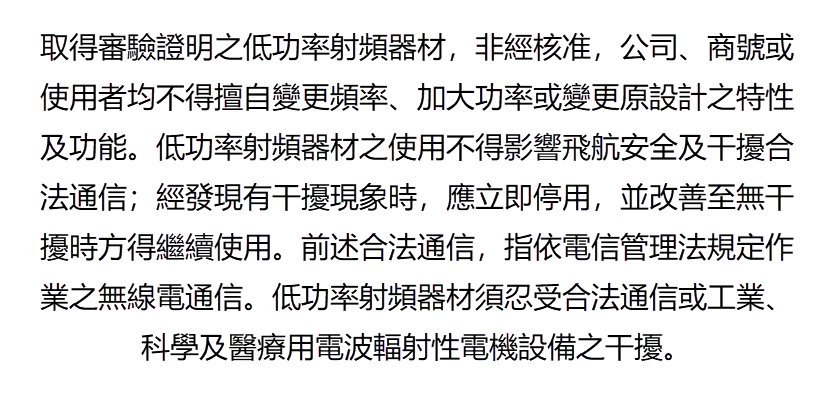
| |
| KC / KCC Class A | South Korea National Radio Research Agency EMC certification | |
| RCM / ACMA | Australian Communications and Media Authority (EMC and telecommunications) | |
| MIC (Ministry of Internal Affairs and Communications, Japan) | Japan radio licensing and type certification for wireless communications equipment | |
| UKCA (UK Conformity Assessed) | UK post-Brexit conformity mark covering electrical equipment safety (UK S.I. 2016/1101) and electromagnetic compatibility (UK S.I. 2016/1091) | |
| Shock, Vibration, Humidity & Environmental Tolerance | IEC 60068 Series |
|
| MIL-STD-810G / MIL-STD-810H | US Military Standard for vibration and shock | |
| IP Rating (Ingress Protection) | Dust-tight and liquid enclosure ratings (such as IP30 or IP40 for fanless metal enclosures) | |
| Hazardous Locations & Utility / Industrial Substation Standards | IEC 61850-3 | Communications networking for electric power utility substations (thermal stability, shock/vibration, EMC emission/immunity) |
| IEEE 1613 | Environmental and EMC immunity testing requirements for communications firewalls in electric power substations | |
| NEBS Level 3 (GR-63-CORE & GR-1089-CORE) | Telecom carrier certification for fire resistance, seismic stability, acoustic noise, and DC power surge immunity | |
| Security, Cryptographic & Government Hardware Assurance | FIPS 140-3 (NIST CMVP) | Cryptographic module validation for physical and logical security of PAN-OS hardware |
| Common Criteria (CCRA / ISO/IEC 15408) | NIAP certification under the Network Device Protection Profile (NDPP) and Stateful Traffic Filter Extended Package | |
| USGv6 | NIST IPv6 profile certification for federal agency network infrastructure | |
| Physical Tamper Protection | Tamper-evident seals and tamper-proof enclosure designs |
Tamper Proof Statement
Learn how to check if your new PA-50R Series firewall was tampered with during
shipping.
To ensure that products purchased from Palo Alto Networks were not tampered
with during shipping, verify the following upon receipt of each product:
- The tracking number provided to you electronically when ordering the product matches the tracking number that is physically labeled on the box or crate.
- The integrity of the tamper-proof tape used to seal the box or crate is not compromised.
- The integrity of the warranty label on the firewall or appliance is not compromised.
Third-Party Component Support
Read the third-party component support statement for the PA-50R Series
firewall.
Before you consider installing third-party hardware, read the Palo Alto Networks Third-Party Component Support
statement.