
Table of Contents

Use the Hub
Contains instruction to activate a product through hub
Next-Generation Firewall, SD-WAN, and some SASE products that have not yet transitioned
to the new activation experience during the phased rollout will use the existing
activation workflow described in this section.
Activate a License or Subscription for Paid Products
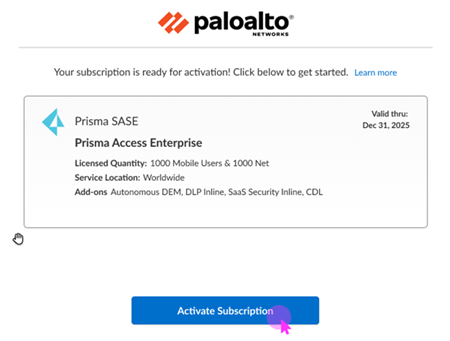
First-time license activation for paid products is through an email that you receive
from Palo Alto Networks regarding. The email contains an activation link. Activating
a product from the activation link creates a single tenant where the product is
deployed.
![]()
After you activate a product, you have access to Common Services to manage your product from the
Activation Console or Strata Cloud Manager. You get assigned the
Superuser role to manage your product.
Single Customer Support Portal Activation Behavior
See the license activation topics in this guide for details about activating specific
products. In general, for a single Customer Support Portal account, certain fields
in the activation form are prepopulated for you. Depending on your product, you
might be asked to select a region where you want to deploy the product, to select or
create Strata Logging Service to store your logs, to select or create a Cloud
Identity Engine instance to identify and verify all users across your
infrastructure, or to associate devices or appliances.
![]()
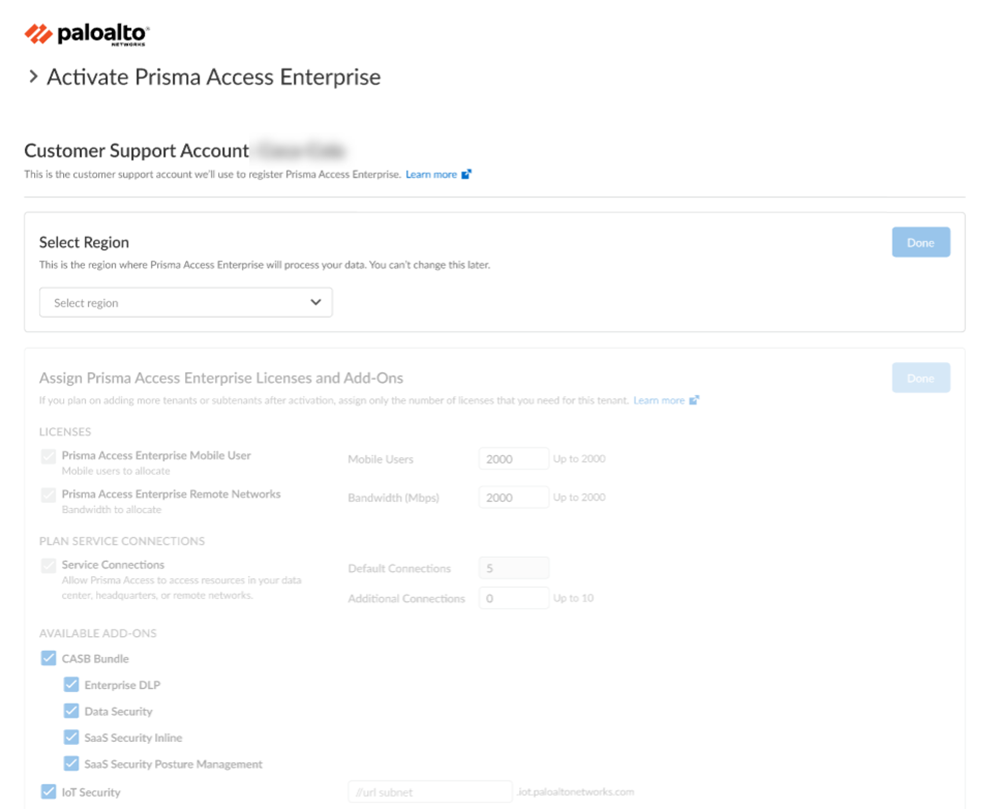
- In the activation workflow, the Customer Support Portal account associated with the user is prepopulated if there is only one Customer Support Portal account associated with the user.
- For the selected Customer Support Portal account, if there is no prior tenant associated, the tenant field is autopopulated with the same name as the Customer Support Portal account.
- After completing the activation, the user who is activating the first product is added as a superuser on the selected tenant, and can also add other users.
- The default tenant can't be deleted as long as there are products activated in the tenant.
- If the user's selected Customer Support Portal account has a previously mapped tenant, and the user activating a license does not have access to that tenant, the user is informed to contact the tenant account admin to request access.
Multiple Customer Support Portal Activation Behavior
See the license activation topics in this guide for details about activating specific
products. In general, if you have multiple Customer Support Portal accounts, you
will select the Customer Support Portal account that you want to use for managing
your product. Depending on your product, you might be asked to select a region where
you want to deploy the product, to select or create Strata Logging Service to
store your logs, to select or create a Cloud Identity Engine instance to identify
and verify all users across your infrastructure, or to associate devices or
appliances.
![]()

- If there are multiple Customer Support Portal accounts associated with the user activating a license, the user can select a specific Customer Support Portal account.
- For the selected Customer Support Portal account, if there is no prior tenant associated, the tenant field is autopopulated with a default tenant that has the same name as the Customer Support Portal account name.
- After completing the activation, the user who is activating the first product is added as a superuser on the selected tenant, and they should be able to add other users.
- If the selected Customer Support Portal account has a previously mapped tenant, and the user does not have access to that tenant, the user is informed to contact the account admin to request access.
- If users require a multitenant setup, they are provided with an option to create a new tenant or a child tenant. They can create the hierarchy with the first child in the tenant management page. They can select the child tenant or create a new child tenant from the activation workflow.
- If multiple tenants exist where products have been previously activated for the Customer Support Portal account, but the user does not have access to those tenants, the user is warned that the product will be activated in a different tenant from where the other services are currently active. The user gets the option to proceed anyway, but is warned that dependent products need to be activated in the same tenant.
Managed Security Service Provider (MSSP) Activation Behavior
See the license activation topics in this guide for details about activating specific
products. In general, for a Managed Security Service Provider (MSSP), you will
select the Customer Support Portal account that you want to use for managing your
customers' products. You will create a tenant hierarchy to manage them. Depending on
the product, you might be asked to select a region where you want to deploy the
product, to select or create Strata Logging Service to store the logs, to
select or create a Cloud Identity Engine instance to identify and verify all users
across the infrastructure, or to associate devices or appliances.
![]()
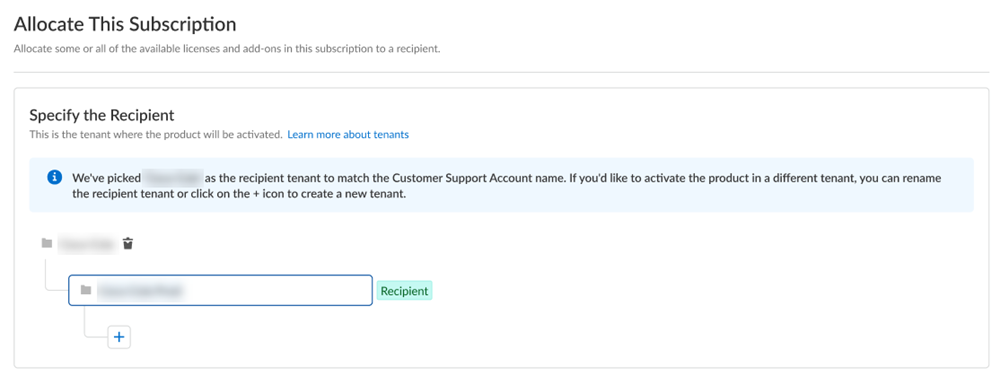
After you activate a tenant heirarchy, you have access to Common Services to manage your tenants from the
Activation Console or Strata Cloud Manager. You can also use Strata Multitenant Cloud Manager aggregated views for monitoring information across all of your
tenants.
- In the case of managed security service providers (MSSP), the end customers are managed by the MSSP that owns the Customer Support Portal account.
- The default tenant is associated with the MSSP Customer Support Portal account. The user activating the product must be granted access to that tenant, and then user can create child tenants and activate products in the child tenant.