
What’s New in Strata Multitenant Cloud Manager
Table of Contents

What’s New in Strata Multitenant Cloud Manager
Review new features and behaviors in Strata Multitenant Cloud Manager.
Here’s what’s new in Strata Multitenant Cloud Manager. These are the features we’re
currently working on that are specific to multitenant monitoring, services, and device
management. You can also check what’s new in the NetSec platform.
- What's New in September 2026
- What's New in July 2026
- What's New in May 2026
- What's New in April 2026
- What's New in November 2025
- What's New in September 2025
- What's New in February 2025
- What's New in September 2024
- What's New in May 2024
- What's New in March 2024
- What's New in February 2024
- What's New in December 2023
- What's New in September 2023
- What's New in August 2023
- What's New in June 2023
- What’s New in October 2022
- What’s New in September 2022
- What’s New in August 2022
- What’s New in July 2022
- What’s New in June 2022
- What’s New in May 2022
What's New in September 2026
Pay-As-You-Go Licensing for MSPs
You can now use Pay-As-You-Go (PayGo)a flexible,
monthly postpaid pricing model that lets you provision tenants on demand and
pay based on provisioned capacity, eliminating the need for per-customer
transactions and licenses purchases when scaling your Managed Services
tenant base. PayGo introduces in-product metering to generate monthly
invoice based on the activated PayGo packages and users/site counts, giving
you complete flexibility as your customer base grows.
PayGo supports Prisma® Browser (minimum one user) and Prisma Access with SASE
SWG (minimum 50 users) or SASE ENT (minimum 100 users). You can also enable
add-ons such as Remote Networks (Site-based), SCM Pro (with Autonomous
Digital Experience Management (ADEM) and AIOps), and secure access to
Private Applications.
The Strata Multitenant Cloud Manager (MSP) platform now supports end-to-end
PayGo management. You can onboard child tenants through a guided wizard,
modify user or site quantities and add-ons, and deprovision tenants when
they are no longer needed. Daily metering provides accurate, prorated
billing for changes made during a billing cycle, with a consolidated monthly
invoice. The Business dashboard provides visibility into PayGo activations,
including per-tenant capacity provisioned, activity logs, and monthly trends
across the tenant hierarchy.
Prisma SASE App for ServiceNow Enhancements
- Support for SDWAN incidents.
- Support for an SDWAN workflow to automate site deployment.
- Support for the following Prisma Access Automation Workflows:
- Remote Networks Aggregate Bandwidth
- Remote Networks - Site-Based Licensing
What's New in July 2026
Domain-Specific Summary and Insights
The Summary and Insights page in Strata
Multitenant Cloud Manager has been completely redesigned to help you find relevant
information faster across your tenant hierarchy. The previous Summary page organized
data by product tabs (SASE, Prisma Access, Prisma SD-WAN), presenting all widgets in
a single flat view. The new design organizes information by role and task, making it
easier to locate the metrics that matter most to you.
The new Summary and Insights page replaces product-based tabs with three domain-specific views:
- Security — Assess threat detection and blocking effectiveness across tenants. Replaces the threat-related widgets from the previous product tabs.
- Operational — Monitor real-time infrastructure health and resolve connectivity issues. Replaces the infrastructure and status widgets.
- Business — Track service adoption, subscription utilization, and subscription status. This is an entirely new capability with no equivalent in the previous portal.
A scope selection control within the Security and Operational tabs lets you switch between Prisma Access, Prisma SD-WAN, and Prisma Browser without adding more top-level tabs. The previous Summary and Insights pages are now combined into a single Summary and Insights page in the left navigation.
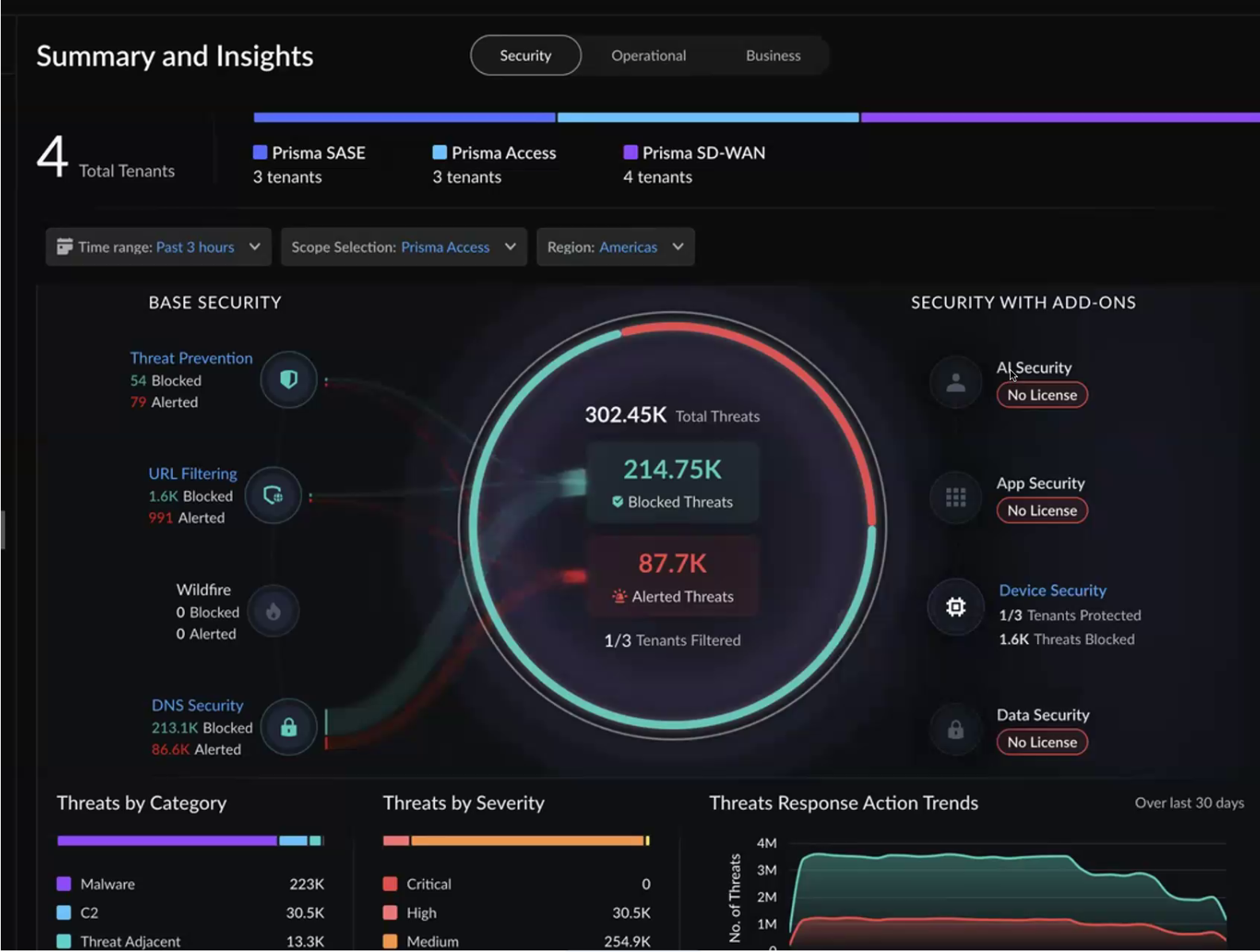
This redesigned experience provides:
- Faster time to action — Each view is tailored to a specific task. You go directly to the relevant tab instead of scrolling through unrelated widgets.
- Add-on visibility — The Security view separates base security from add-on services (AI Security, App Security, Device Security, Data Security), showing which tenants have gaps in coverage.
- Real-time operational awareness — The Operational view shows the current state of your infrastructure without a time range filter, highlighting which connections are down and which tenants are affected.
- Executive-level business reporting — The Business view provides service adoption metrics, bandwidth usage, usage trends, add-on penetration, subscription utilization (over-utilized vs. standard), and license lifecycle tracking across all tenants.
- Scalable design — New products can be added to the scope selection without cluttering the interface.
- Streamlined resolution workflow — Click through from aggregated metrics to the tenant table, open the recommendation panel, and navigate directly to the single-tenant view to take action.
For information about the new location of widgets from the previous Monitor,
Insights, and Summary dashboards, see Dashboard Widget Mapping.
Strata Multitenant Cloud Manager UI Enhancements
The Strata Multitenant Cloud Manager navigation has been reorganized to simplify access to service provider workflows and monitoring information.
Service Provider Interconnect
All service provider–related configuration and monitoring pages are now consolidated under the Telcos section.
- Configuration > Configuration Center is now Telcos > Setup
- Configuration > SP Interconnect is now Telcos > SP Interconnect
- Configuration > 5G SASE is now Telcos > 5G SASE
- Insights > Service Provider Interconnect > Summary is now Telcos > SP Interconnect Summary
- Insights > 5G Summary is now Telcos > 5G Summary
Summary and Insights
The Monitor, Insights, and Summary dashboards have been consolidated into a redesigned Summary and Insights experience.
The new dashboard organizes data into three domain-specific views—Security, Operational, and Business—replacing the previous product-based tabs. This streamlined layout helps you access relevant insights more efficiently based on your role and objectives.
For information about the new location of widgets from the previous Monitor,
Insights, and Summary dashboards, see Dashboard Widget Mapping.
Prisma Browser for Managed Service Providers
Prisma Browser for Managed Service Providers
Many organizations lack the time, resources, or expertise to manage enterprise-grade
security tools effectively. Prisma® Browser for MSPs bridges this gap
by enabling managed service providers to deliver powerful, browser-based security to
customers of any size—even starting with a single user. This approach streamlines
deployment, centralizes management, and removes the need for customers to maintain
their own complex security infrastructure.
Key Features
- Flexible Licensing — The Prisma Browser license and flexible license pooling let you purchase a central quantity of licenses and dynamically allocate or reclaim them from child tenants, making license management efficient for variable customer sizes. Child tenants can be as low as one user, while the root tenant still requires the minimum quantity (200) of standalone Prisma Browser licenses.
- Centralized Management — The Strata Multitenant Cloud Manager provides a unified view of all customer tenants, allowing you to centrally manage browsing policies, enforce security controls, and maintain consistent configurations across your customer base. It also offers consolidated visibility into user activity, security events, and browser-based threats, enabling proactive monitoring and quicker response to risks.
- Streamlined Onboarding — The new add tenant wizard is a self-service workflow that automates provisioning, including license allocation and Identity Provider (IdP) setup.
- Simplified Identity — You can leverage the MSP Identity Provider (MSP IdP) architecture to host a single, centralized IdP at the root level to manage all users, eliminating the need for each small business to integrate its own complex IdP.
- Reporting and Visibility — The dashboard surfaces aggregated security metrics across tenants, including the total number of websites analyzed and a detailed breakdown of threats blocked by category and method. You can also generate and download tenant-specific reports for individual customers, covering top malicious websites, malware families, and malicious extensions blocked to demonstrate value.
What's New in May 2026
Associate Snippets with Folders in Bulk Configuration
You can now associate bulk configuration snippets with one or
more folders (such as Global, Prisma Access, or All Firewalls) before pushing them
to tenants, enabling more granular control over which folder scopes receive specific
configurations and reducing the risk of applying incompatible settings.
- Targeted Deployments: Associate snippets with specific folders so configurations are applied only to the intended folder scopes, preventing misconfigurations across different deployment targets.
- Reduced Deployment Risk: By explicitly linking snippets to folders during the assignment workflow, you eliminate the possibility of pushing incompatible configurations to tenants, improving deployment reliability and compliance.
- Streamlined Workflow: The snippet association step integrates directly into the bulk configuration assignment process, allowing you to define folder associations once before pushing to multiple tenants—saving time and reducing manual errors.
Custom BGP IPv4 Address Allocation for VLAN Attachments
You can now define custom IP addresses for BGP peering sessions on GCP VLAN
attachments to gain greater control over your network addressing and simplify
integration with existing service provider infrastructure.
By default, GCP automatically assigns link-local addresses from the 169.254.0.0/16
range for BGP peering between the edge router and the cloud router. While
functional, auto-assigned addresses can conflict with existing network
configurations and make troubleshooting more complex in large-scale deployments.
With custom BGP IPv4 address allocation, you choose between two options when adding a
VLAN attachment:
- Automatically Allocate Link-Local Range—GCP assigns addresses from the 169.254.0.0/16 range (default behavior).
- Specify Custom IP Address—You define Cloud Router IP and Peer IP addresses for both the primary and secondary VLAN attachments using /30 subnets.
Custom IP allocation gives you consistent, predictable addressing across your
interconnects, simplifies route management, and aligns BGP peering with your
existing IP address plan. This is particularly beneficial if you manage multiple
tenants and require deterministic IP assignments for operational visibility and
automated provisioning workflows.
You can configure custom BGP IPv4 addresses when you add a VLAN attachment to an
interconnect.
What's New in April 2026
Device Security Add-on Support for SASE 5G
The SASE 5G solution now integrates with the Device Security add-on to discover and
monitor 5G-connected devices. You can now discover and monitor all SASE 5G devices by leveraging the Device Security add-on integration, which enables all SASE 5G devices to appear
in the IoT dashboard in Strata Cloud Manager.
Using the device IMEI, Device Security enriches device identity with details
including the device model, manufacturer, and type, and provides policy
recommendations to help improve device visibility and security posture.
What's New in November 2025
Prisma SASE App for ServiceNow
The Prisma SASE App is a ServiceNow certified
app which helps customers who have standardized on ServiceNow as their automation
and ITSM platform to configure and integrate with Prisma SASE accelerating time to
value.
This integration delivers significant value for both enterprise customers and Managed
Service Providers (MSPs), bridging the gap between network security operations and
IT service management for faster incident response, consistent configuration
management, and greater operational efficiency.
The application streamlines
operations and enhances visibility through several core modules:
- Unified Management and Simplified Operations: Manage Prisma SASE infrastructure, incident configuration, and log forwarding directly from ServiceNow, significantly reducing operational complexity. MSPs can leverage Multi-Tenant Support to manage multiple customer domains with isolated data views.
- Accelerated Deployment with Automated Workflows: The app includes a dedicated Automated Workflows module to minimize manual setup and R&D effort.
- It automates Day 1 to Day N workflows across Prisma SASE tenants.
- Configuration and lifecycle management tasks—such as onboarding tenants, configuring infrastructure, and setting up ZTNA connectors—can be executed using either intuitive UI forms or JSON-based templates.
- Each workflow follows an approval process and includes detailed execution logs for audit and tracking.
- Enhanced Visibility and Control: Gain a consolidated, end-to-end view of Prisma SASE incidents and infrastructure status.
- Incident Management provides centralized visibility, automatically creating ServiceNow incidents from Prisma SASE alerts.
- Dashboards and Visibility offer real-time insights into threat trends, application usage, license utilization, and tenant resources.
- Streamlined Support: Users can raise and track Customer Support Ticketing (CSP) tickets directly from the app, with the option to correlate tickets to existing incidents for efficient troubleshooting.
Service Provider Interconnect with Non-IPsec
The Service Provider Interconnect (SPI)
feature, formerly known as Service Provider Backbone (Cleanpipe), has been
transformed to support native IP ingress and high-bandwidth connectivity, enabling
service providers to deliver Prisma Access services more efficiently. With support
for up to 20 Gbps per tenant and 400 Gbps per interconnect, SPI eliminates IPsec
tunnel overhead and enhances throughput and scalability for large enterprise and
MPLS deployments. It also unlocks the complete Prisma Access feature set—including
ZTNA, CASB, and IoT Security—while maintaining strict multi-tenant isolation and
offering flexible egress options through either the service provider’s network or
Prisma Access-managed points.
Guided Configuration Workflow
The new Configuration Center provides a guided workflow that assists
administrators in the end-to-end configuration of interconnects. The workflow covers
all key stages, including ingress configuration involving cloud service provider
setup, interconnect configuration, VLAN and IP pool configuration, and egress path
definition. This guided process simplifies complex setup tasks and ensures accuracy
and consistency across all interconnect deployments.
Visibility and Monitoring Enhancements
Management and monitoring interfaces are enhanced to offer a unified,
centralized experience across all interconnects and associated tenants. You can:
- View interconnect type, operational status, and capacity utilization at a glance.
- Access detailed per-tenant insights on VLAN health, traffic usage, and routing states.
Prisma SASE 5G Advanced Monitoring
The Prisma 5G SASE feature has been enhanced
to deliver deeper monitoring, richer observability, and a more streamlined
configuration experience for both RADIUS and API-based integrations. The
configuration workflow is also enhanced and combined with the Service Provider
Interconnect (SPI) workflow, enabling administrators to configure and monitor 5G and
interconnect environments seamlessly from a unified interface.
Key Enhancements
Unified Configuration Workflow
- Administrators can define the connection type (RADIUS or API) during setup.
- Enables end-to-end configuration and monitoring across both 5G and SPI environments.
Enhanced 5G SASE Monitoring
- Existing monitoring capabilities are extended with dynamic metrics that adjust automatically based on the selected integration type.
- Provides detailed proxy and API usage metrics, including:
- Active, added, and cleared mappings.
- Connection and processing status for each interface.
New UE Mapping Tab
- Introduced within the SASE Monitoring feature to deliver comprehensive device-level visibility.
- Supports search and filter options for IMSI, IMEI, IP address, tenant, and region.
- Features a simplified UE Metrics Trend widget to track 5G registration and unknown IP trends, enabling quick analysis of user activity and connection patterns.
What's New in September 2025
Flexible Multitenant License Allocation
Administrators can now increase or decrease license quantities allocated to tenants
after activation, giving them greater flexibility to manage licenses as
organizational needs evolve.
This capability offers the following benefits:
- Reallocation for New Tenants- If the administrator initially activate a tenant using the full allocated quantity of a license and later encounter a change in business requirements or a new operational need that requires a separate tenant, they can reduce the license quantity assigned to the original tenant. This reduction frees up capacity in the license pool, which administrators can then allocate to activate the new tenant, ensuring that they distribute resources efficiently to meet evolving organizational demands.
- Post-Activation Readjustment-After activation, license usage often shifts as business needs evolve or consumption patterns change. Administrators can evaluate historical usage and redistribute licenses across tenants to ensure allocations match actual demand. For example, they can reduce license quantities in one tenant with low consumption and reassign that capacity to another tenant that requires more resources. This ongoing flexibility enables enterprises and service providers to maximize license efficiency and adapt quickly to business priorities.
What's New in February 2025
Prisma SASE 5G
Prisma SASE 5G extends comprehensive
zero-trust security to enterprise 5G deployments.
Prisma SASE 5G feature integrates zero-trust security with 5G networks,
enabling service providers to offer comprehensive SASE services for 5G-connected
devices without the complexity of agents or inline hardware. This innovative
approach combines Palo Alto Networks' proven Prisma Access with your 5G
infrastructure, providing agentless authentication, flexible traffic routing, and
intuitive multi-tenant management. By bridging the gap between 5G authentication and
SASE policy rules, Prisma Access lets enterprises embrace 5G technology securely
and at scale. With support for all SASE use cases, robust monitoring, and
integration with existing Prisma Access capabilities, Prisma SASE 5G is the key to
unlocking the full potential of enterprise mobility in the 5G era.
What's New in September 2024
Application Monitoring Update
The Strata Multitenant Cloud Manager enables managed security service providers
(MSSP) or distributed enterprise customers of to get a holistic view of the
application landscape for all tenants. Depending on your license, you can monitor
application activity to get visibility into the Prisma Access applications along
with information on data usage, incidents, and user experience of the
applications.
If you have an Autonomous Digital Experience Management (ADEM) license, now you have
access to features such as experience scores, plus the single tenant
view for monitored applications in Strata Cloud
Manager. AI-Powered ADEM is a service that provides native end-to-end visibility and
performance metrics for application traffic in your environment. However, usage data
is displayed for applications whether an ADEM license is enabled or not. This means
that you can still access essential information about your applications, even
without the advanced features provided by ADEM.
The application monitoring display is enhanced with the introduction of a new chart
view and an updated table view, making it easier for you to analyze and interpret
the information presented for parent and child tenants. It's not an aggregated view
of the total usage from the perspective of the parent tenant. Access the Strata Multitenant Cloud Manager and
select .
What's New in May 2024
Enhanced Tenant Selector
The tenant selector persistently shows on the left for ease of switching between tenants, and to give context on where you are within a
hierarchy.
Bulk Configuration
The Strata Multitenant Cloud Manager enables managed security service
providers (MSSP) or distributed enterprise customers of Prisma Access to define and
enforce global security policies in all or some of their child tenants. You would
use this to create repeatable common configurations that can be applied to many
tenants, while allowing for granular customization of configurations at the
individual tenants for local tenant admins. Bulk configuration management is only
supported for Cloud managed tenants. Panorama managed tenants are not supported as
part of this feature. This feature is available in .
What's New in March 2024
Service Provider IP Address Pools
You can now configure, view, and monitor Service Provider IP
address pools to leverage your own IP addresses for Prisma Access egress
traffic instead of using the egress through public cloud providers.
Multitenant Notifications
In a multitenant hierarchy, the notifications provide you with a consolidated view of
the Strata Cloud Manager announcements and Prisma Access dataplane upgrade info that
you would otherwise see in various places throughout the single tenant environment.
The aggregated notifications prompt you to take necessary actions or help you to
make informed decisions about all the tenants in your hierarchy.
If you're a managed security service provider (MSSP) or distributed enterprise with
a multitenant hierarchy, you can manage notification profiles for all the
tenants in your hierarchy. You can also configure to receive notifications via email
or webhook.
What's New in February 2024
From within Strata Cloud Manager, the Prisma SASE Multitenant Portal is renamed
to Strata Multitenant Cloud Manager.
![]()

The application tile name is also changed on the tenant view of the Activation Console.
![]()

What's New in December 2023
The Prisma SASE Multitenant portal is supported as part of FedRAMP High "In Process" certification.
It is available from the .
![]()

Also available from
sase.paloaltonetworks.com/msp/dashboard
.
![]()
![]()

What's New in September 2023
The following new items were released in September 2023.
| New Features in September 2023 | |
|---|---|
| ASC Partner Portal | The Authorized Support Center (ASC) Partner Portal docs are moved to the LIVEcommunity. |
| SP connection change | When adding a service provider (SP) connection to a SP backbone, the option is removed for defining edge availability. |
What's New in August 2023
The following new items were released in August 2023.
| New Features in August 2023 | |
|---|---|
| Incidents | Incidents is replacing Alerts & Alarms. The Incidents page includes Prisma Access incidents and Prisma SD-WAN Incidents. |
| First time setup for Prisma Access | After activating a Prisma Access license, the First Time Setup experience is revised. From , select Get Started and you are automatically directed to Manage Services to complete your setup. |
What's New in June 2023
The following new items were released in June 2023.
| New Features in June 2023 | |
|---|---|
| Strata Cloud Manager | Depending on your licensed products, and if you have received information about the migration of your tenant, you might begin to manage and monitor your network and security infrastructure through Strata Cloud Manager. You still use the same Strata Multitenant Cloud Manager button for aggregated monitoring and device management across all your multitenant hierarchy, but you might be redirected from https://sase.paloaltonetworks.com/msp/dashboard to a different URL, though it still takes you to /msp/dashboard). |
| Upgrade page enhancements |
The now contains new information about tenant upgrade
status. The upgrade
page includes new items such as: next upgrade
location, next upgrade date, next upgrade window, and upgrade
version.
|
| Prisma Access Summary Dashboard Map View |
The Prisma Access Summary Dashboard now
contains an additional tab that displays summary information in
a map view.
The map view includes items such as: total tenants, total
allocated users, total allocated bandwidth, service connectivity
metrics, and threat metrics.
|
| Authorized Support Center (ASC) Partner Portal |
Depending on your roles in Identity and Access and Customer
Support Portal, you can now use the Authorized Support Center (ASC)
Partner Portal. The ASC Partner Portal provides
dashboards with relevant tools and data to enable ASC partners
to address their L1 and L2 cloud-managed SASE issues.
|
| Bulk Config |
Depending on your license, you can now Manage Bulk
Configurations to create repeatable, common
configurations that can be applied to many Prisma Access tenants
at once.
|
What’s New in October 2022
The following new items were released in October 2022.
| New Features in October 2022 | |
|---|---|
| Virtual ION Devices |
Depending on your license, you can now allocate Virtual ION
devices and revoke virtual ION
devices for Prisma SD-WAN.
|
What’s New in September 2022
The following new items were released in September 2022.
| New Features in September 2022 | |
|---|---|
| Service Connectivity |
Depending on your license, you can monitor service
connectivity reports across your Prisma Access
tenants and view child tenant service
connectivity details.
|
What’s New in August 2022
The following new items were released in August 2022.
| New Features in August 2022 | |
|---|---|
| Common Services Docs |
Documentation for license activation, tenant management, and
identity and access management is now relocated to Common Services.
|
What’s New in July 2022
The following new items were released in July 2022.
| New Features in July 2022 | |
|---|---|
| Prisma Access Shared Licensing |
You can now allocate an entire license to
one tenant or you can allocate portions of the license to
multiple tenants. For example, activate a and share a .
|
| Prisma SD-WAN and Prisma SASE Licenses |
You can now activate
licenses for Prisma SD-WAN Prisma SASE on your
tenants.
|
| SASE Summary Dashboard |
Depending on your license, the Summary screen now contains a
SASE Summary
Dashboard that displays the high-level summarized
status of all your SASE tenants.
|
| Prisma SD-WAN Summary Dashboard |
Depending on your license, the Summary screen now contains a
Prisma SD-WAN that
displays the high-level summarized status of all your Prisma SD-WAN tenants.
|
| Monitor Branches |
Depending on your license, you can now monitor .
|
What’s New in June 2022
The following new items were released in June 2022.
| New Features in June 2022 | |
|---|---|
| Shortcut to single tenant dashboard |
When monitoring tenant
threats or monitoring tenant
applications, you can now click a tenant name from
the monitoring table as a shortcut to viewing the child tenant
details, rather than going directly to the Prisma Access
activity dashboards.
|
| Top-level TSG limit |
When adding tenants, there
are now tenant hierarchy
limits for how many used and unused Tenant Service
Groups (TSGs) you can add.
|
| Customer Support Contact |
When you add a tenant, you can
now specify a customer support contact person’s name, email, or
phone number.
|
What’s New in May 2022
The following new items were released in May 2022.
| New Features in May 2022 | |
|---|---|
| Region Display |
Aggregate and summary dashboards now display the tenant region in
the filter bar for your convenience, such as in the Prisma Access
Summary
Dashboard.
|
| Tenant Service Group ID (TSG ID) |
The TSG ID is now visible in various locations in the UI, such as
in Access Products from Tenant Management.
|
| Default TSG ID |
The default TSG ID is now the top-level
parent tenant with the lowest TSG ID by default, for example in
what is a
tenant?.
|